





GeeTeeNZ
Members
-
Joined
-
Last visited
-
Thanks Jorge. Have actually had to remove Parity2 to ensure things worked better. Have started rebuilding Disk8. I'm going to have to do another parity rebuild when I remove the 4 4TB drives, so I'm assuming I can reintroduce the 2nd parity drive then. cheers for the help mate. GT
-
Due to Drive Bay constraints I had to jury-rig the drive connections (ie they are not in Bays currently) till I can remove the 4TBs from the array. I have "rejigged" things slightly, checked the connections, and restarted. Diags attached. xeus-diagnostics-20241207-2229.zip
-
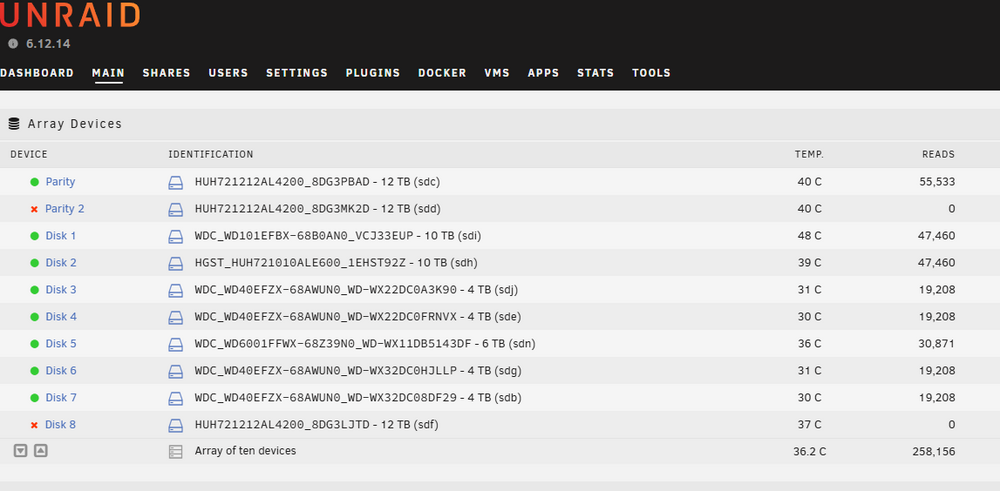
I have an HP Z800/dual Xeon/81GB server running 6.12.14. A couple of months ago I installed an LSI 9211 SAS HBA card, which has been working flawlessly. 4 Days ago, I acquired 3 x HGST 12TB SAS drives and installed them into the array (cf Xeus Array.png). 2 were installed as new parity drives, and the other as Disk 8. I rebuilt parity first, then installed Disk 8 after pre-clearing. All was fine at this point. I then moved all files from the 4TB disks in turn with Unbalance starting with Disk 7, the 6, 3 & 4 in turn respectively. All went fine until the final transfer of files from Disk 4 last night. Midway through the process, I noted that Parity 2 & Disk 8 were disabled and that Disk 8 was being emulated. As there were only 3 or so hours to run til completion I let Unbalanced finish doing its thing. I do not know in which order the drives were disabled. I then generated the diagnostics, SMART reports & screenshots attached which you will note include a File System check of Disk 8 I haven't done anything else since. (I just downloaded and attached SYS+logs as I type this) I'm not sure what to do from here to resolve the issues. I'm hoping both SAS drives aren't toasted as I do not have spares to replace them at hand. Any guidance on how to troubleshoot this would be greatly appreciated. If you need any more info please ask. Thanks In advance, GeeTeeNZ xeus-diagnostics-20241207-1146.zip xeus-smart-20241207-1154.zip xeus-smart-20241207-1204.zip xeus-syslog-20241207-0417.zip xeus-syslog-previous-20241207-0415.zip
.thumb.png.0abd94714c99f5afb72de4ec0542b036.png)
-
Hey all, I just shifted my server and rebooted to find one of my disks has been disabled. I performed a short Self-test which came back ok, and nothing is glaring in the log for the disk. I haven't had any problems with this drive at all. Could someone take a quick look at the diagnostics and latest SMART report to see what's gone wrong. cheers, GT xeus-diagnostics-20241018-1823.zip xeus-smart-20241018-1826.zip
-
Does this mean the memory is failing and needs replacing, or should I just monitor it?? Will do! yeah, this drive is pretty old. I have a new 12TB coming in a couple of weeks to replace it with - do you think it is safe to continue using this drive till then (there's nothing stored on it currently). Lastly, I want to learn more about diagnosing problems - is there a Noob guide/FAQ on how to go about interpreting these diagnostic files?? cheers, GT
-
Hi all, I have just completed a parity rebuild during which a few UDMA errors were detected. Fix Common Problems plugin has detected an MCE - it suggests loading diagnostics here and asking for support from the community. as such, could someone take a look at the diagnostics and advise me what action I should take from here. Thanks Guys, GT xeus-diagnostics-20241009-0606.zip
-
No, not exactly. the 2 drives in question JLLP & 43DF (those are the last 4 chars of serial) in reality are 4TB & 6TB respectively. They were only reported by unraid as 2.2TB because of the old SATA ports on the Z800 I connected them to. I have spent the last three hours changing the physical positions of the drives, inserting them individually, basically every possible configuration a number of times. I changed the ports they connected to, with no success. What was strange is that the Logical drive position (e.g., Disk 5 or Disk 6) would change depending upon which solitary drive I had inserted. So, in the end, I said f@#k it and used the New Config tool again, reset the configuration, and started the array. All drives are now reported in their correct positions and sizes, and Parity is being recomputed. From the quick check I have made all data seems intact. I don't know how to explain the bizarre behaviour that Unraid has displayed. In any case, your comment about changing back the drive positions started the recovery process I guess. Thanks for that. I'll put some money on your beer account later in the week when I get paid. Cheers, GT
-
Sorry JorgeB, was old copy - correct server tho. Try this one. xeus-diagnostics-20241007-1127.zip
-
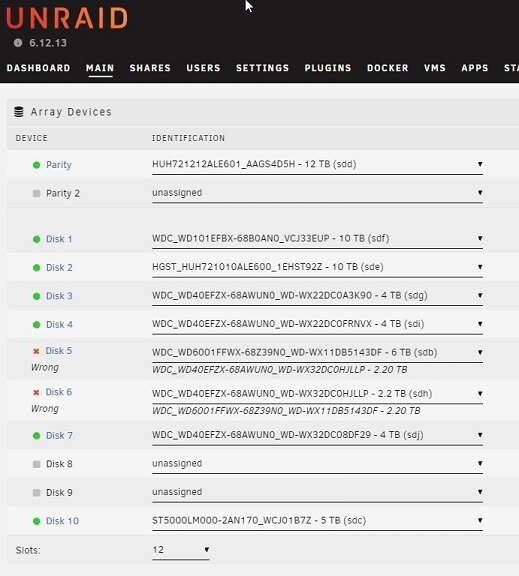
Unraid OS Plus v 6.12.13 running on HP Z800. Hi folks, I'm in desperate need of help to rectify a situation I stupidly got myself into. Although I have been using Unraid for a couple of years now, I still consider myself to be a Noob here (also, after this, of somewhat below-average intelligence as well). This description is probably going to be a bit longwinded but I want to be thorough, so please bear with me. Referring to this screenshot: As you see my array is comprised of a 12TB Parity dve and 8 HDDs of varying sizes. The sizes shown in the screengrab are not the actuals in all cases. I will refer to each HDD by both its Linux mount point & the last 4 characters of its s/n for clarity. The actual sizes are as follows: parity (sdd)- 12TB sdf (3EUP) - 10TB sde (T92Z) - 10TB sdg (3K90) - 4TB sdi (RNVX) - 4TB sdh (JLLP) - 4TB ** sdb (43DF) - 6TB ** sdj (DF29) - 4TB sdc (1B7Z) - 5TB I draw your attention to the drives annotated by **. As you can see there are discrepancies. 43DF is a 6TB drive. JLLP is actually a 4TB drive. The mismatches in the drive sizes came about because up until now I had to use a mix of SAS2 & SATA ports. The SATA ports have a 2TB limit on what they recognise as the maximum drive size. SO here's where I screwed the pooch: Last week DF29 was in the array recognised as a 2.2TB drive. It was sitting at around 1.98TB total usage. I installed a newly acquired LSI 2011-8i IT card into the server. Unfortunately, it came with the wrong break-out cables - they were integrated SAS data & power connectors, rather than the solitary SAS data connector. I have subsequently ordered new breakout cables which arrive today. Anyway, being smart (I thought) and impatient (I was) I connected another 4TB drive (JLLP) and transferred all the data from DF29 to it because I thought I was going to have to reformat DF29 and reinsert it into the array when I got the new cables. COMPLICATING Factor - I noticed 4 unconnected SATA ports that I had originally thought were connected to an SAS backplane for the Original Z800 drive caddy. Realising that this did not make any sense, I thought I might have found extra SAS2 ports that would not have the 2 TB limit. I had another 1TB drive that was unused and decided to connect it to see if Unraid recognised it in UD. It did. I thought I was onto something. So, I then proceeded to exchange DF29 & JLLP. I used the New Config tool to change the drive order and stipulated that Parity had not changed as per a post I found on the boards. I then reconnected the drive bay containing JLLP to one of the "found SAS2 ports" - except I DIDN'T - I actually reconnected the cable from 43DF to the new port. Blonde moment I know - but that's an achievement in itself 'cause I'm totally Bald. I then restarted the array in Maintenance mode and found that the new port was actually a SATA, not SAS2, and I got the drive wrong. Unraid then told me that when I started the array again 43DF would be overwritten and then I proceeded to utilise my extensive vocabulary of expletives. I then tried to put everything back to the way it was originally, and this is where things are at now. Here's my Plea For Help: Can anyone give me guidance on how to extricate myself from this self-invoked clusterF@#k of a situation??? I am aware that I may end up losing some data (would prefer not to if at all possible) but would like to minimise that - IE I want to protect 43DF & its 6 TB. If I need to lose the data I transferred onto either or both DF29 or JLLP (it's the same) so be it - Cost of being a Dipshit! I just reread this all and it makes sense to me, but I am sure you all will have questions. I have attached a copy of the diagnostics data. If you need any more info please let me know. One last thing - I am a Kiwi down in NZ, and we have a tradition for buying beers for those who help us out of jams like this. Logistical problems aside, happy to do that in this case for the Legend that is going to save my sanity!! Cheers, GeeTeeNZ p.s. We also have a tradition of throwing sarcastic windups at those who have fucked up so please - "Fill ya Boots" - I'm in need of some new material. :-) xeus-diagnostics-20211207-1525.zip
-
Tried both a mouse & keyboard - No Luck. Logs attached. cheers, GT xeus-diagnostics-20211207-1525.zip
-
Yes, I hadn't initially and there was no power to the USB HDDs. Connected and both drives spun up, but were still not recognised. Any other thoughts? cheers
-
Was thinking of using 2x 2TB for movies/tv. What is the problem with USB out of interest?? cheers, GT
-
Sorry for the delay in replying. Got the following: 03:00.0 USB controller: VIA Technologies, Inc. VL805/806 xHCI USB 3.0 Controller (rev 01) (prog-if 30 [XHCI]) Subsystem: VIA Technologies, Inc. VL805 USB 3.0 Host Controller Flags: bus master, fast devsel, latency 0, IRQ 36, IOMMU group 18 Memory at df000000 (64-bit, non-prefetchable) [size=4K] Capabilities: [80] Power Management version 3 Capabilities: [90] MSI: Enable+ Count=1/4 Maskable- 64bit+ Capabilities: [c4] Express Endpoint, MSI 00 Capabilities: [100] Advanced Error Reporting Kernel driver in use: xhci_hcd Have also attached the diagnostics package. What do you suggest from here? Cheers, GT xeus-diagnostics-20211202-1842.zip
-
GeeTeeNZ joined the community
-
Have just installed an Orico 4-port USB 3.0 PCIe expansion card (https://www.orico.cc/us/product/detail/3330.html) into my HP Z800. It seems to be recognised by the hardware as it shows in the IOMMU groups, power is supplied to the USB drives, but they do not appear in Unraid UNassigned Devices. Plugging into onboard USB2.0 ports works however. I am a bit of a noobie to unraid so am totally unsure what to do from here. This is the second USB3 card I have tried. This one specifically says that it is compatible with Linux.

.png.b06c9c118f4ff222092f0f7cd3c10b99.png)

