





saskiuhia
Members
-
Joined
-
Last visited
-
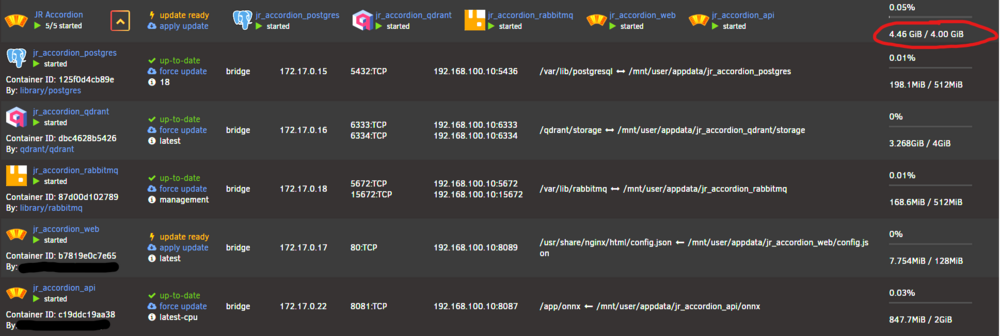
Hi. First of all, I want to thanks every contributor keeping FolderView plugin alive. I have noticed that FolderView2 plugin stopped calculating CPU & Memory usage per docker folder, so I have update to FolderView3. It partially works: CPU and current RAM usage seems to be correct, but max RAM allowance is not always right. I guess, it works fine if you have unlimited RAM available for containers. But in my case, I limit my container max RAM allowance by using --memory=2G as Extra Parameter. I think the best fix would be to use sum of max RAM allowance if every container has limit set in the folder or use max if else.
-
After Satisfactory 1.0 update dedicated server no longer properly works. Seems like they changed path to where the server executable is. text error warn system array login Session terminated, killing shell...kill: usage: kill [-s sigspec | -n signum | -sigspec] pid | jobspec ... or kill -l [sigspec] ---Ensuring UID: 99 matches user--- ---Ensuring GID: 100 matches user--- ---Setting umask to 0000--- ---Checking for optional scripts--- ---No optional script found, continuing--- ---Taking ownership of data...--- ---Starting...--- ---Update SteamCMD--- Redirecting stderr to '/serverdata/serverfiles/Steam/logs/stderr.txt' Logging directory: '/serverdata/serverfiles/Steam/logs' [ 0%] Checking for available updates... [----] Verifying installation... UpdateUI: skip show logoSteam Console Client (c) Valve Corporation - version 1721172922 -- type 'quit' to exit -- Loading Steam API...OK Connecting anonymously to Steam Public...OK Waiting for client config...OK Waiting for user info...OK ---Update Server--- Redirecting stderr to '/serverdata/serverfiles/Steam/logs/stderr.txt' Logging directory: '/serverdata/serverfiles/Steam/logs' [ 0%] Checking for available updates... [----] Verifying installation... UpdateUI: skip show logoSteam Console Client (c) Valve Corporation - version 1721172922 -- type 'quit' to exit -- Loading Steam API...OK Connecting anonymously to Steam Public...OK Waiting for client config...OK Waiting for user info...OK Update state (0x3) reconfiguring, progress: 0.00 (0 / 0) Update state (0x11) preallocating, progress: 58.69 (2525713987 / 4303569976) Update state (0x61) downloading, progress: 1.82 (78382436 / 4303569976) Update state (0x61) downloading, progress: 11.33 (487585113 / 4303569976) Update state (0x61) downloading, progress: 19.83 (853393384 / 4303569976) Update state (0x61) downloading, progress: 27.73 (1193532405 / 4303569976) Update state (0x61) downloading, progress: 35.17 (1513580138 / 4303569976) Update state (0x61) downloading, progress: 43.03 (1851753897 / 4303569976) Update state (0x61) downloading, progress: 52.78 (2271533645 / 4303569976) Update state (0x61) downloading, progress: 61.31 (2638638782 / 4303569976) Update state (0x61) downloading, progress: 68.87 (2963705013 / 4303569976) Update state (0x61) downloading, progress: 76.87 (3308171801 / 4303569976) Update state (0x61) downloading, progress: 80.65 (3470865316 / 4303569976) Update state (0x61) downloading, progress: 84.09 (3618796115 / 4303569976) Update state (0x61) downloading, progress: 87.46 (3763761350 / 4303569976) Update state (0x61) downloading, progress: 90.86 (3910237774 / 4303569976) Update state (0x61) downloading, progress: 94.89 (4083866316 / 4303569976) Update state (0x61) downloading, progress: 98.45 (4236766874 / 4303569976) Update state (0x81) verifying update, progress: 2.84 (122295288 / 4303569976) Update state (0x81) verifying update, progress: 18.06 (777267739 / 4303569976) Update state (0x81) verifying update, progress: 26.95 (1159925598 / 4303569976) Update state (0x81) verifying update, progress: 42.01 (1807817528 / 4303569976) Update state (0x81) verifying update, progress: 58.89 (2534476195 / 4303569976) Update state (0x81) verifying update, progress: 72.91 (3137534577 / 4303569976) Update state (0x81) verifying update, progress: 86.41 (3718897946 / 4303569976) Success! App '1690800' fully installed. ---Prepare Server--- ---Server ready--- ---Start Server--- --ERROR: Couldn't find a game executable, something went probably wrong with the download!--- ** Press ANY KEY to close this window **

