




-
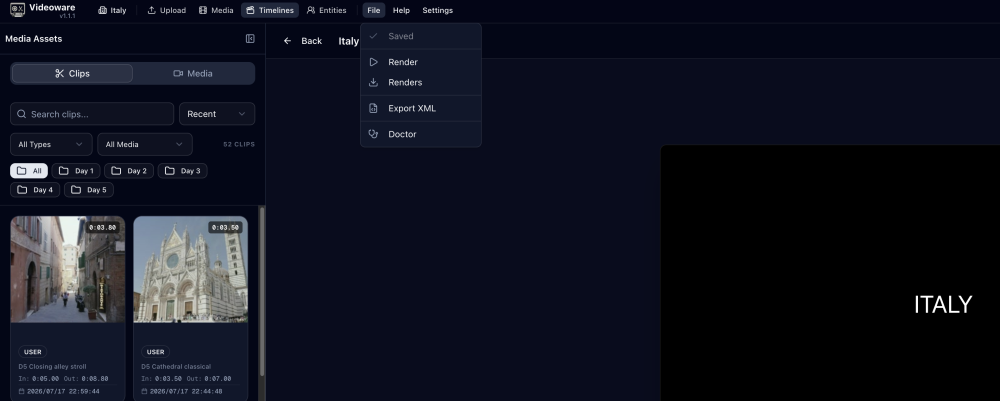
@ucffool There's a "File" dropdown in the top menu, you are able to export, view renders and copy an XML export!
-
This is a support thread for the VideoWare Docker Container for unRAID. Project homepage: https://makeware.io/projects/video-ware Source / Issues: https://github.com/make-ware/video-ware Container Registry: ghcr.io/make-ware/video-ware:latest (linux/amd64, linux/arm64) License: AGPL-3.0 You can find this container in Community Applications. Storage VideoWare keeps everything in /data – library + DB. On unRAID that's typically /mnt/user/appdata/video-ware. It writes to local disk or any S3-compatible store. I run mine against garageHQ for S3 – any S3 endpoint works, put the bucket / keys in the template env. If you're just starting, local disk is fine and will be more stable! You can move to S3 later. S3 will reduce the local footprint but disk space will be consumed during transcoding and render operations. CLI If you want to create videos using scripts, or even enable coding agents to interact with your video footage you can download and install the CLI. It provides parity with web based UI, and will allow you to automate much of the video editing workflow. Labeling By default there is no data labeling, it's just a web based video editor. To enable labeling you will need an elevenlabs API key for speaker detection and transcription and to enable object tracking and other video based label you will need a google cloud project with the GCVI api enabled. Labeling gives context to your video library, allows for easier entity tagging and better search. Also if you choose to use the CLI it provides rich context for script or AI based editing. Notes First boot creates the superadmin via POCKETBASE_ADMIN_EMAIL / POCKETBASE_ADMIN_PASSWORD. This allows for access to the database admin, and these credentials are used by the backend worker to authenticate to the database. No built-in TLS. Put it behind your usual reverse proxy (Cloudflared / Caddy / Traefik) if you want https. If you have questions or issues, post them here – I'll do what I can to help, and others running it can chime in.
-
For a profile with multiple apps, is it preferred to have a single shared repo or a dedicated repo per app on github? I submitted an app as a dedicated repo, but I changed my mind and want to use a single shared repository (unraid-templates). Is it possible to change the github repo after an app is submitted and published?
-
I’ve run into a new issue with the built-in VNC viewer. Immediately after connecting to a virtual machine, the viewer freezes. I can't tell if the entire session is locked up or if it's just failing to receive input, but it makes installing Linux over VNC nearly impossible. I see an error in the browser console: `noVNC requires a secure context (TLS). Expect crashes!`. I have found a temporary solution, If I switch the VM network to virbr0, the freezing issue completely disappears. I'm seeing this problem across multiple networks. All of them are managed by UniFi and utilize VLANs (a pretty standard setup, I assume). My workflow right now to install Ubuntu Server remotely is to: Create a VM with virbr0, install linux. Enable SSH. Update the VM's network configuration. Switch the interface over to br0. VNC is frozen but SSH is working. Is anyone else experiencing this same VNC freeze on bridged networks, or does anyone have a permanent fix?

View in the app
A better way to browse. Learn more.

