





Stanui
Members
-
Joined
-
Last visited
-
Thanks for the advice
-
Got it, So if I have 4TB drives on the Array I shouldn't make a Vdisk larger than 4TB. Once data starts being added to the Vdisk it will fail if it's larger than a physical drive?
-
Its on HDDs on the main array at the moment
-
Hi, I’ve been experimenting with Vdisk image sizes on my Unraid array. I can successfully create, connect, and mount large images (up to 25TB of a test Vdisk) in a Windows VM. However, before taking this approach further, I’d like to understand the potential downsides. Could you please share any concerns or issues that might arise from using such large Vdisk images? I’m looking for insights on potential problems or limitations to consider. Thanks!
-
Sever is stable and Parity ran properly after swapping the motherboard and CPU. Guessing there was an issue with one of those components unfortunately. Only issue I'm having now is my GPU not wanting to passthrough/be detected by windows once it's set up. going to try an Nvidia GPU later tonight to see if its a compatibility problem with my intel Arc and the motherboard. Thank you for the assistance.
-
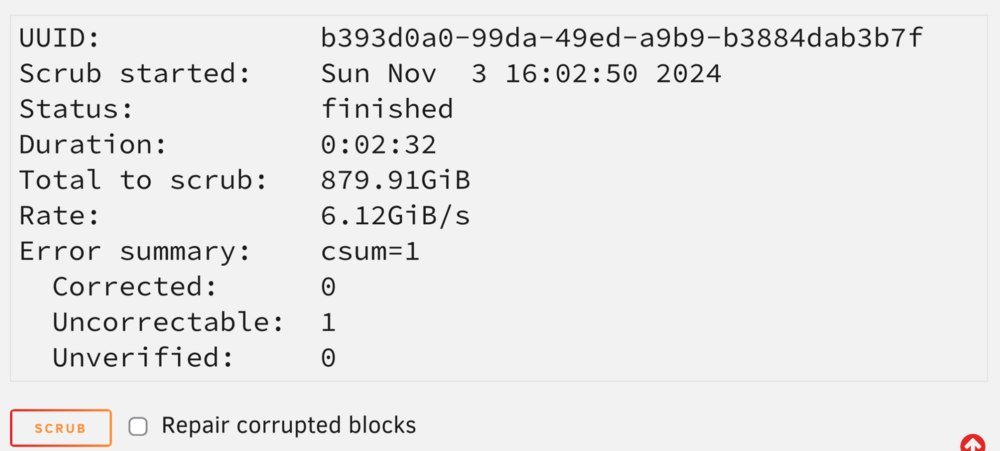
Removed the VM image and ran another correcting scrub here’s the syslog result Nov 3 16:02:50 Tower ool www[22751]: /usr/local/emhttp/plugins/dynamix/scripts/btrfs_scrub 'start' '/mnt/vm_nvme_new' '' Nov 3 16:02:50 Tower kernel: BTRFS info (device nvme0n1p1): scrub: started on devid 1 Nov 3 16:02:53 Tower kernel: BTRFS warning (device nvme0n1p1): checksum error at logical 14426165248 on dev /dev/nvme0n1p1, physical 15508295680, root 5, inode 258, offset 13200904192: path resolving failed with ret=1 Nov 3 16:02:53 Tower kernel: BTRFS error (device nvme0n1p1): bdev /dev/nvme0n1p1 errs: wr 0, rd 0, flush 0, corrupt 189, gen 0 Nov 3 16:02:53 Tower kernel: BTRFS error (device nvme0n1p1): unable to fixup (regular) error at logical 14426165248 on dev /dev/nvme0n1p1 Nov 3 16:05:22 Tower kernel: BTRFS info (device nvme0n1p1): scrub: finished on devid 1 with status: 0 Scrub result: the disk I copied the Img onto it isn’t reporting any errors with the file
-
Similar result with the “repair corrected blocks” checkbox ticked. Going to try moving the VM image to another disk and running again after deleting the file to see if the error follows the Img file.
-
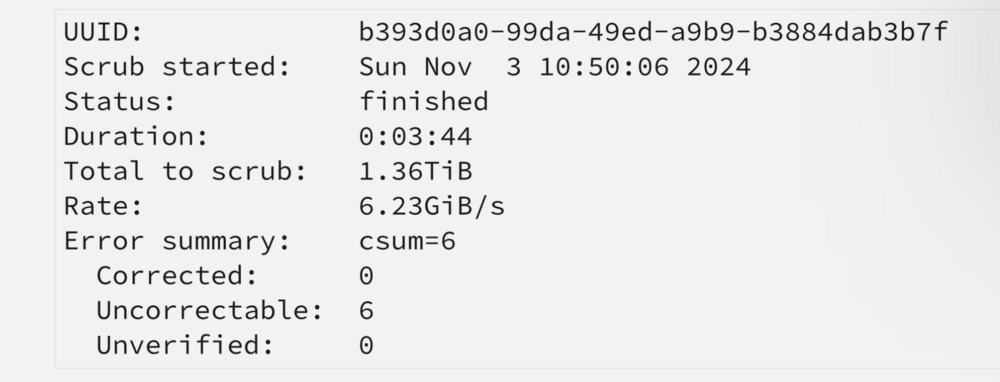
sorry, here is the GUI result after running another scrub Looks like the problem file is with one of my windows 10 VM images? Nov 3 09:47:49 Tower ool www[29005]: /usr/local/emhttp/plugins/dynamix/scripts/btrfs_scrub 'start' '/mnt/vm_nvme_new' '-r' Nov 3 09:47:49 Tower kernel: BTRFS info (device nvme0n1p1): scrub: started on devid 1 Nov 3 09:47:51 Tower kernel: BTRFS warning (device nvme0n1p1): checksum error at logical 14426165248 on dev /dev/nvme0n1p1, physical 15508295680, root 5, inode 258, offset 13200904192, length 4096, links 1 (path:WIN10Updated.img) Nov 3 09:47:51 Tower kernel: BTRFS error (device nvme0n1p1): bdev /dev/nvme0n1p1 errs: wr 0, rd 0, flush 0, corrupt 129, gen 0 Nov 3 09:47:59 Tower kernel: BTRFS warning (device nvme0n1p1): checksum error at logical 67002748928 on dev /dev/nvme0n1p1, physical 68084879360, root 5, inode 258, offset 65537626112, length 4096, links 1 (path:WIN10Updated.img) Nov 3 09:47:59 Tower kernel: BTRFS error (device nvme0n1p1): bdev /dev/nvme0n1p1 errs: wr 0, rd 0, flush 0, corrupt 130, gen 0 Nov 3 09:48:03 Tower kernel: BTRFS warning (device nvme0n1p1): checksum error at logical 96108392448 on dev /dev/nvme0n1p1, physical 97190522880, root 5, inode 258, offset 94603161600, length 4096, links 1 (path:WIN10Updated.img) Nov 3 09:48:03 Tower kernel: BTRFS error (device nvme0n1p1): bdev /dev/nvme0n1p1 errs: wr 0, rd 0, flush 0, corrupt 131, gen 0 Nov 3 09:48:33 Tower kernel: BTRFS warning (device nvme0n1p1): checksum error at logical 300322787328 on dev /dev/nvme0n1p1, physical 301404917760, root 5, inode 258, offset 297590198272, length 4096, links 1 (path:WIN10Updated.img) Nov 3 09:48:33 Tower kernel: BTRFS error (device nvme0n1p1): bdev /dev/nvme0n1p1 errs: wr 0, rd 0, flush 0, corrupt 132, gen 0 Nov 3 09:48:44 Tower kernel: BTRFS warning (device nvme0n1p1): checksum error at logical 374187524096 on dev /dev/nvme0n1p1, physical 375269654528, root 5, inode 258, offset 371176538112, length 4096, links 1 (path:WIN10Updated.img) Nov 3 09:48:44 Tower kernel: BTRFS error (device nvme0n1p1): bdev /dev/nvme0n1p1 errs: wr 0, rd 0, flush 0, corrupt 133, gen 0 Nov 3 09:48:47 Tower kernel: BTRFS warning (device nvme0n1p1): checksum error at logical 394049949696 on dev /dev/nvme0n1p1, physical 395132080128, root 5, inode 258, offset 390942494720, length 4096, links 1 (path: WIN10Updated.img) Nov 3 09:48:47 Tower kernel: BTRFS error (device nvme0n1p1): bdev /dev/nvme0n1p1 errs: wr 0, rd 0, flush 0, corrupt 134, gen 0 Nov 3 09:51:35 Tower kernel: BTRFS info (device nvme0n1p1): scrub: finished on devid 1 with status: 0 The VM is running, should I try shutting down the VM and running a scrub again?
-
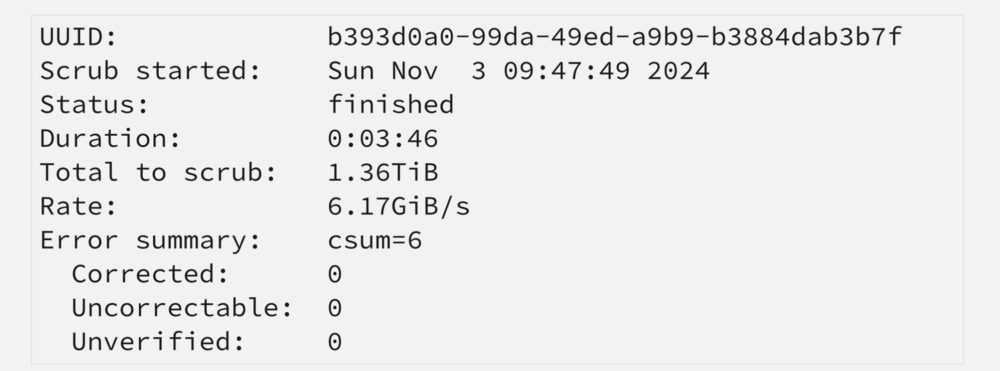
I ran a scrub on the NVME01 Device, This is the disk log from the start to the end of the scrub. Nov 2 12:02:36 Tower kernel: BTRFS info (device nvme0n1p1): scrub: started on devid 1 Nov 2 12:02:39 Tower kernel: BTRFS warning (device nvme0n1p1): checksum error at logical 14426165248 on dev /dev/nvme0n1p1, physical 15508295680, root 5, inode 258, offset 13200904192, length 4096, links 1 (path: PlexVM-WIN10Updated.img) Nov 2 12:02:39 Tower kernel: BTRFS error (device nvme0n1p1): bdev /dev/nvme0n1p1 errs: wr 0, rd 0, flush 0, corrupt 122, gen 0 Nov 2 12:02:39 Tower kernel: BTRFS error (device nvme0n1p1): unable to fixup (regular) error at logical 14426165248 on dev /dev/nvme0n1p1 Nov 2 12:02:47 Tower kernel: BTRFS warning (device nvme0n1p1): checksum error at logical 67002748928 on dev /dev/nvme0n1p1, physical 68084879360, root 5, inode 258, offset 65537626112, length 4096, links 1 (path: PlexVM-WIN10Updated.img) Nov 2 12:02:47 Tower kernel: BTRFS error (device nvme0n1p1): bdev /dev/nvme0n1p1 errs: wr 0, rd 0, flush 0, corrupt 123, gen 0 Nov 2 12:02:47 Tower kernel: BTRFS error (device nvme0n1p1): unable to fixup (regular) error at logical 67002748928 on dev /dev/nvme0n1p1 Nov 2 12:02:51 Tower kernel: BTRFS warning (device nvme0n1p1): checksum error at logical 96108392448 on dev /dev/nvme0n1p1, physical 97190522880, root 5, inode 258, offset 94603161600, length 4096, links 1 (path: PlexVM-WIN10Updated.img) Nov 2 12:02:51 Tower kernel: BTRFS error (device nvme0n1p1): bdev /dev/nvme0n1p1 errs: wr 0, rd 0, flush 0, corrupt 124, gen 0 Nov 2 12:02:51 Tower kernel: BTRFS error (device nvme0n1p1): unable to fixup (regular) error at logical 96108392448 on dev /dev/nvme0n1p1 Nov 2 12:03:21 Tower kernel: BTRFS warning (device nvme0n1p1): checksum error at logical 300322787328 on dev /dev/nvme0n1p1, physical 301404917760, root 5, inode 258, offset 297590198272, length 4096, links 1 (path: PlexVM-WIN10Updated.img) Nov 2 12:03:21 Tower kernel: BTRFS error (device nvme0n1p1): bdev /dev/nvme0n1p1 errs: wr 0, rd 0, flush 0, corrupt 125, gen 0 Nov 2 12:03:21 Tower kernel: BTRFS error (device nvme0n1p1): unable to fixup (regular) error at logical 300322787328 on dev /dev/nvme0n1p1 Nov 2 12:03:32 Tower kernel: BTRFS warning (device nvme0n1p1): checksum error at logical 374187524096 on dev /dev/nvme0n1p1, physical 375269654528, root 5, inode 258, offset 371176538112, length 4096, links 1 (path: PlexVM-WIN10Updated.img) Nov 2 12:03:32 Tower kernel: BTRFS error (device nvme0n1p1): bdev /dev/nvme0n1p1 errs: wr 0, rd 0, flush 0, corrupt 126, gen 0 Nov 2 12:03:32 Tower kernel: BTRFS error (device nvme0n1p1): unable to fixup (regular) error at logical 374187524096 on dev /dev/nvme0n1p1 Nov 2 12:03:35 Tower kernel: BTRFS warning (device nvme0n1p1): checksum error at logical 394049949696 on dev /dev/nvme0n1p1, physical 395132080128, root 5, inode 258, offset 390942494720, length 4096, links 1 (path: PlexVM-WIN10Updated.img) Nov 2 12:03:35 Tower kernel: BTRFS error (device nvme0n1p1): bdev /dev/nvme0n1p1 errs: wr 0, rd 0, flush 0, corrupt 127, gen 0 Nov 2 12:03:35 Tower kernel: BTRFS error (device nvme0n1p1): unable to fixup (regular) error at logical 394049949696 on dev /dev/nvme0n1p1 Nov 2 12:06:17 Tower kernel: BTRFS info (device nvme0n1p1): scrub: finished on devid 1 with status: 0 Is there Somewhere to pull just the Scrub Log from?
-
ended up going back to my old Motherboard/ CPU combo. Not sure what the deal is with the new system. back up finally and running a parity check. my NVME is still reporting a bunch of errors however. BTRFS error (device nvme0n1p1): bdev /dev/nvme0n1p1 errs: wr 0, rd 0, flush 0, corrupt 121, gen 0 been doing that since the system booted back up. other errors seem to be in the clear so the NVME is the only remaining. Any ideas on how to resolve it? Thank you for the help.
-
I swapped to my old Kit of memory and tried with 1 stick in each slot. still getting the same performance but also getting some of these Errors. CPU: 8 PID: 14692 Comm: unraidd0 Tainted: P O 6.1.64-Unraid #1 I'm going to try pulling my CPU out of my workstation PC and see if I get similar issues. I re Ran Memory Test and all sticks passed without issue.
-
I believe I may have found the issue, I think one of my SSDs is on its last legs. Found this in the disk Logs. Oct 24 21:01:42 Tower kernel: nvme0n1: p1 Oct 24 21:01:42 Tower kernel: BTRFS: device fsid a690c7d2-38b7-46ec-a665-45cc98a5c570 devid 1 transid 1360152 /dev/nvme0n1p1 scanned by udevd (1152) Oct 24 21:02:06 Tower emhttpd: CT4000P3PSSD8_2321E6DB4E35 (nvme0n1) 512 7814037168 Oct 24 21:02:06 Tower emhttpd: import 44 cache device: (nvme0n1) CT4000P3PSSD8_2321E6DB4E35 Oct 24 21:02:06 Tower emhttpd: read SMART /dev/nvme0n1 Oct 24 21:03:20 Tower emhttpd: shcmd (196): mount -t btrfs -o noatime,space_cache=v2 /dev/nvme0n1p1 /mnt/vm_nvme Oct 24 21:03:20 Tower kernel: BTRFS info (device nvme0n1p1): using crc32c (crc32c-intel) checksum algorithm Oct 24 21:03:20 Tower kernel: BTRFS info (device nvme0n1p1): using free space tree Oct 24 21:03:21 Tower kernel: BTRFS info (device nvme0n1p1): enabling ssd optimizations Oct 24 21:03:21 Tower kernel: BTRFS info (device nvme0n1p1: state M): turning on async discard Oct 26 16:41:13 Tower kernel: BTRFS critical (device nvme0n1p1): corrupt leaf: block=1464592842752 slot=25 extent bytenr=997310889984 len=16384 unknown inline ref type: 0 Oct 26 16:41:13 Tower kernel: BTRFS info (device nvme0n1p1): leaf 1464592842752 gen 1365394 total ptrs 151 free space 7525 owner 2 Oct 26 16:41:13 Tower kernel: BTRFS error (device nvme0n1p1): block=1464592842752 write time tree block corruption detected Oct 26 16:41:14 Tower kernel: BTRFS: error (device nvme0n1p1) in btrfs_commit_transaction:2494: errno=-5 IO failure (Error while writing out transaction) Oct 26 16:41:14 Tower kernel: BTRFS info (device nvme0n1p1: state E): forced readonly Oct 26 16:41:14 Tower kernel: BTRFS warning (device nvme0n1p1: state E): Skipping commit of aborted transaction. Oct 26 16:41:14 Tower kernel: BTRFS: error (device nvme0n1p1: state EA) in cleanup_transaction:1992: errno=-5 IO failure going to try replacing the disk with a different one and see if it resolves my parity issues.
-
Sorry, I meant is there a troubleshooting step to see if its a CPU or motherboard issue.
-
Got it. Is there a way I can test to find out what hardware is causing the crashes? Thank you
-
Hello, I have been trying to figure this out since my scheduled parity check ran but never finished. Normally it finishes after about a day an a half but after 3 days It was still running . after checking I was getting parity check speeds in the 22-30/Kbs range with an ETA of 7000+ days. Whats odd is the server other than that seems to be running normally. All my shares have normal read/write speeds, No drives are reporting errors as far as I can tell and when benchmarking the drives the slowest one is still well above 150/mbs. There are a few errors in my logs but Im not sure what they mean: Tower kernel: CPU: 8 PID: 26968 Comm: lsof Tainted: P D W O 6.1.64-Unraid #1 Tower kernel: notify[9679]: segfault at 14b84be00040 ip 00000000008a29c7 sp 00007ffd58857c58 error 4 in php[600000+3b3000] likely on CPU 8 (core 16, socket 0) Tower kernel: traps: disk_load[11424] general protection fault ip:4e932f sp:7ffe9d9c6dc0 error:0 in bash[426000+c5000] memory all passed memtest86. CPU problems? Any help would be greatly appreciated. Thank you! tower-diagnostics-20241024-1622.zip


