





Jlarimore
Members
-
Joined
-
Last visited
-
Made a little headway: It seems there is some kind of hard-coded tuning variable where if the battery is greater than n%, the UPS decides its willing to turn itself back on regardless of main power state. I had the power down tuning at 90% for ease of testing. I decided to try a more realistic 25% number and waited an hour for the battery to drain. (with an ondelay = 90) This time the UPS shut off properly. But, when main power was restored nothing happened after 90 seconds. I'm now not sure if its ever going to come back up. Is 90 actually 90 minutes instead of seconds? Am i waiting for the battery to recharge back to n?
-
Yeah, that failed to shut off the UPS at all. It just remained on despite the tuning being set to shut off. Thats when i switched to NUT.
-
If chatgpt is to be believed its a bug with Cyberpower UPSs interacting with the NUT driver in Unraid. If ondelay is > 0 the UPS will turn back on regardless of whether main power has been restored. If ondelay =< 0 the UPS does shut off properly but you cannot delay power on after main power is restored. I need that delay as i expect power to flicker as it returns. Anyone have another good brand of UPS i can try next year?
-
Alright, so as expected Unraid and the UPS are doing battle. I got Unraid to poer down and shut off the UPS. But, the Cyberpower UPS then waits 60s and turns everything back on while still on battery power. How do i stop it from powering on until main power is restored? I only have access to the hardware for another 24h before i have to either return it and try again next year or get it working.
-
Last summer my family successfully set up an Unraid server at a remote cabin in the rockies. It's done a great job over the last year helping to monitor the place via cameras and various other sensors. Its biggest problem is that the power is pretty unstable at this cabin. Short 5-20m outages are quite common. So far, the machine has survived a years worth of these unclean shutdowns and the BIOS has been in charge of turning the machine back on when the power is restored. This summer i am hoping to add an UPS as i think that'll allow the machine to glide through most of these outages without incident. But, i do have a question: If you have Unraid initiate a clean shut down of the machine when the UPS is running low (say 25%), how do you stop the BIOS from just immediately rebooting the machine and repeating that loop until the battery is completely drained and you experience another dirty shutdown? Will that not happen for some reason? I need the machine to try to turn on as there is no one within a thousand miles of it for 51 weeks of the year. Do i need to set an interval so the machine waits at least an hour between power on attempts? Or is there some level of intelligence that tells the machine dont restart until main power is restored and the battery starts charging?
-
So, I have been remodeling my garage recently (involving throwing breakers quite a bit) which has caused me to notice this problem frequently: Steps to Reproduce: 1) Set up an UPS. 2) Plug Unraid server into UPS. 3) Set Unraid to shutdown on n% UPS power. 4) Shut off power. 5) Wait until UPS batter depletes until at least n% power remaining. 6) Turn power back on. 7) Turn Unraid server on. 8) Attempt to login using webUI. User cannot login to webUI. The browser times out trying to connect. According to my router, the server is there. But, I cannot login to it until I crawl under my house to a nice cool place where the server lives, unplug the machine, take it into the house, plug it into a different network jack, turn the machine on, power it off, and then finally place it back in its home under the house. I've tried flushing power by unplugging the machine and network plug for 30 seconds. No luck. This is super annoying. My guess is this has something to do with the network not properly finding the thing after it gets a new IP address or it's coming back on with some kind of error that won't bypass without keyboard intervention. But, the funny thing is when I bring it into the house, no input is required. It comes right up just fine. -Jim
-
My Nextcloud install atrophied over the last couple years and there wasn't much on there. So, I decided to blow it all away and start fresh on 7.0. I followed SpaceInvaderOne's Nextcloud AIO video which worked great right up until the point I received my initial 48 character admin password for Nextcloud. When I enter said password the screen flickers, the password field clears and has a red highlight (which I assume means it did not accept my password). I have reinstalled from scratch 3 times with the same results after cleaning up the previous docker installs using instructions I found on how to clean up dangling nextcloud docker containers. I can't reset the password as I have not gotten far enough to submit email information. My assumption is that there is a critical bug in Nextcloud AIO v10.3. Is that possible or am I doing something stupid?
-
I moved it to another USB hub and am trying again. Seeing some weird behavior where Nextcloud is unaware of the files on the drive from the previous session. When accessing via Webdav through my windows client I see them. But, nextcloud does not. Any idea why that would happen? My machine is a small ITX build. It's all full with 10 nvme drives. So, trying to use other ports like the USB C.
-
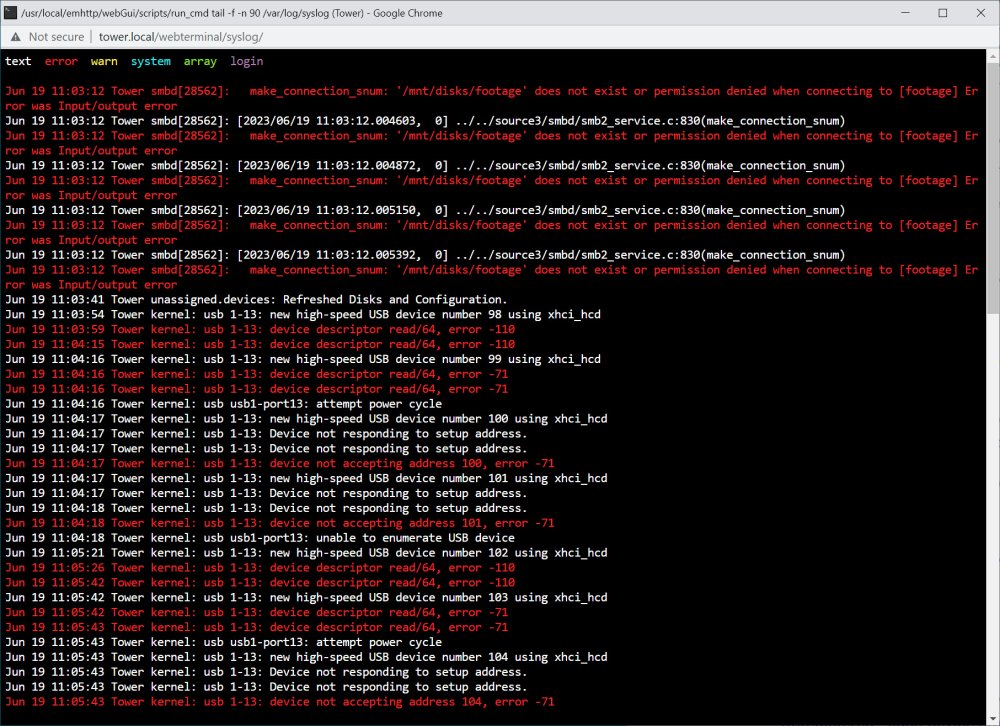
I'm using an unassigned devices NVMe drive outside of my array. I am doing this because it just collects security camera footage and I don't really need or want that to hammer on my parity disk. Unfortunately, the USB device does not seem to want to stay on reliably. It drops, seems to be unable to recover, and I have yet to figure out how to get the drive to reappear in Unraid. (a reboot didn't do it) I would like a drive that is reliable and outside of my array because if it disappears out from under the security camera, footage will back up and bad things will happen. Is there a way to make an external disk maintain a reliable connection to my server?
-
His router is an Arris BGW210-700 supplied by AT&T. Mine is a Google Wifi router. I wouldn't say I trust his router. But, we have the same port forwarding rules set up as far as I can tell. Is there some setting on his router that would prevent internal traffic but not external traffic? I've never heard of such a thing. -Jim
-
I have built two Unraid servers: One for myself and one for my dad. I am seeing a difference between the behavior on the two of them that I cannot explain: I am going to call one pair Computer A and NC A which are on my computers/network. Computer B and NC B are on my dads computers/network. Computer A can successfully mount a disk from both NC A and NC B without issues. (via WebDAV) Computer B can successfully mount a disk from NC A but not NC B. (within it's own network) "Net use" tries for a while and then gives an error 67. Does anyone have any idea why computer B would be able to map a drive outside of its network but not one from within?
-
et tu davfs2! Were you the culprit all this time?
-
The people pulling their hair out with similar issues online makes me pre hurt for what I am about to go through. Is the problem some upload limit with Cloudflare, WebDAV, Swag, Nextcloud? At first I thought Cloudflare was the culprit. But, my limit being closer to 50MB has me leaning WebDAV. I see plenty of guides on how to change that limit via the Windows registry. But, any idea how you up this limit in Unix?
-
I have a remote camera FTPing video files to a beaglebone. In a script, those files get tarred up every 10 minutes and pushed to my Nextcloud server (via WinDAV) on my Unraid server. (in an external storage location) I have verified that the tar files are coming through intact. Once on the server, the script attempts to unpack them and that is where I am running into trouble. In my low res test scenario, there are 3-4 10MB files coming through. When unpacked the 30MB files create 2x10MB intact files and one 7MB partial file. The 40MB file untars into 1x10MB + 1x7MB + 2x0b files. In both cases I hit a ~57MB wall before getting the error "cannot write: no space left on device" and the untar process fails out leaving a mess of incomplete video files. (massive gaps in my surveillance footage) I can tell you there is 8TB allocated to this share and it is adding another 57MB every time the script runs. So, any idea why each session believes it has so little space to work with?
-
It worked! The camera FTPs the videos to the Beaglebone. The Beaglebone mounts the Nextcloud drive and transfers the files via WebDAV.
