





tj0
Members
-
Joined
-
Last visited
Everything posted by tj0
-
Hi - I have been getting the same messages in syslog every minute or so since 6.11.* (wasn't the case with 6.10.?). It really seems to be an i915 driver issue. I was hoping for newer unraid versions including new kernels would fix it but they haven't (I am now happily running 6.12.8). Following a tip in another thread I have installed the plugin "Intel i915 SR-IOV" (which installs an updated i915 driver), and it worked ! No error messages anymore. The plugin is labeled as "highly experimental" though... hopefully the new driver will end up making it into the linux kernel.
-
Thanks for the tip, the plugin "Intel i915 SR-IOV" fixed it for me too. Which confirms this was a driver issue to start with. The plugin is labeled as "highly experimental" though... hopefully the new driver will end up making it into the linux kernel.
-
For anyone wondering, it's dead easy to move from the (no longer supported) linuxserver.io image to the self-maintained image. Just rename your existing container (eg nzbget-old), and install the new one directly from the nzbgetcom repo in Community Apps, using the same PATHs, login/password and (importantly) the existing appdata folder. Works like a charm : retains all server configuration, doesn't break arr's integrations and even remembers your download history. Also works with your reverse proxy if you call the container nzbget instead of nzbget-ng. (If you really want to be on the cautious side, back up your appdata dir somewhere safe before proceeding). Docker is f..ing magic.
-
It worked ! Thanks again for all the help !
-
Thanks and that makes sense, but I don't see any duplicates on the array (see the output of the find command above). Should I still fall back to moving files myself ?
-
Well I had actually disabled Docker before running Mover, and re-enabled it right afterwards and before running Diagnostics... I am attaching a Diagnostics file with Docker disabled. Thanks ! ur-diagnostics-20220109-1059.zip
-
Hi - so Mover did not move anything again, and this is what I see in the logs : Jan 9 10:55:38 ur move: file: /mnt/cache/system/docker/docker.img Jan 9 10:55:38 ur move: move_object: /mnt/cache/system/docker/docker.img File exists Jan 9 10:55:38 ur move: file: /mnt/cache/system/libvirt/libvirt.img Jan 9 10:55:38 ur move: move_object: /mnt/cache/system/libvirt/libvirt.img File exists Jan 9 10:55:38 ur root: mover: finished also for what it's worth : root@ur:~# find / | grep docker.img find: ‘/sys/kernel/slab’: Input/output error /mnt/user/system/docker/docker.img /mnt/cache/system/docker/docker.img Thanks again !
-
Here you go - thanks again ! ur-diagnostics-20220108-2018.zip
-
Thanks for your answer - I understand the idea. I have just tried (with Docker and VMs stopped in Settings), but Mover did not move anything. What am I missing ?
-
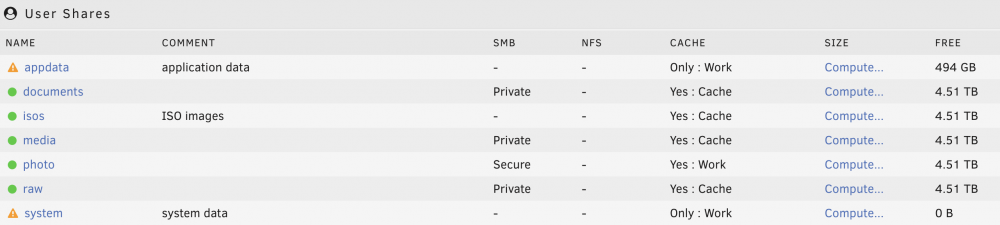
Hi, I have 2 cache pools : 'cache' and 'work', each using 1 dedicated NVMe drive. I would like both appdata and system to live on 'work' (Cache Only). For some reason though (maybe I messed up at the beginining), system currently sits on 'cache' : root@ur:~# ls -la /mnt/cache/ total 16 drwxrwxrwx 1 nobody users 12 Jan 8 18:39 ./ drwxr-xr-x 7 root root 140 Jan 8 14:34 ../ drwxrwxrwx 1 nobody users 26 Dec 5 20:17 system/ root@ur:~# ls -la /mnt/work/ total 0 drwxrwxrwx 3 nobody users 21 Dec 5 21:06 ./ drwxr-xr-x 7 root root 140 Jan 8 14:34 ../ drwxrwxrwx 13 nobody users 197 Jan 8 05:06 appdata/ and changing "Select cache pool:" on the Shares tab doesn't seem to do anything about it, outside of strangely reporting 0 B free : What's the correct course of action here ? Do I need to move folders around manually ? Thanks in advance for your help ! TJ
-
Thank you so much for the detailed answer, this explains everything indeed ! I will definitely provision an official cert and report back here. Side question : in the meantime, I looked into how nginx works and tried to fiddle with the config files to prevent the redirection behaviour you have explained, but I couldn't manage to make persistent changes to the files in /etc/nginx/conf.d - my edits were overridden when I restarted nginx. For my understanding, is there a way to change nginx settings otherwise ? Thanks again for your help ! TJ
-
6.10-rc2 Use SSL/TLS -> Yes" No self-signed cert (I am living with the Chrome security warning)
-
Well Tailscale sounded (and actually was) super easy to setup. And I strongly suspect I would have the same issue, which seems to have more to do with unraid's web server or nginx ?
-
Hi, I am setting up a new Unraid server and need remote admin access. I understand it's not recommended to just forward port 443 and expose the admin UI to the outside world, so my plan is to use Tailscale. I deployed the Tailscale docker container and installed the Tailscale client on my laptop, and it works fine for services like ssh or eg the Prowlarr web UI, as run in a docker container in bridge mode (and without NATing anything on my router). So everything works fine, except the Unraid GUI. When I try to access it from the outside (eg. https://100.XXX.XXX.XXX:443), it redirects my browser to tower.local (actually ur.local, which is my custom hostname) then logically fails to resolve DNS. To rule out any issue with Tailgate, I got rid of it and tried to just forward ports on my router (for troubleshooting purposes only - again I understand this is not recommended), and I am still running into the exact same issue : http://xxx.xxx.xxx.xxx:9696 gets me into the prowlarr UI, I can ssh into the server just fine, but https://xxx.xxx.xxx.xxx:443 redirects to ur.local and the browser logically returns a DNS lookup error. What am I missing ? Thanks in advance for your help. TJ
