ToxicBill
Members
-
Joined
-
Last visited
-
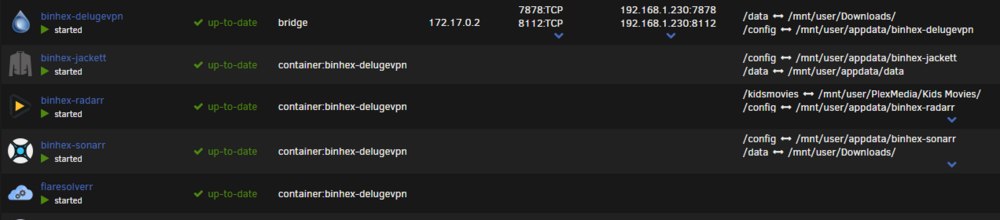
I'm not 100% sure what you mean by sharing the network but I've got delugevpn set up in "bridge" and jackett has the --net=container:binhex-delugevpn extra parameter. If that's sharing the network, then yes. Otherwise, I might need a little more detail on hat "sharing the vpn network" means. Thanks!

-
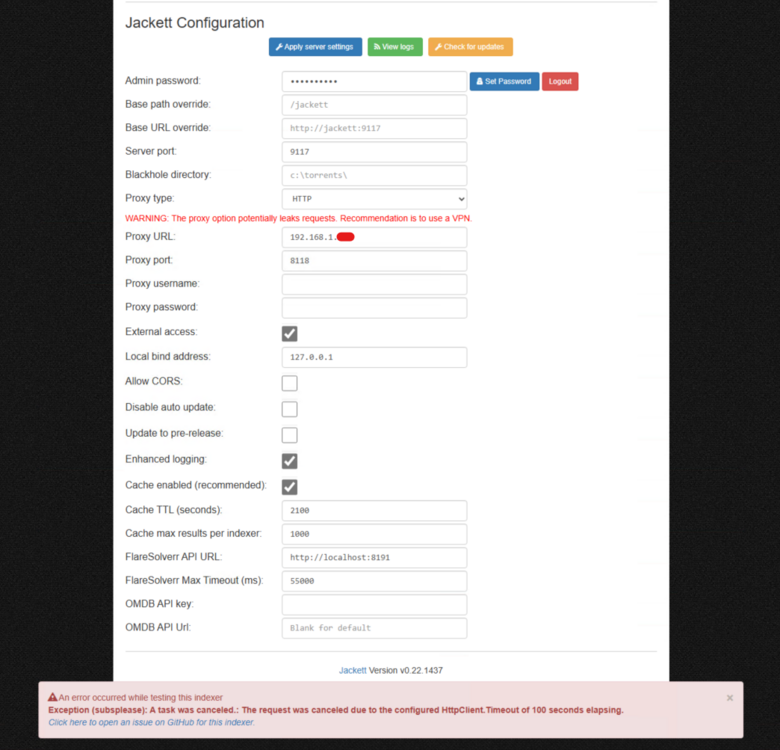
OK. I did a couple of things. 1) I uninstalled and reinstalled the container. I did delete/rename the old app data folder so it was a true reinstall. No difference 2) during testing, I left the Proxy URL blank - testing passed. 3) I make the proxy URL "localhost" and the port 8118 - testing failed 4) I used the container IP from the docker page (172.17.0.2) and that seemed to work. Is this expected? Am I actually traversing the VPN? Why does localhost work from radarr and sonarr but not jackett?
-
Bump.
-
Not sure if its helpful but here's some output from jackett 2025-02-27 19:42:18,488 DEBG 'jackett' stdout output: 02-27 19:42:18 Error Jackett.Common.IndexerException: Exception (1337x): A task was canceled. [v0.22.1461.0] Jackett.Common.IndexerException: Exception (1337x): A task was canceled. ---> System.Threading.Tasks.TaskCanceledException: The request was canceled due to the configured HttpClient.Timeout of 100 seconds elapsing. ---> System.TimeoutException: A task was canceled. ---> System.Threading.Tasks.TaskCanceledException: A task was canceled. at System.Threading.Tasks.TaskCompletionSourceWithCancellation`1.WaitWithCancellationAsync(CancellationToken cancellationToken) at System.Net.Http.HttpConnectionPool.SendWithVersionDetectionAndRetryAsync(HttpRequestMessage request, Boolean async, Boolean doRequestAuth, CancellationToken cancellationToken) 2025-02-27 19:42:18,488 DEBG 'jackett' stdout output: at System.Net.Http.DiagnosticsHandler.SendAsyncCore(HttpRequestMessage request, Boolean async, CancellationToken cancellationToken) at System.Net.Http.DecompressionHandler.SendAsync(HttpRequestMessage request, Boolean async, CancellationToken cancellationToken) at FlareSolverrSharp.ClearanceHandler.SendAsync(HttpRequestMessage request, CancellationToken cancellationToken) at System.Net.Http.HttpClient.<SendAsync>g__Core|83_0(HttpRequestMessage request, HttpCompletionOption completionOption, CancellationTokenSource cts, Boolean disposeCts, CancellationTokenSource pendingRequestsCts, CancellationToken originalCancellationToken) --- End of inner exception stack trace --- --- End of inner exception stack trace --- at System.Net.Http.HttpClient.HandleFailure(Exception e, Boolean telemetryStarted, HttpResponseMessage response, CancellationTokenSource cts, CancellationToken cancellationToken, CancellationTokenSource pendingRequestsCts) at System.Net.Http.HttpClient.<SendAsync>g__Core|83_0(HttpRequestMessage request, HttpCompletionOption completionOption, CancellationTokenSource cts, Boolean disposeCts, CancellationTokenSource pendingRequestsCts, CancellationToken originalCancellationToken) at Jackett.Common.Utils.Clients.HttpWebClient2.Run(WebRequest webRequest) in ./Jackett.Common/Utils/Clients/HttpWebClient2.cs:line 180 at Jackett.Common.Utils.Clients.WebClient.GetResultAsync(WebRequest request) in ./Jackett.Common/Utils/Clients/WebClient.cs:line 188 at Jackett.Common.Indexers.BaseWebIndexer.RequestWithCookiesAsync(String url, String cookieOverride, RequestType method, String referer, IEnumerable`1 data, Dictionary`2 headers, String rawbody, Nullable`1 emulateBrowser) in ./Jackett.Common/Indexers/BaseIndexer.cs:line 617 at Jackett.Common.Indexers.Definitions.CardigannIndexer.PerformQuery(TorznabQuery query) in ./Jackett.Common/Indexers/Definitions/CardigannIndexer.cs:line 1563 at Jackett.Common.Indexers.BaseIndexer.ResultsForQuery(TorznabQuery query, Boolean isMetaIndexer) in ./Jackett.Common/Indexers/BaseIndexer.cs:line 378 --- End of inner exception stack trace --- at Jackett.Common.Indexers.BaseIndexer.ResultsForQuery(TorznabQuery query, Boolean isMetaIndexer) in ./Jackett.Common/Indexers/BaseIndexer.cs:line 403 at Jackett.Common.Indexers.BaseWebIndexer.ResultsForQuery(TorznabQuery query, Boolean isMetaIndexer) in ./Jackett.Common/Indexers/BaseIndexer.cs:line 816 at Jackett.Server.Controllers.ResultsController.Torznab(TorznabRequest request) in ./Jackett.Server/Controllers/ResultsController.cs:line 437
-
Yeah, I've seen where if the privoxyvpn/delugevpn container reboots while the others stay up, they go into a weird connectivity state and a restart fixes that. In this case, that's not the issue. 1 - turn the containers off 2 - start delugevpn and wait a few minutes 3 - start jackett and wait a few minutes Unfortunately the issue continues. I've also applied a recent update but no changes. I confirmed that radarr still works. Are there any logs that I can provide to see what the issue might be? Any settings I can check? Thanks!!
-
Bump for great justice.
-
Good day! I'm having an issue where jackett can't successfully test any of my configured indexers. I noticed that it appears to have started to fail when I updated to Unraid 7.0.0 (based on when my most recent sonarr/radarr files stopped). 2025-02-21 20:14:41,869 DEBG 'jackett' stdout output: 02-21 20:14:41 Warn Request to SubsPlease failed with exception 'The request was canceled due to the configured HttpClient.Timeout of 100 seconds elapsing.'. Retrying in 1.317882s. Jackett is going through delugevpn as a proxy as are sonarr and radarr. I can use sonarr and radarr to look up shows and movies so I'm pretty confident my proxy is OK. Any help would be appreciated.