





hulo2727
Members
-
Joined
-
Last visited
Everything posted by hulo2727
-
Keycloak was down as of yesterday, it seems the image host for the community app: Bitnami, is changing things up. I recovered it by reading their info and changing the image to: bitnamilegacy/keycloak:latest but this image isn't going to be updated. Trying to change this to the official image doesn't bring up the container either, as it seems like there's a hook in the Bitnami image that isn't in the official. According to their notes in the logs Aug 28th, 2025 was the changeover date for the original image for Bitnami. Doesn't seem like they have a BitnamiSecure image for Keycloak to match either.
-
Network Settings
-
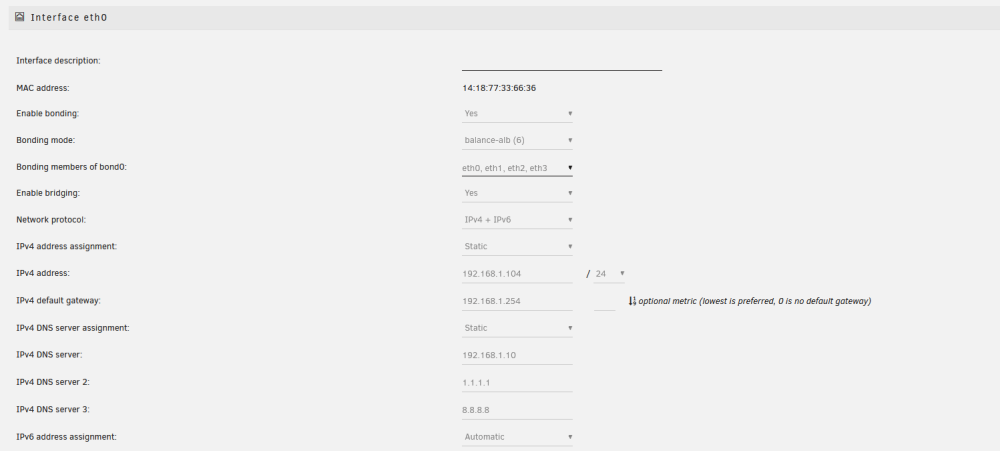
I use br0 for a couple of DNS servers and NextCloud, but starting a few months ago every time I reboot the server the br0 network is removed. Here is the command I used to recreate it after it happened the first time: docker network create -d ipvlan --subnet=192.168.1.0/24 --gateway=192.168.1.254 --ipv6 --subnet=2001:5xx:7exx::/48 -o parent=br0 br0 I use IPv6 for a few things. I initially tried to use macvlan in the command, but changed to ipvlan, as the docker custom network type is set to ipvlan. I saw a few people talking about shim network settings being the issue, but I'm not sure if that applies in my situation. I've attached my diagnostics and system log from this morning, which was my last reboot for an upgrade to 6.12.3, and the last time I saw the issue. server-diagnostics-20230717-0830.zip server-syslog-20230717-1531.zip
