wadesnj
Members
-
Joined
-
Last visited
-
This is what is in the log - it looks like the user does not exist: 192.168.0.22 - - [23/Apr/2022:15:48:26 +0100] "GET /auth/login HTTP/1.1" 200 3725 "-" "Mozilla/5.0 (Windows NT 10.0; Win64; x64) AppleWebKit/537.36 (KHTML, like Gecko) Chrome/100.0.4896.127 Safari/537.36" [2022-04-23 14:48:34] production.ERROR: SQLSTATE[42S02]: Base table or view not found: 1146 Table 'akaunting.ak_users' doesn't exist (SQL: select * from `ak_users` where `email` = ************ and `ak_users`.`deleted_at` is null limit 1) {"exception":"[object] (Illuminate\\Database\\QueryException(code: 42S02): SQLSTATE[42S02]: Base table or view not found: 1146 Table 'akaunting.ak_users' doesn't exist (SQL: select * from `ak_users` where `email` = ****** and `ak_users`.`deleted_at` is null limit 1) at /var/www/html/vendor/laravel/framework/src/Illuminate/Database/Connection.php:712) [stacktrace] #0 /var/www/html/vendor/laravel/framework/src/Illuminate/Database/Connection.php(672): Illuminate\\Database\\Connection->runQueryCallback('select * from `...', Array, Object(Closure)) #1 /var/www/html/vend
-
I have exactly the same problem, if setup is set to true, multiple users are created using the user details in the config, if setup is set to false, it does not connect to database. Any ideas?
-
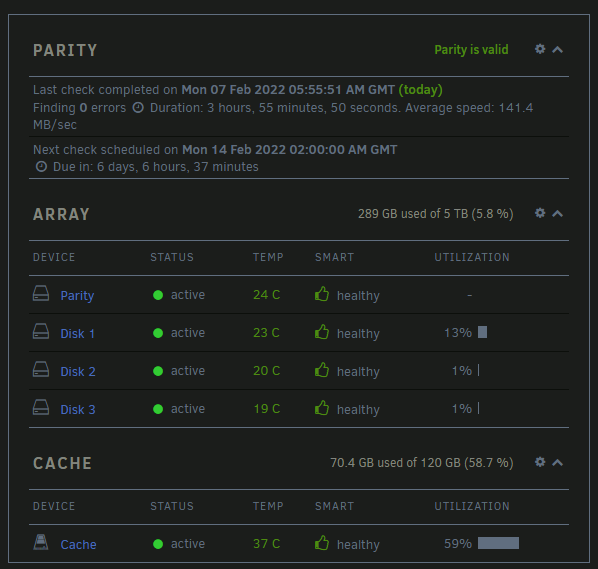
Sorry, new to Unraid. I currently have 1 cache/pool device which is a 120Gb SSD in an eSata enclosure. I would like to replace this 1 device with two new eSata drives of 500Gb in external SATA enclosures using a two port eSata card in my Poweredge server.. How do I take the 120Gb device out of the array and add the two new devices without losing any data? I have appdata, domains and system shares set to prefer cache and current utilisation of the pool is 60%.