




Skip to content
View in the app

A better way to browse. Learn more.

Unraid

A full-screen app on your home screen with push notifications, badges and more.

To install this app on iOS and iPadOS
  1. Tap the Share icon in Safari
  2. Scroll the menu and tap Add to Home Screen.
  3. Tap Add in the top-right corner.
To install this app on Android
  1. Tap the 3-dot menu (⋮) in the top-right corner of the browser.
  2. Tap Add to Home screen or Install app.
  3. Confirm by tapping Install.

BrotherBruh

Members
  • Joined

  • Last visited

  1. Wow, thanks for the insightful and extremely helpful reply. I assume you are clueless about why this happened to me, but thanks for your "support"!
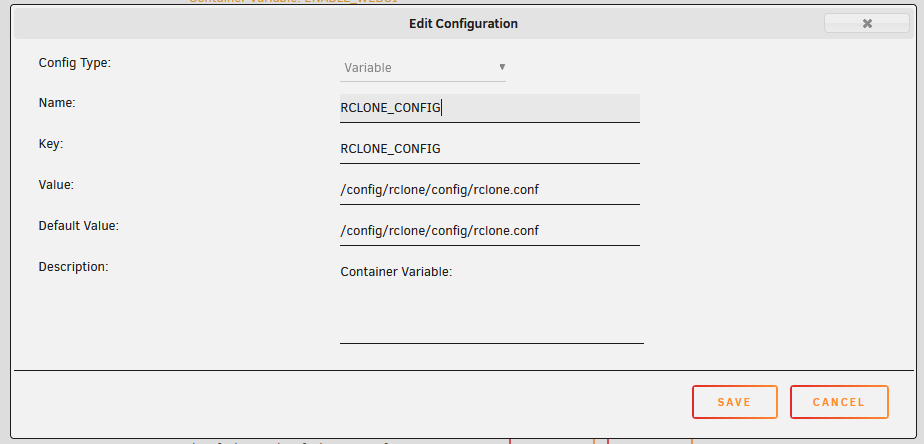
  2. I had a SIMILAR problem. I never found a quick/easy solution, but adding another variable worked for me: After adding that and restarting the docker, it is able to find the .conf stored in appdata. I hope this helps someone. I also hope this issues is resolved somehow in a future release. The dev doesn't seem to know what causes, lol.
Account

Navigation

Search

Search

Configure browser push notifications

Chrome (Android)
  1. Tap the lock icon next to the address bar.
  2. Tap Permissions → Notifications.
  3. Adjust your preference.
Chrome (Desktop)
  1. Click the padlock icon in the address bar.
  2. Select Site settings.
  3. Find Notifications and adjust your preference.