





Sarge
Members
-
Joined
-
Last visited
Everything posted by Sarge
-
After a bunch of research and testing I've found this works best on 6.11.5 nginx -s reload
-
I'm using Authentik for centralized authentication for most of my apps in my homelab and would like to use it for authentication to Unraid as well but it looks like we can no longer disable the built in authentication to Unraid. Is there any way to do so or another work around to use an app like Authentik with Unraid?
-
I've been beating my head against the wall with this for a bit. I'm running a LOT of docker containers on Unraid. At work I implemented Rancher several years ago and have built a bunch of k8s clusters. I'm trying to spin up the single node, docker version of Rancher on Unraid and can't get it to function properly. I can run the same container on my Windows box in WSL2 ubuntu linux without issue. As far as I can tell there is something stopping Rancher from installing components during setup. I can't tell if it is network related somehow or some other contributing factor. I can see what is failing in the container logs but they aren't very helpful. The Rancher container uses Docker in Docker to spin up a k3s cluster to run Rancher on. It requires to be ran as root. I have all of this configured correctly as far as I can tell. I have plenty of disk space and RAM available. I've wiped the Rancher data directory and started over with different configs several times. I've tried using my own certs The error is that it can't install Fleet, which is Rancher's gitops tool used to install other components. No fleet means the rest of the internal setup fails. Is there any special configuration with the Unraid version of Docker I don't know about? I'm looking for any suggestions others might have as to what I could try to get this to work.
-
I know this has been asked before but I'm finding the previous / older provided solutions are causing instability. Let me explain. I'm using a wildcard cert from LetsEncrypt. As you probably know, letsencrypt certs have a fairly short expire time. I'm using SWAG to grab the certs and a custom script to check for new certs from SWAG and copy them to the various places they need to go, including `/boot/config/ssl/certs` The problem is that either NGINX or PHP doesn't pick up the new certs until they are restarted. Here's what I was running: # Restart Unraid WebGUI echo "Reloading Unraid NGINX for the WebUI" # Below command might have been casuing issues with the server, processes kept getting killed and restarted. /etc/rc.d/rc.nginx reload # Commented out for now, broke on unraid upgrade, research later /etc/rc.d/rc.nginx restart /etc/rc.d/rc.php-fpm restart I've uncommented the three commands above, but in my script they are currently commented out. So I'm asking if someone working on the Unraid project has the official way we should be doing this so I don't feel like I'm doing something that could break my NAS. If we can get an official answer, maybe adding it to the below would be good. https://wiki.unraid.net/Manual/Security#Securing_webGui_connections_.28SSL.29
-
Also, Unraid folks, when installing docker containers, the UI in any other tab does still become unresponsive. Just FYI.
-
For those that care (seems to be approximately zero of you) I figured it out, sort of. Finally tracked it down to network. Transfers from Unraid to my PC were fine but transfers from my PC to Unraid or Unraid curling a file were abysmal. < 1 MB a second. I uninstalled most of the plugins I had installed and shut down docker, restarted and now network is fine. Turning Docker back on and now I can install Docker apps just fine. So. all those plugins and tweaking are gone. Maybe in the end that is best.
-
Note: Using oflag=direct is fast, but using dsync is very very slow dsync is
-
OK, found something out. Doing a manual docker image pull from the ssh shows the same basic results, it starts out "ok" but then slows down to a crawl. So I started looking at the cache drives and something is seriously wrong. It is SLOWWWWW I ran a basic test we use at work: dd if=/dev/zero of=/mnt/user/system/test1.img bs=1G count=1 oflag=dsync On my local box which is Windows with Windows Subsystem for Linux installed with Ubuntu I get 1073741824 bytes (1.1 GB, 1.0 GiB) copied, 1.12554 s, 954 MB/s That's on an NVME drive, but it's also on an emulated file system running in a VM, so . . On Unraid? Well, I don't know, it's still running about fifteen minutes later. ctrl+c no worky, one does not simply interrupt dd And it's finished 1073741824 bytes (1.1 GB, 1.0 GiB) copied, 543.663 s, 2.0 MB/s Well. There's the problem. To megabytes a second. Now . .why?!?! In my first post I had gone to the Unraid UI --> Main --> Cache to look at the cache drive and everything looked fine, now when I go there after upgrading to RC5 the page is refresh looping REALLY fast (weird) If I hit Escape and just the right time I can see filled out results. Things still look normal there. I can go to the Cache 2 page just fin and any other disk page, but the main cache page is borked. Disk log for Cache looks fine Apr 26 19:26:50 Thor kernel: nvme1n1: p1 Apr 26 19:26:50 Thor kernel: BTRFS: device fsid bca1d14f-b1a9-4986-bb92-c7c687acbe70 devid 2 transid 284634 /dev/nvme1n1p1 scanned by udevd (1385) Apr 26 19:28:58 Thor emhttpd: Samsung_SSD_970_EVO_Plus_2TB_S59CNM0R925667W (nvme1n1) 512 3907029168 Apr 26 19:28:58 Thor emhttpd: import 30 cache device: (nvme1n1) Samsung_SSD_970_EVO_Plus_2TB_S59CNM0R925667W Apr 26 19:28:58 Thor emhttpd: read SMART /dev/nvme1n1 Apr 26 19:29:45 Thor emhttpd: /mnt/cache devid 2 size 1.82TiB used 452.03GiB path /dev/nvme1n1p1 Someone help please?
-
Nope, does not complete, at least not in any kind of normal time. Takes freaking forever and the UI becomes unresponsive.
-
I should also note that SSH access is fine. I can interact with the shell without issue while the UI is locked up. I'll give this a bit then try again without trying to load the UI in another tab, see if the docker image download will complete then.
-
The interface never came back from the test above and the docker container never got installed (after over an hour) I upgraded to RC5 and rebooted. Everything seems fine until I try to install another docker container using apps. The instance the install starts the UI is unavailable in another tab of chrome., even while the docker image downloads and the interface is updated in the first tab. Eventually the interface in the first tab also stops responding, maybe when I try to reload the UI in the second tab? I'm super confused as to what could be causing this and am getting really frustrated.
-
I stopped the Balance to test as it was going to take forever. I then added another container back, it still locked up the interface and is taking forever for a simple container. I see there is a new version out, I'll try upgrading to that when the container finally finishes.
-
I'm running 6.10 rc4. My USB drive died. My latest backup was from a month ago before I had upgraded from 6.10 rc2 to rc3 then rc4. I followed the instructions to restore the backup and boot up with the new thumb drive. I then had to upgrade before I could transition the license. I then saw a bunch of plugins and docker containers needed upgrades. I upgraded the plugins, no problem. I tried mass upgrading the containers but they seem to have gotten stuck. I rebooted the server and tried upgrading one container, it downloaded the layers fine but got stuck at extracting them. At this point the Web UI became unresponsive, so I rebooted the server again. I figured maybe Docker needed to be nuked and I needed to start over. I stopped the docker service and deleted the Docker data directory at /mnt/user/system/docker/, restarted then started the service again. I then used Apps to reinstall the first container, it did the same thing, extraction took forever and the UI become unresponsive. I realized it was trying to rebuild parity on the main array so I let it do that overnight and just checked again. That first app installed but the next Docker container I tried did the same thing. container layer extraction took forever for a 5MB layer and the UI become unresponsive (new tab) This was not the case before the restore of the backup, so something is hosed somewhere. All of my Docker data and the app data is stored on cache, which is a RAID 1 BTRFS of two 2 TB NVME drives that read/write at 5GB a second. I ran a scrub on the BTRFS drives and nothing came back amiss. I just noticed a BTRFS scrub is currently running on the cache drives. `Balance on '/mnt/cache' is running 32 out of about 255 chunks balanced (33 considered), 87% left` So maybe that is it. I'm going to go ahead and post this and respond back if things get better. This server has been heavily tested with Memtest, prime95 and each disk deep scanned. Specs: Dell r720XD with dual Intel® Xeon® CPU E5-2697 v2 @ 2.70GHz 128 GB RAM Dual Samsung SSD 970 EVO Plus 2TB in RAID 1 with BTRFS Attaching diagnostics below. thor-diagnostics-20220426-1411.zip
-
-
@mgutt Great write up! For #7, you mentioned "or disable the write cache", have you tested disabling the write cache? If so, how do you do it properly? I ask because I was trying to diagnose slow SMB performance on my Unraid box and in the process set vm.dirty_background_ratio=0 and vm.dirty_ratio=0 to remove the RAM cache from the testing and my SMB transfer speed tanked to about 5 MB/s. I replicated this in different Unraid versions and an Ubuntu live USB image on the same hardware. This was to NVME storage that I confirm is working at > 1.5 GB/s on system. I can transfer 650 MB/s to the RAM cache when it's on in Unraid. I'm very curios if others have ran into this and if it is normal behavior for Linux or if there is something goofy with my hardware or I didn't disable the RAM cache correctly. You can read more about the testing I did here:
-
OK, tried this with a Ubuntu live boot USB and get the same results, so NOT an Unraid bug, a "Linux thing". Seems Linux needs those RAM caches for SMB to work worth a darn? IDK, super weird.
-
I'm turning off the cache to replicate the issue I saw with the cache on when the RAM runs out. SMB transfers should not slow to 3 to 5 MB/s on a 10 gig network to NVME storage, there's no excuse for this. Either something is really really really broken in Unraid or Linux needs RAM caches to make SMB work for some reason. I'm going to try to replicate on Ubuntu shortly but have a few meetings this morning.
-
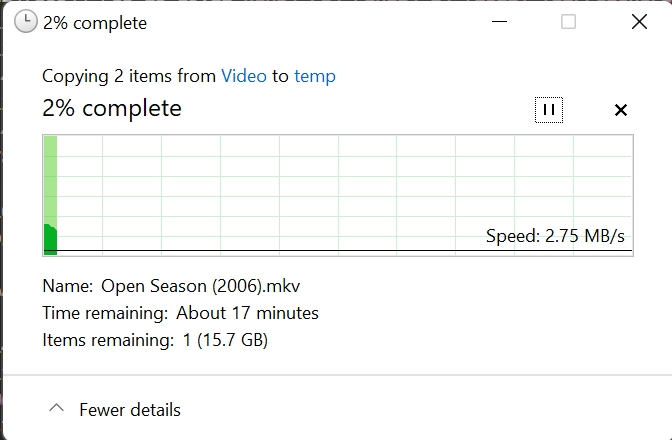
Same results with 6.9.2. Fast with vm.dirty_background_ratio until it runs out, then slow
-
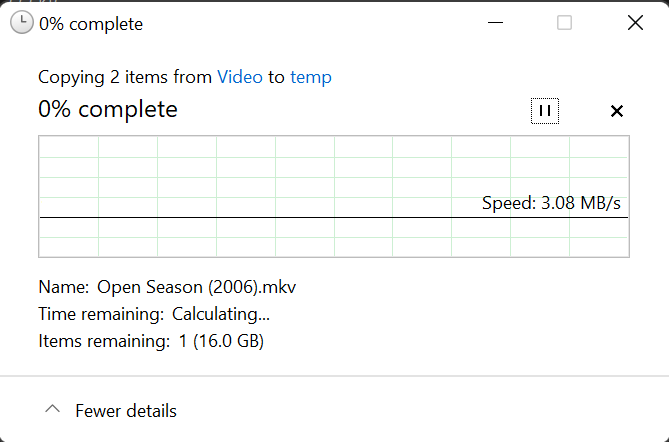
@Vr2Io Booted into new Unraid 6.10 RC2 and long story short, same issue. Here's the full rundown of what I did. Created a new USB key with 6.10 RC2 Booted with new key Set root password and logged in. Logged into Unraid.net to get demo key Assigned devices to array and started it Turned on public SMB sharing for Temp share that is cache drive only Logged into ssh and ran `sysctl vm.dirty_ratio=0` and `sysctl vm.dirty_background_ratio=0` Ran `dd if=/dev/zero of=/mnt/cache/temp/test1.img bs=1G count=1 oflag=direct` Got expected performance of about 1.5 GB/s Tried copying 16.1 GB file to temp share on cache drive and got about 3.08 MB/s, see screenshot below. </sigh> I'm going to install 6.9 on a USB drive to see if the speed is the same. Burning my whole day on this, really getting frustrated.
-
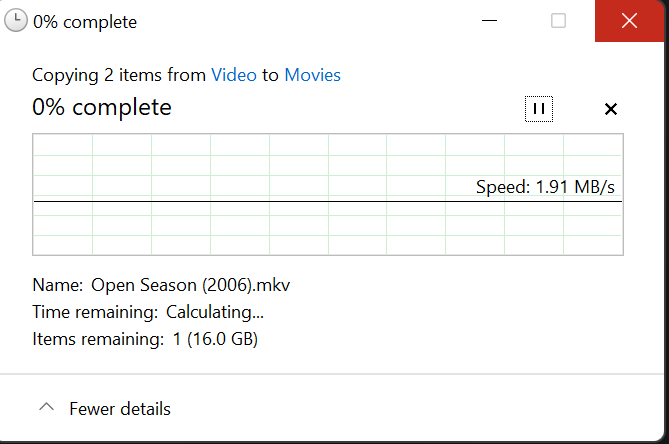
Ahh, thank you. Yes, that fixed the testing with dd, now I'm getting the speed I expect using dd on Ubuntu and Unraid. Booting Unraid, even in safe mode still has file transfers over SMB be very slow, now about 2 MB or less of speed. This is for one large file when the vm.dirty_ratio is 0, when vm.dirty_ratio is default (20) then I get 300 MB/s or more. This is telling me that it's not a SMB or network config thing. Again, this is in Safe Mode, so no plugins. I'll try a new Unraid install with a demo key on a different USB drive and report back.
-
Well, now I'm just stumped. Booting to an Ubuntu live USB and mounting the disks is showing the same perf issues, worse in fact. The NVME BTRFS flash array that is the cache drive shows write speeds of 5MB/s One of the spinning disks is showing 511 KB/s using dd. This is after setting sysctl vm.dirty_background_ratio=0 sysctl vm.dirty_ratio=0 Is this "normal" for Linux? Or is something seriously broken in my server all of a sudden? I was thinking that maybe it was the flashing of the Dell RAID card to IT mode, but the NVME drives are attached via PCI Express cards. I'm starting to run out of ideas. I guess I can pull the PCI express cards, install them in spare desktop I have and boot with the Ubuntu USB and replicate it there. Any help would be greatly appreciated.
-
Ignore all of the above, including safe mode fixing it. Safe mode / uninstalling Tips and Tweaks was resetting vm.dirty_background_ratio and vm.dirty_ratio back to their defaults of 10 and 20. Setting both of these manually to 0 using systemctl causes the dd tests to slow way back down. Not as bad as before, around 50 MB/s for the NVME cache and 7MB/s for spinning disks but still too slow. Again, this is in Safe mode, so no plugins are running. I really have no idea what is going on now. I think my next test is going to be to boot to a USB Ubuntu instance and run the same tests on one of the spinning disks there. This should take Unraid out of the equations to see if it is a hardware issue or not. I'm pretty sure things were working fine not that long ago. I was copying massive amounts of data to the array as I ripped my bluray collection. I'd rip disks all day to my local system then make sure their directories and file names were correct then copy all of them to Unraid over SMB. The first 80 gigs or so was super fast because it was going to the Ram cache but it would slow down some for the rest once it hit the dirty_ratio limit (I had it set at 50 at the time, so about half of 128 gigs). But it certainly wasn't a few megs a secons.
-
Following is the list of plugins I had installed. Plugins with an x in front of them I uninstalled. I ran a speed test between each uninstall with no improvements. Once I got to this point I decided a reboot was in order in case one of the plugins needed the reboot. After the reboot speeds were back to normal. I'm now going to reinstall the critical plugins one at a time, running a speed test between each, will probably reboot from time to time to make sure things are stable. Really sucks rebooting enterprise hardware, take forever. x CA Auto Turbo Write Mode CA Auto Update Applications CA Backup / Restore Appdata CA Cleanup Appdata CA Mover Tuning Community Applications x Dynamix Cache Directories Dynamix System Buttons x Dynamix System Information x Dynamix System Statistics Fix Common Problems GPU Statistics x My Servers Nerd Tools Nvidia Driver x Open Files x Preclear Disks rclone x Tips and Tweaks x Unassigned Devices x Unassigned Devices Plus x unBALANCE User Scripts
-
Booting Unraid into safe mode fixes the disk perf speed issues. I'll bot back into normal and begin trying to figure out which plugin might be causing the issue.
-
I ran both of those commands multiple times over several reboots while I was working on the issue with the same results. It's not network, dd bypasses network as it's ran locally, also network perf to RAM is as expected.


