





mrfly
Members
-
Joined
-
Last visited
-
thanks for the reply. i will do after its finishes should it be without Correcting Parity Check On?
-
hello unraiders, i have a lot of parity sync errors for months now after removing my hbacard and using my motherboard sata ports. i run parity sync first with out Correcting Parity Check On with a lot of errors after its was finished and now its running with Correcting Parity Check On but still having ther errors ( its still running ) i did change twice the sata cables but it has no effect. parity check done without Correcting Parity Check On what can i do ? or should i rebuild the parity with new config? Regards sarnas-diagnostics-20240912-1942.zip


-
yea i am sure because i run 3 times in safemode and i got the same results. i installed zfs plugin 2 times and everytime i get that read/writes issue.
-
little update. i restored one month old flashbackup version 6.12.0 and everything was back to normaal then i update to 6.12.3 and disks went to spindown and no more reads/writes etc but the systeem was to slow somehow and still slow now. i installed zfs plugin then the reads and write begon again so i uninstalled and the disks behavior went to normaal. somehow there is something or bug somewhere that it causes this probleem. i am thinking that i'll change the disks back to xfs filesystem cause if i cant use zfsplugin and cant make snapshots whats the point of zfs files system right?
-
i treid to set some hdd to xfs file system but the results are the same. last option is to redo the flash but for that u meant to flash the usb with USB Flash Creator tool right ?
-
Yes it is
-
preclear the disk first helps also
-
Yes I did but same result.
-
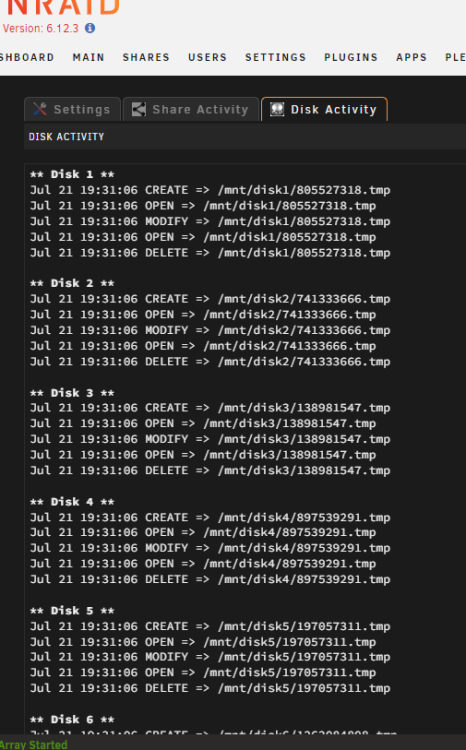
hey guys, i am having a issue with the the array, its continuously reading at full speed and writing and dont goes to spindown the disks. i set the whole array to the zfs file system and its works great for 5 days but after a normaal reboot having this issue. i set docker/vm off to see if something there given this problem but no, i even pulled my hba card out of the system and connected disk to sata ports on motherboard still the disks are on load. i dont know whats cousing this. i am getting this by FileActivity look at the screenshot All help is welcome lol sarnas-diagnostics-20230721-1833.zip

-
Thank you, thats the trick somehow the bios settings was not set right but i did change it and its works now like a charm👌
-
i cant use it, i am at 6th gen but is says not support it. can u have a look? diagnostics-20221217-2003.zip
-
you can use proxy manager and cloudflare and a domain name to acces them at one place.





