





Wake
Members
-
Joined
-
Last visited
-
I haven't changed any defaults, and when I run docker exec -u nobody -it shelfmark whoami and again for CWA container, I get nobody returned for both. I'm relatively unfamiliar with linux users and permissions, but I seemed to break CWA when forcing it to 99:100. I set extra parameters as --user 99:100 and created variables PGID and PUID to set to 100 and 99 respectively.
-
Thanks for sharing this container with us. It has worked fine for me for months, but lately I am getting Errno:13 when trying to download new books. Running DockerSafeNewPerms fixes my issue for a while, but it reverts back to the error in short time. I checked the perms of my CWA import folder (where Shelfmark downloads to) and there are no write permissions when I get the error (drwxr-xr-x). Has anyone else encountered this? Should I be using something other than CWA for my library management? To me, it seems that CWA is changing folder permissions every time it runs an import, and that leaves Shelfmark unable to write to the directory, but I don't know where to go from here.
-
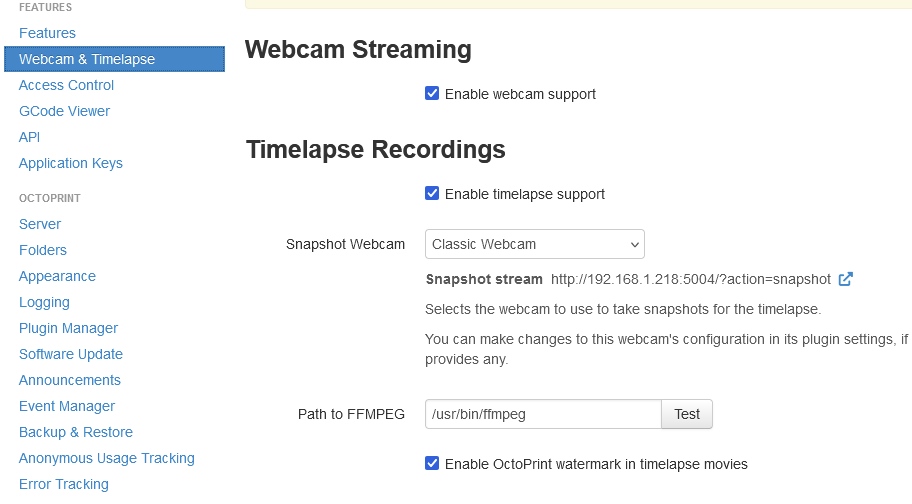
Do you have DVB Drivers installed and configured per this post? Even after that, I had to restart the service and my server a second or third time for ffmpeg to passthrough. I'm unsure why, unless I was mistyping the path, but it does work for me now. If you have the driver service and plugin installed, after the restarts you should be able to populate this field with /usr/bin/ffmeg
-
I am having a similar issue after changing the Cache drive my appdata folder was on. Were you able to find a resolution? I thought it might be a permission issue, but I've tried 777 to no avail EDIT: Also running an nvidia GPU as well, but before changing my cache drive, I had no issues (Using the HardwareDevicePath field in Preferences.XML to select my iGPU for quicksynk, in my case D129). Now, I can't use the iGPU or the Nvidia, Plex goes straight to CPU/software encoding. EDIT 2: Removing the container and image, uninstalling Nvidia and Intel TOP and drivers, and then recreating the container has worked for me. I did not yet reinstall TOP or any driver. Hopefully that helps someone else.
-
It works beautifully! Thanks so much for all the effort and attention you've put into maintaining this guide
-
AttributeError: 'bool' object has no attribute 'info' Checking if The Git Repo Has Changed.... Local Files Are Up to Date Loading InvokeAI WebUI..... * --web was specified, starting web server... ** Press ANY KEY to close this window ** Hey there, getting the above error when installing for the first time. Is this the break you are mentioning you get when restarting docker? I've tried the dockerhub and manual methods (Along with rebuilding pyvenv.cfg and /invokeai/invokeai/ on both, and completely removing container, image, and appdata folders in between methods). Here's the full log if it helps >> Initializing, be patient... >> Initialization file /home/invokeuser/userfiles/invokeai.init found. Loading... >> Internet connectivity is True >> InvokeAI, version 3.0.0+a0 >> InvokeAI runtime directory is "/home/invokeuser/userfiles" >> GFPGAN Initialized >> CodeFormer Initialized >> ESRGAN Initialized >> Using device_type cuda >> xformers memory-efficient attention is available and enabled >> NSFW checker is disabled >> Current VRAM usage:0.00G >> Loading diffusers model from runwayml/stable-diffusion-v1-5 | Using faster float16 precision | Loading diffusers VAE from stabilityai/sd-vae-ft-mse | Default image dimensions = 512 x 512 >> Loading embeddings from /home/invokeuser/userfiles/embeddings >> Textual inversion triggers: >> Model loaded in 3.09s >> Max VRAM used to load the model: 2.17G >> Current VRAM usage: 2.17G >> Setting Sampler to k_lms (LMSDiscreteScheduler) Loading Python libraries... >> Initializing, be patient... >> Initialization file /home/invokeuser/userfiles/invokeai.init found. Loading... ╭───────────────────── Traceback (most recent call last) ──────────────────────╮ │ /home/invokeuser/venv/bin/invokeai:8 in <module> │ │ │ │ 5 from invokeai.frontend.CLI import invokeai_command_line_interface │ │ 6 if __name__ == '__main__': │ │ 7 │ sys.argv[0] = re.sub(r'(-script\.pyw|\.exe)?$', '', sys.argv[0]) │ │ ❱ 8 │ sys.exit(invokeai_command_line_interface()) │ │ 9 │ │ │ │ /home/invokeuser/InvokeAI/invokeai/frontend/CLI/CLI.py:169 in main │ │ │ │ 166 │ │ │ 167 │ # web server loops forever │ │ 168 │ if opt.web or opt.gui: │ │ ❱ 169 │ │ invoke_ai_web_server_loop(gen, gfpgan, codeformer, esrgan) │ │ 170 │ │ sys.exit(0) │ │ 171 │ │ │ 172 │ if not infile: │ │ │ │ /home/invokeuser/InvokeAI/invokeai/frontend/CLI/CLI.py:1073 in │ │ invoke_ai_web_server_loop │ │ │ │ 1070 │ ) │ │ 1071 │ │ │ 1072 │ try: │ │ ❱ 1073 │ │ invoke_ai_web_server.run() │ │ 1074 │ except KeyboardInterrupt: │ │ 1075 │ │ pass │ │ 1076 │ │ │ │ /home/invokeuser/InvokeAI/invokeai/backend/web/invoke_ai_web_server.py:74 in │ │ run │ │ │ │ 71 │ │ │ 72 │ def run(self): │ │ 73 │ │ self.setup_app() │ │ ❱ 74 │ │ self.setup_flask() │ │ 75 │ │ │ 76 │ def setup_flask(self): │ │ 77 │ │ # Fix missing mimetypes on Windows │ │ │ │ /home/invokeuser/InvokeAI/invokeai/backend/web/invoke_ai_web_server.py:235 │ │ in setup_flask │ │ │ │ 232 │ │ │ │ sys.exit(0) │ │ 233 │ │ else: │ │ 234 │ │ │ useSSL = args.certfile or args.keyfile │ │ ❱ 235 │ │ │ logger.info("Started Invoke AI Web Server") │ │ 236 │ │ │ if self.host == "0.0.0.0": │ │ 237 │ │ │ │ logger.info( │ │ 238 │ │ │ │ │ f"Point your browser at http{'s' if useSSL else ' │ ╰──────────────────────────────────────────────────────────────────────────────╯ AttributeError: 'bool' object has no attribute 'info' Checking if The Git Repo Has Changed.... Local Files Are Up to Date Loading InvokeAI WebUI.....
