




Skip to content
View in the app

A better way to browse. Learn more.

Unraid

A full-screen app on your home screen with push notifications, badges and more.

To install this app on iOS and iPadOS
  1. Tap the Share icon in Safari
  2. Scroll the menu and tap Add to Home Screen.
  3. Tap Add in the top-right corner.
To install this app on Android
  1. Tap the 3-dot menu (⋮) in the top-right corner of the browser.
  2. Tap Add to Home screen or Install app.
  3. Confirm by tapping Install.

KyonV2

Members
  • Joined

  • Last visited

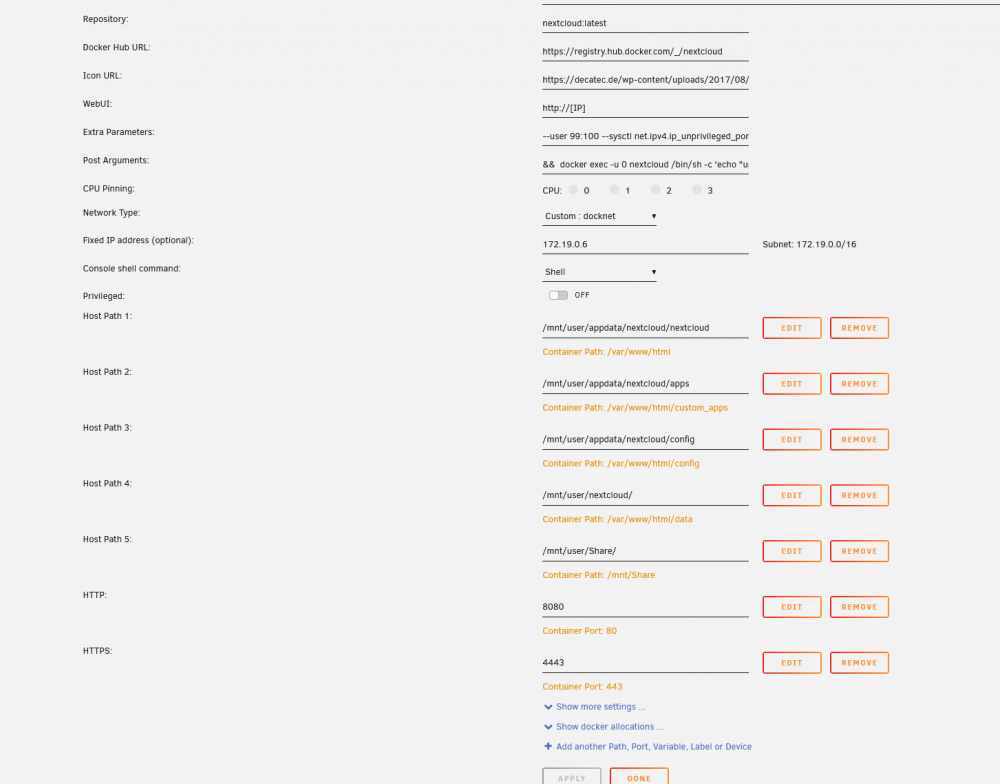
  1. Hello, I'm pretty new to this so forgive me if this is a basic question. I have successfully managed to setup SWAG and got emby working on it, now I'm trying to do the same with Nextcloud. When I installed this container it didn't map any ports for me so I created a new HTTP mapping (80 to 8080) and I did the same with HTTPS (443 to 4443). It works and installs fine on port 8080 but it does not answer at all on port 4443. In the official image of nextcloud I can see that only port 80 is exposed (https://hub.docker.com/_/nextcloud) but if this is the case then how can I setup SSL for it? I tried changing stuff in nextcloud/config/config.php (trusted domains) but no matter what I did it wouldn't work. I would appreciate any help. Thank you
Account

Navigation

Search

Search

Configure browser push notifications

Chrome (Android)
  1. Tap the lock icon next to the address bar.
  2. Tap Permissions → Notifications.
  3. Adjust your preference.
Chrome (Desktop)
  1. Click the padlock icon in the address bar.
  2. Select Site settings.
  3. Find Notifications and adjust your preference.