





zarfx4
Members
-
Joined
-
Last visited
-
What is the path of the Homebridge Logs within the container? Does not seem to be /var/log which is what i thought was standard..??..
-
Would it do this if I installed my plugins through the Config UI only and did not have the npm packages listed in the Docker setup variable? That’s the only “non standard “ thing I have done.
-
With the HomeBridgeUI - Every time there is an update for the Docker, it wipes out my setup and I have to re-add everything or use the Config tool to recover a backup. When this is done, all the plugins return to a "new" state and have to be added back to their correct room, and I also lose all automations that were setup with them. Is there a way around this - or am I doing something wrong?
-
Weird. I am migrating to this Docker for Couchpotato. Was working fine on the previous docker. Put in the Prowl API value, but each test fails. Says to check the logs. The logs say nothing but sending test to test.prowl.api. No other errors. Just "fails". Even generated a new API code. Just somewhat weird. WIll have to dig into it.
-
Is there a know issue with this docker and setting up Prowl notifications?
-
Thanks Peter. At least now i know i am not crazy. Is this going to be fixed in the newer release you previously spoke about...or is it an UnRaid issue..?
-
Thanks for the response Peter. I am on 6.1.9. I tried the network settings idea thinking maybe it would help. It did not. It is almost as if the Server is no longer listening to Port 1194. I removed the plugin and re-installed. I verified that the port is properly open on the router, which was unchanged as well. I ended up having to remove the plugin and installed one of the Open VPN dockers (which is a pain to setup in contrast to your plugin) and it worked right away. What unRAID version are you on? If 6.2 I want you to save your unRAID network settings and try again. I have a new release soon that read the unRAID variables from a different way, apart from that the latest version should work in 6.2. For unRAID Version 6.1 is not affected about this and should be running fine
-
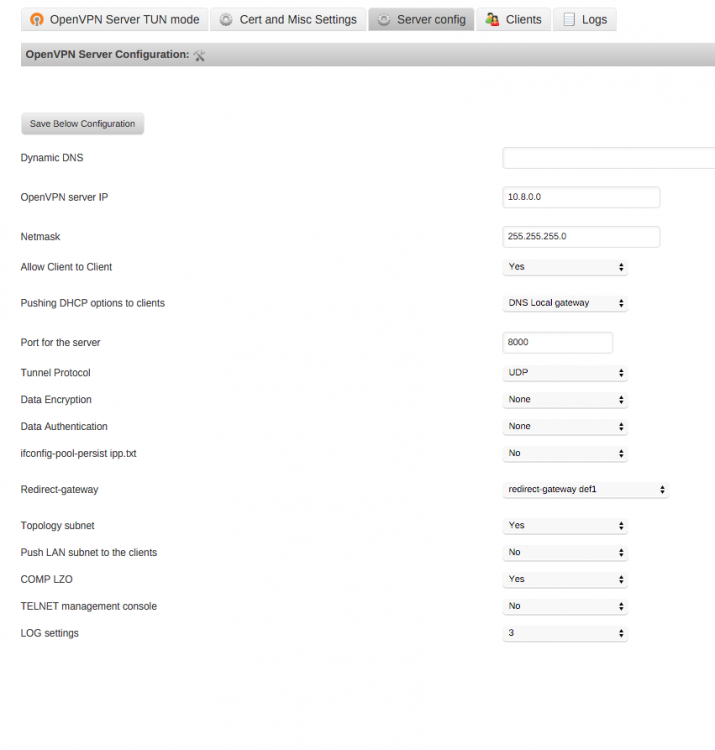
Any ideas why I would suddenly have openvpn just stop working? Nothing has changed except unRaid has updated. The connection in the open VPN app on any of my iOS devices just spins. Shows bytes going out. But no response. Keeps taking out. Checked port forwarding for UDP 1194 and it's going to the unraid IP Checked that open VPN is running. It is. Rebooted. Nothing Created a new opvn file. Nothing. Any ideas **EDIT** I have rebooted everything. The OpenVPN logs from my iphone keep showing that not bytes are coming in. Router has 1194 forwarded, thats the Port in the OpenVPN plugin Server Settings. This all used to work. I have also removed the entire plugin and tried again to no avail.
-
Thanks Peter!!!! I made the changes to the Server settings and then created/used the inline option. Assume that leaving this port open is "OK" as nothing can connect to OpenVPN w/o the Cert details correct? And I should be able to edit the inline file to replace the WAN IP to a Dynamic Hose such as DuckDNS correct (vs. the static IP it inserted into the file?) Appreciate your help. Love your work and dedication!!
-
Hi Peter, See attached screenshots. THANKS!

-
Im having issues connecting as well....I setup the server several days ago..following all the instructions (after my one idiotic oversight) and then proceeded to create a user. I created a user for iOS, and therefore went to my Cert folder and opened the ZIP file to install the profile file first, then loaded the opvn file. Ive tried 2 different ports for the server, and I get the same issue....it finds the server, but hangs in the "connecting" phase. Here it the logs from the OPENVPN app.....any thoughts on why it wont connect? Appreciate the help!!!!! 2016-01-09 18:33:58 Connecting to 24.xxxxxxxxxxxxxx:XXxX (24.xxxxxxxxxxxxxx) via UDPv4 2016-01-09 18:33:58 EVENT: CONNECTING 2016-01-09 18:33:58 Tunnel Options:V4,dev-type tun,link-mtu 1542,tun-mtu 1500,proto UDPv4,comp-lzo,keydir 1,cipher BF-CBC,auth SHA1,keysize 128,tls-auth,key-method 2,tls-client 2016-01-09 18:33:58 Peer Info: IV_GUI_VER=net.openvpn.connect.ios 1.0.5-177 IV_VER=3.0 IV_PLAT=ios IV_NCP=1 IV_LZO=1 2016-01-09 18:33:59 VERIFY OK: depth=1 cert. version : 3 serial number : EC:2E:8A:D0:3D:58:52:CE issuer name : CN=Easy-RSA CA subject name : CN=Easy-RSA CA issued on : 2015-12-31 03:23:12 expires on : 2025-12-28 03:23:12 signed using : RSA with SHA-256 RSA key size : 2048 bits basic constraints : CA=true key usage : Key Cert Sign, CRL Sign 2016-01-09 18:33:59 VERIFY OK: depth=0 cert. version : 3 serial number : 01 issuer name : CN=Easy-RSA CA subject name : CN=server issued on : 2015-12-31 03:23:13 expires on : 2025-12-28 03:23:13 signed using : RSA with SHA-256 RSA key size : 2048 bits basic constraints : CA=false key usage : Digital Signature, Key Encipherment ext key usage : TLS Web Server Authentication 2016-01-09 18:34:07 EVENT: DISCONNECTED 2016-01-09 18:34:07 Raw stats on disconnect: BYTES_IN : 5672 BYTES_OUT : 10824 PACKETS_IN : 10 PACKETS_OUT : 35 KEEPALIVE_TIMEOUT : 1 N_RECONNECT : 1 2016-01-09 18:34:07 Performance stats on disconnect: CPU usage (microseconds): 426654 Network bytes per CPU second: 38663 Tunnel bytes per CPU second: 0 2016-01-09 18:34:07 ----- OpenVPN Stop -----
-
And the Darwin award goes to me..... Thanks!
-
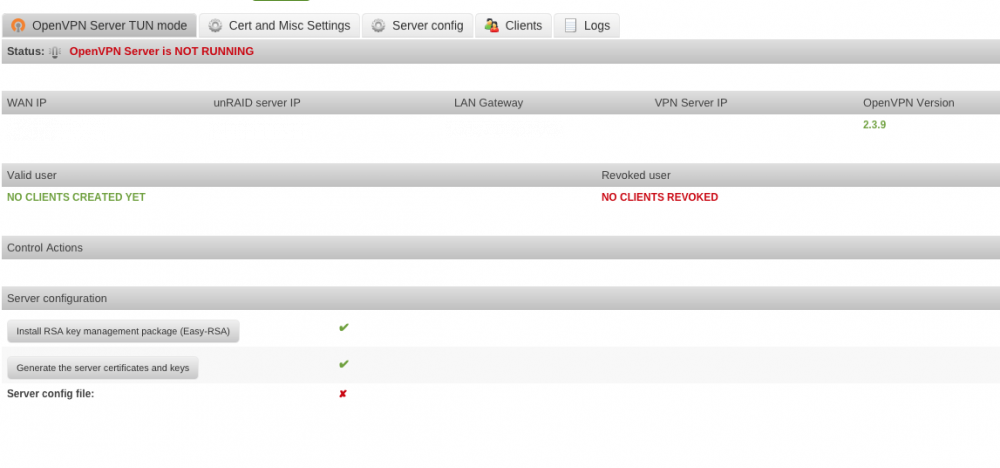
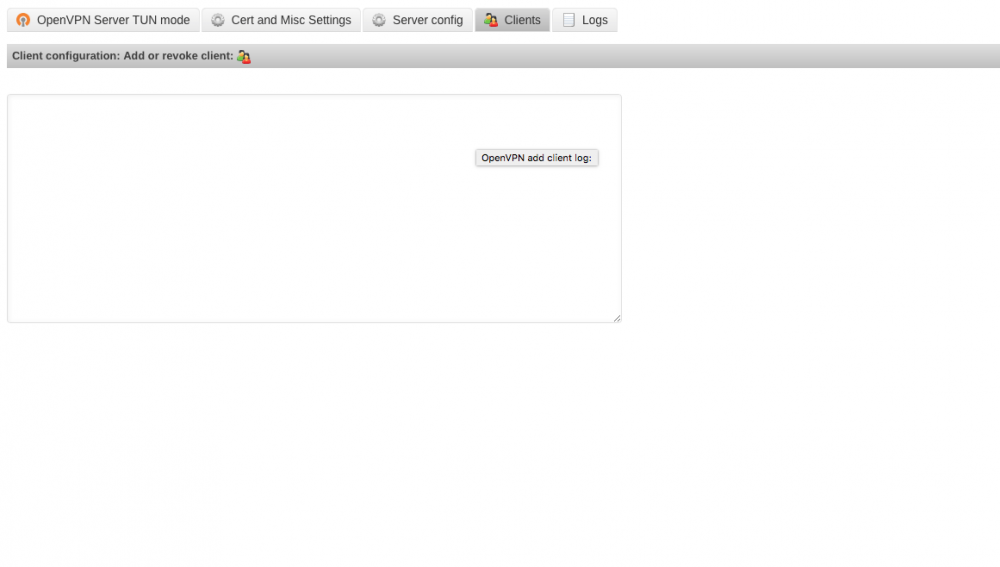
I must be clueless.. I just installed the x64 server plugin....followed the directions, but cant see the button to "add clients" I installed, set path to store RSA keys and such to my Cache/Appdata drive, saved. Clicked INSTALL RSA, then clicked GENERATE SERVER CERT. Now the instructions say to Add a client...but I dont see where to do this. Help???
-
Hello All, Attempting to setup OwnCloud, and got to the point where I go to the page, and i get several notices that: PHP module zip not installed. Please ask your server administrator to install the module. PHP module mb multibyte not installed. Please ask your server administrator to install the module. PHP module ctype is not installed. Please ask your server administrator to install the module. PHP module zlib is not installed. Please ask your server administrator to install the module. PHP module iconv is not installed. Please ask your server administrator to install the module. Ive read the forums, and ppl say to enable it in the SimpleFeatures or PHP ini file, however, I must be blind as to what Im looking for within the file to correct. As a side note, I can see in my php.ini file extension=zip.so is in there, but its coming back as not enabled. Anyone have some guidance?


