





JPDVM2014
Members
-
Joined
-
Last visited
Everything posted by JPDVM2014
-
Maybe your database got corrupted somehow? I'd ask at the github: https://github.com/nandyalu/trailarr
-
That's a question for the dev. The template is just a copy of the docker compose install instructions. You can probably remove it if you don't want to set it. I think it defaults to UTC.
-
That "failed to create shim task" is usually an issue with docker rather than the image. I'd completely remove lms, including the image, and try again. You could also try ro remove the "--user 99:100" just as a troubleshooting step.
-
Looks like it isn't just you, and not limited to Unraid. The person that started this issue is on Synology. The dev is usually pretty responsive, so hopefully it gets fixed quick. https://github.com/crocodilestick/Calibre-Web-Automated/issues/281
-
Template looks ok. Anything showing in the logs when you try to download? If it is letting you read in the browser, then the mapping must be right. I'm wondering if maybe it's a path setting somewhere in the CWA settings.
-
@LondonDragon Are you accessing it by IP address or through a reverse proxy? Could you post a screenshot of your template too?
-
If it is in the appdata folder and it's set in trailarr settings, you might want to ask at the creator's github to see if they have any ideas. Is everything else working now through?
-
@jfeeser I'm not sure on that one. The template shouldn't touch anything on run.sh. May be worth asking on the soularr github to see if the dev has any ideas. https://github.com/mrusse/soularr Seems like maybe run.sh got corrupted or changed somehow. You could always delete the docker image amd redownload it.
-
My guess is where you had appdata set to /CONFIG, your database was saving there instead of your mounted appdata folder, which is probably why it is saying you don't have any trailers. You may also want to cd into your TV show directory and run "ls -la" again there, just to see if any subfolders are owned by root. If they are, then that is a sonarr permission issue where it is creating folders as root. And just to cover everything, you still have PUID 99 and PGID 100 set in the template? Everything looks ok to me as far as setup goes. If it still isn't working, I'd probably take note of your current settings and start over from scratch. You may have accidentally changed something while trying to fix it.
-
After reading the docs, I think you are correct to have the path mappings, so leave them alone. Especially since your Movies are working. So, it must be a permission issue with your TV folder. If you are comfortable with the terminal, go into the unraid terminal and do the below without the quotes: "cd /mnt/user/Plex && ls -la" See if any of the folders are showing as being owned by root instead of nobody:users.
-
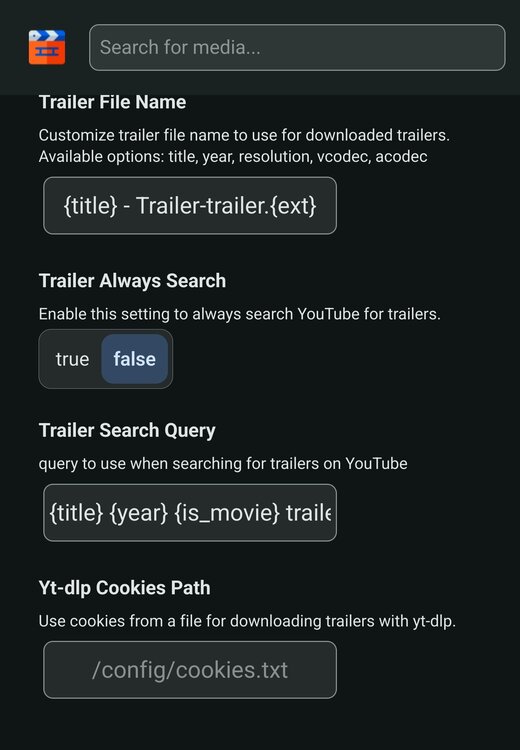
Did you set the path in trailarr too? EDIT: Also, if you didn't already, make sure to either remove or.correct that appdata variable. Your screenshot has it set to "/CONFIG". If you are going to keep it, it should be set to "/config"
-
Could you post your radarr and sonarr templates too? Two things I noticed, you shouldn't need the APP_DATA_DIR variable. /config is the default. You also might not need the path mappings. I'd get rid of those and see what happens. For the cookie error, you need to follow the instructions here (https://nandyalu.github.io/trailarr/help/common/#export-youtube-cookiestxt-file) and put the cookies.txt file you get into your appdata folder. Then there is a setting in the trailarr webui to tell trailarr where it is.
-
Thanks for the update! I updated the template and fixed that typo. docker_vm is my appdata drive. For the cookie file, I don't think you need that extra YT_DLP_ARGS variable. Put your cookies.txt in your appdata folder, and then you can set the path in trailarr's webui under settings.
-
@almulder Looks like the default appdata directory changed to /config at some point. Hit edit next to Appdata and change the container path from /data to /config, and see if that helps. For some reason, my install works with both mappings, even though I don't have the appdata env var set. Let me know if that fixes it so I can update the template. Thanks!
-
@DeadEndRoadAny luck?
-
I haven't done more than one album at a time, so I'm not sure how it figures out if/when a download is done. It may just wait until everything is done. Hopefully it kicks in at some point.
-
Ok, that means it is waiting for a download to finish. It won't import until an entire album is downloaded at least. So it may still work. I'd give it a little bit and see if it changes. The logs should update when it sees a download is finished.
-
Right there with you with yaml. Lol Are you getting any import failures in soularr logs? Or does it just say "Soularr completed"? There should also be a line like [INFO|soularr|L499] 2025-01-09T21:41:20-0500: Starting Lidarr import for: Porcupine Tree if it is trying to import.
-
You have to indent everything below authentication by 2 spaces.I went and purposely did the wrong API key in my Soularr config, and got the same error. So, I think it's an issue there. Could you post your slskd and Soularr config? Just blur out the API key.Just to rule it out, slskd is running, right?@DeadEndRoad Looks like Soularr can't communicate with slskd. I'd start by double checking you have the right address in your soularr config. Did you set an API key in slskd too?@Rick Gillyon This looks like an issue with Kapowarr recently. I don't use it a lot, but just tried adding a volume with the same result. I know it worked when I created the template though, because all of my downloads from then have the correct permissions, and I don't think I would have manually changed them all. It looks like a fix may be on the way though. https://github.com/Casvt/Kapowarr/pull/188@Trinistan Last thing I can think of would be to double-check your permissions. If you didn't already, go through the readme I typed up here. Especially the slskd note in step 1. https://github.com/JPDVM2014/soularr One other thing, if you followed Trash's guide for your media, you may need to add new mounts to Lidarr and Slskd to remove the /data from them. There is some discussion here about it. https://github.com/mrusse/soularr/issues/58 If all that looks good, and it still isn't working, let me know, and I'll see about taking a deep dive through your templates to see if I can find anything.




