






frostimunki
Members
-
Joined
-
Last visited
-
Hi mgutt Which database should I replace from backup. ls of /mnt/cache/appdata/Plex-Media-Server/Library/Application Support/Plex Media Server/Plug-in Support/Databases gives me all of the following files. Or am I doing something wrong? total 2174236 drwxrwxrwx 1 nobody users 82 Jan 13 03:02 Music\ Analysis\ 3/ -rw-r--r-- 1 nobody users 1806336 Dec 19 15:20 com.plexapp.dlna.db -rw-r--r-- 1 nobody users 32768 Dec 19 15:36 com.plexapp.dlna.db-shm -rw-r--r-- 1 nobody users 2233072 Dec 19 15:20 com.plexapp.dlna.db-wal -rw-rw-r-- 1 nobody users 230526976 Jan 13 13:40 com.plexapp.plugins.library.blobs.db -rw-r--r-- 1 nobody users 229875712 Jan 3 03:03 com.plexapp.plugins.library.blobs.db-2025-01-03 -rw-r--r-- 1 nobody users 229875712 Jan 6 03:03 com.plexapp.plugins.library.blobs.db-2025-01-06 -rw-r--r-- 1 nobody users 230530048 Jan 9 03:03 com.plexapp.plugins.library.blobs.db-2025-01-09 -rw-r--r-- 1 nobody users 230526976 Jan 12 03:03 com.plexapp.plugins.library.blobs.db-2025-01-12 -rw-rw-r-- 1 nobody users 216023040 Jan 14 15:17 com.plexapp.plugins.library.db -rw-r--r-- 1 nobody users 210732032 Jan 3 03:02 com.plexapp.plugins.library.db-2025-01-03 -rw-r--r-- 1 nobody users 213143552 Jan 6 03:02 com.plexapp.plugins.library.db-2025-01-06 -rw-r--r-- 1 nobody users 215719936 Jan 9 03:02 com.plexapp.plugins.library.db-2025-01-09 -rw-r--r-- 1 nobody users 215383040 Jan 12 03:02 com.plexapp.plugins.library.db-2025-01-12
-
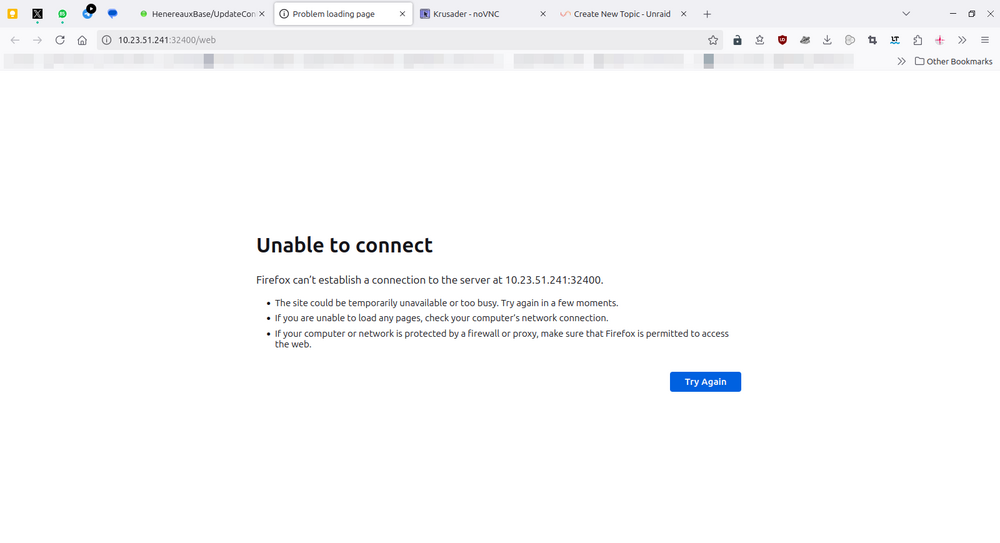
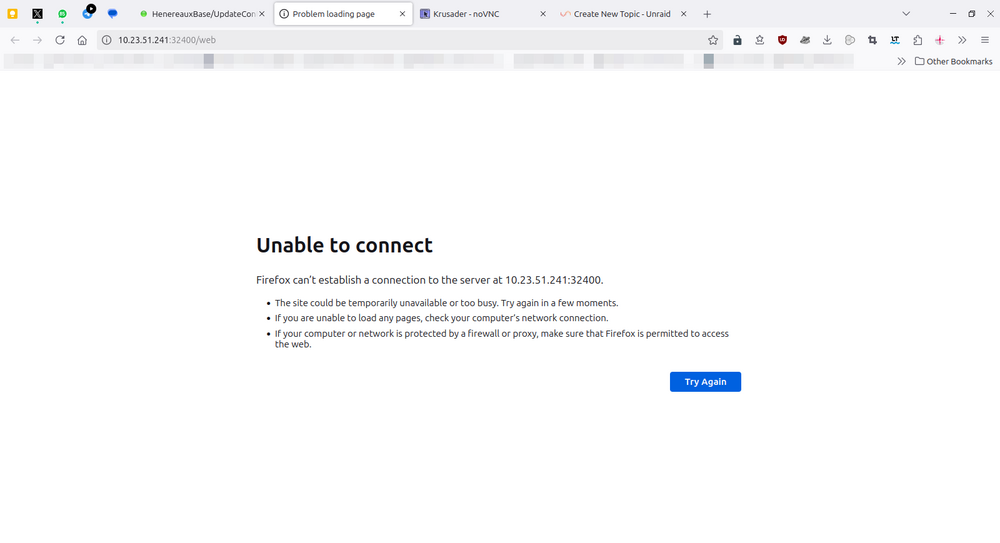
I upgraded from 6.12.14 to 7.0.0, faced issues with cache/appdata, then downgraded back to 6.12.14. This was solved in the following thread Anyway after the solutions provided by JorgeB and lovaan I proceeded to reinstall dockers as all docker containers were deleted. Every docker container works as expected except Plex. The browser cannot connect to the Plex server. (This Docker is the official release by Plex) Here are the logs: could someone kindly look into these and advise any solutions? Plex Media Server.log: Lines 11-15 seem to indicate some sort of crash, but I cannot figure it out. 1 Jan 15, 2025 14:18:46.144 [22899985468216] INFO - Plex Media Server v1.41.3.9314-a0bfb8370 - Docker Docker Container x86_64 - build: linux-x86_64 debian - GMT -06:00 2 Jan 15, 2025 14:18:46.144 [22899985468216] INFO - Linux version: 6.1.118-Unraid, language: en-US 3 Jan 15, 2025 14:18:46.145 [22899985468216] INFO - Processor: 12-core AMD Ryzen 5 5600 6-Core Processor 4 Jan 15, 2025 14:18:46.145 [22899985468216] INFO - Compiler is - Clang 11.0.1 (https://plex.tv 9b997da8e5b47bdb4a9425b3a3b290be393b4b1f) 5 Jan 15, 2025 14:18:46.145 [22899985468216] INFO - /usr/lib/plexmediaserver/Plex Media Server 6 Jan 15, 2025 14:18:46.140 [22900072004240] DEBUG - BPQ: [Idle] -> [Starting] 7 Jan 15, 2025 14:18:46.144 [22900072004240] DEBUG - FeatureManager: Using cached data for features list 8 Jan 15, 2025 14:18:46.149 [22900072004240] DEBUG - MyPlex: mapping state set to 'Unknown'. 9 Jan 15, 2025 14:18:46.151 [22900072004240] DEBUG - Relay: read 22 cached entries from hosts file 10 Jan 15, 2025 14:18:46.152 [22900072004240] DEBUG - Opening 20 database sessions to library (com.plexapp.plugins.library), SQLite 3.39.4, threadsafe=1 11 Jan 15, 2025 14:18:46.157 [22900072004240] ERROR - SQLITE3:0x80000001, 11, database corruption at line 69165 of [a29f994989] 12 Jan 15, 2025 14:18:46.157 [22900072004240] ERROR - SQLITE3:0x80000001, 11, statement aborts at 10: [] database disk image is malformed 13 Jan 15, 2025 14:18:46.158 [22900072004240] ERROR - SQLITE3:0x80000001, 11, database disk image is malformed in "PRAGMA cache_size=5120" 14 Jan 15, 2025 14:18:46.159 [22900072004240] ERROR - Promise destroyed without handling exception: Promise fell out of scope without resolving or rejecting 15 Jan 15, 2025 14:18:46.398 [22900072004240] DEBUG - [JobRunner] Job running: /usr/lib/plexmediaserver/CrashUploader "--directory=/config/Library/Application Support/Plex Media Server/Crash Reports/1.41.3.9314-a0bfb8370" --version=1.41.3.9314-a0bfb8370 --platform=Linux --platformVersion=6.1.118-Unraid --serverUuid=03db01f0d1507fbcf4a73b28eccac5b7e53541dd [email protected] --sentryUrl=https://o17675.ingest.sentry.io/api/1233455/ --sentryKey=xxxxxxxxxxxxxxxxxxxxxxxxxxxxxxxx --vendor=Docker --model=x86_64 "--device=Docker Container" --sessionStatus=crashed --sessionStart=1736972326 --sessionDuration=0 Plex Crash Uploader.log below Plex Crash Uploader.log 1 Jan 15, 2025 14:36:00.990 [22766165048120] INFO - Crash Uploader - Session Health - Status: crashed StartTime: 1736973360 Duration: 0 UserId: [email protected] Version: 1.41.3.9314-a0bfb8370 2 Jan 15, 2025 14:36:00.990 [22766165048120] INFO - Crash Uploader - Platform: Linux ServerUUID: 03db01f0d1507fbcf4a73b28eccac5b7e53541dd UserId: [email protected] Version: 1.41.3.9314-a0bfb8370 3 Jan 15, 2025 14:36:00.990 [22766165048120] INFO - Pre-processed minidump directory: /config/Library/Application Support/Plex Media Server/Crash Reports/1.41.3.9314-a0bfb8370 4 Jan 15, 2025 14:36:00.990 [22766165048120] INFO - Post-processed minidump directory: /tmp 5 Jan 15, 2025 14:36:00.985 [22766171367432] DEBUG - [HCl#1] HTTP requesting POST https://o17675.ingest.sentry.io/api/1233455/envelope/?sentry_key=xxxxxxxxxxxxxxxxxxxxxxxxxxxxxxxx 6 Jan 15, 2025 14:36:01.066 [22766164810552] DEBUG - [HttpClient/HCl#1] HTTP/2.0 (0.1s) 200 response from POST https://o17675.ingest.sentry.io/api/1233455/envelope/?sentry_key=xxxxxxxxxxxxxxxxxxxxxxxxxxxxxxxx 7 Jan 15, 2025 14:36:01.066 [22766171367432] INFO - Successfully reported session health 8 Jan 15, 2025 14:36:01.070 [22766171367432] INFO - Crashdump 5f2c0509-f2d2-44e1-1d4947a4-a7f005b7 not uploaded due to local rate limiting. 9 Jan 15, 2025 14:36:01.072 [22766171367432] DEBUG - Moved file "/config/Library/Application Support/Plex Media Server/Crash Reports/1.41.3.9314-a0bfb8370/PLEX MEDIA SERVER/5f2c0509-f2d2-44e1-1d4947a4-a7f005b7.dmp" to "/tmp/5f2c0509-f2d2-44e1-1d4947a4-a7f005b7.dmp". 10 Jan 15, 2025 14:36:01.074 [22766171367432] DEBUG - Moved file "/config/Library/Application Support/Plex Media Server/Crash Reports/1.41.3.9314-a0bfb8370/PLEX MEDIA SERVER/5f2c0509-f2d2-44e1-1d4947a4-a7f005b7.log" to "/tmp/5f2c0509-f2d2-44e1-1d4947a4-a7f005b7.log". 11 Jan 15, 2025 14:36:01.077 [22766171367432] INFO - Crash Uploader - Processing Complete.
-
I upgraded from 6.12.14 to 7.0.0, faced issues with cache/appdata, then downgraded back to 6.12.14. This was solved in the following thread Anyway after the solutions provided by JorgeB and lovaan I proceeded to reinstall dockers as all docker containers were deleted. Every docker container works as expected except Plex. The browser cannot connect to the Plex server. (This Docker is the official release by Plex) Here are the logs: could someone kindly look into these and advise any solutions? Plex Media Server.log: Lines 11-15 seem to indicate some sort of crash, but I cannot figure it out. 1 Jan 15, 2025 14:18:46.144 [22899985468216] INFO - Plex Media Server v1.41.3.9314-a0bfb8370 - Docker Docker Container x86_64 - build: linux-x86_64 debian - GMT -06:00 2 Jan 15, 2025 14:18:46.144 [22899985468216] INFO - Linux version: 6.1.118-Unraid, language: en-US 3 Jan 15, 2025 14:18:46.145 [22899985468216] INFO - Processor: 12-core AMD Ryzen 5 5600 6-Core Processor 4 Jan 15, 2025 14:18:46.145 [22899985468216] INFO - Compiler is - Clang 11.0.1 (https://plex.tv 9b997da8e5b47bdb4a9425b3a3b290be393b4b1f) 5 Jan 15, 2025 14:18:46.145 [22899985468216] INFO - /usr/lib/plexmediaserver/Plex Media Server 6 Jan 15, 2025 14:18:46.140 [22900072004240] DEBUG - BPQ: [Idle] -> [Starting] 7 Jan 15, 2025 14:18:46.144 [22900072004240] DEBUG - FeatureManager: Using cached data for features list 8 Jan 15, 2025 14:18:46.149 [22900072004240] DEBUG - MyPlex: mapping state set to 'Unknown'. 9 Jan 15, 2025 14:18:46.151 [22900072004240] DEBUG - Relay: read 22 cached entries from hosts file 10 Jan 15, 2025 14:18:46.152 [22900072004240] DEBUG - Opening 20 database sessions to library (com.plexapp.plugins.library), SQLite 3.39.4, threadsafe=1 11 Jan 15, 2025 14:18:46.157 [22900072004240] ERROR - SQLITE3:0x80000001, 11, database corruption at line 69165 of [a29f994989] 12 Jan 15, 2025 14:18:46.157 [22900072004240] ERROR - SQLITE3:0x80000001, 11, statement aborts at 10: [] database disk image is malformed 13 Jan 15, 2025 14:18:46.158 [22900072004240] ERROR - SQLITE3:0x80000001, 11, database disk image is malformed in "PRAGMA cache_size=5120" 14 Jan 15, 2025 14:18:46.159 [22900072004240] ERROR - Promise destroyed without handling exception: Promise fell out of scope without resolving or rejecting 15 Jan 15, 2025 14:18:46.398 [22900072004240] DEBUG - [JobRunner] Job running: /usr/lib/plexmediaserver/CrashUploader "--directory=/config/Library/Application Support/Plex Media Server/Crash Reports/1.41.3.9314-a0bfb8370" --version=1.41.3.9314-a0bfb8370 --platform=Linux --platformVersion=6.1.118-Unraid --serverUuid=03db01f0d1507fbcf4a73b28eccac5b7e53541dd [email protected] --sentryUrl=https://o17675.ingest.sentry.io/api/1233455/ --sentryKey=xxxxxxxxxxxxxxxxxxxxxxxxxxxxxxxx --vendor=Docker --model=x86_64 "--device=Docker Container" --sessionStatus=crashed --sessionStart=1736972326 --sessionDuration=0 Plex Crash Uploader.log below Plex Crash Uploader.log 1 Jan 15, 2025 14:36:00.990 [22766165048120] INFO - Crash Uploader - Session Health - Status: crashed StartTime: 1736973360 Duration: 0 UserId: [email protected] Version: 1.41.3.9314-a0bfb8370 2 Jan 15, 2025 14:36:00.990 [22766165048120] INFO - Crash Uploader - Platform: Linux ServerUUID: 03db01f0d1507fbcf4a73b28eccac5b7e53541dd UserId: [email protected] Version: 1.41.3.9314-a0bfb8370 3 Jan 15, 2025 14:36:00.990 [22766165048120] INFO - Pre-processed minidump directory: /config/Library/Application Support/Plex Media Server/Crash Reports/1.41.3.9314-a0bfb8370 4 Jan 15, 2025 14:36:00.990 [22766165048120] INFO - Post-processed minidump directory: /tmp 5 Jan 15, 2025 14:36:00.985 [22766171367432] DEBUG - [HCl#1] HTTP requesting POST https://o17675.ingest.sentry.io/api/1233455/envelope/?sentry_key=xxxxxxxxxxxxxxxxxxxxxxxxxxxxxxxx 6 Jan 15, 2025 14:36:01.066 [22766164810552] DEBUG - [HttpClient/HCl#1] HTTP/2.0 (0.1s) 200 response from POST https://o17675.ingest.sentry.io/api/1233455/envelope/?sentry_key=xxxxxxxxxxxxxxxxxxxxxxxxxxxxxxxx 7 Jan 15, 2025 14:36:01.066 [22766171367432] INFO - Successfully reported session health 8 Jan 15, 2025 14:36:01.070 [22766171367432] INFO - Crashdump 5f2c0509-f2d2-44e1-1d4947a4-a7f005b7 not uploaded due to local rate limiting. 9 Jan 15, 2025 14:36:01.072 [22766171367432] DEBUG - Moved file "/config/Library/Application Support/Plex Media Server/Crash Reports/1.41.3.9314-a0bfb8370/PLEX MEDIA SERVER/5f2c0509-f2d2-44e1-1d4947a4-a7f005b7.dmp" to "/tmp/5f2c0509-f2d2-44e1-1d4947a4-a7f005b7.dmp". 10 Jan 15, 2025 14:36:01.074 [22766171367432] DEBUG - Moved file "/config/Library/Application Support/Plex Media Server/Crash Reports/1.41.3.9314-a0bfb8370/PLEX MEDIA SERVER/5f2c0509-f2d2-44e1-1d4947a4-a7f005b7.log" to "/tmp/5f2c0509-f2d2-44e1-1d4947a4-a7f005b7.log". 11 Jan 15, 2025 14:36:01.077 [22766171367432] INFO - Crash Uploader - Processing Complete.
-
@JorgeB Thank you that worked to enable cache for appdata. I have marked it as a solution. @lovaan Thank you for helping me understand the concept of "cache only" for appdata! I followed your instructions and this works. Your instructions combined with the instruction from JorgeB helped solve this issue for me.
-
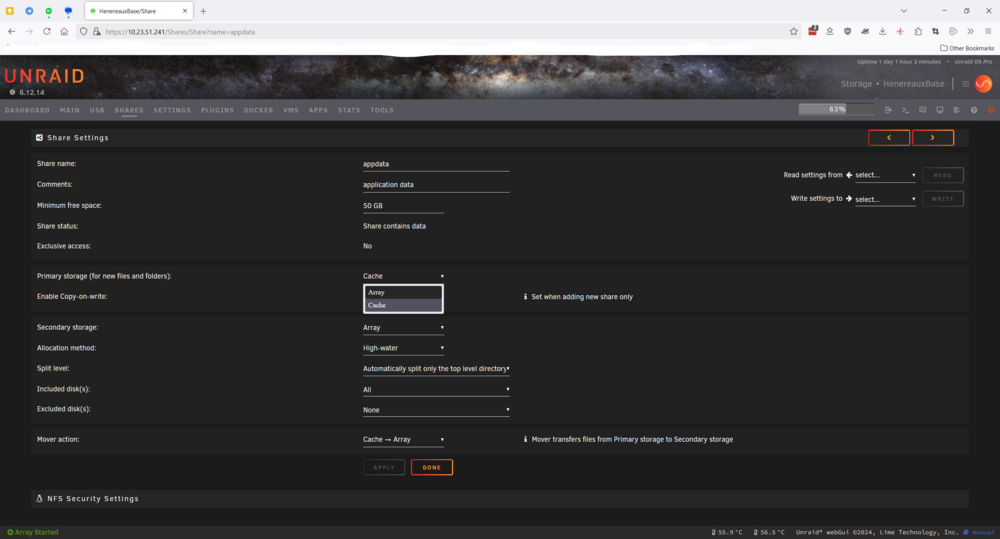
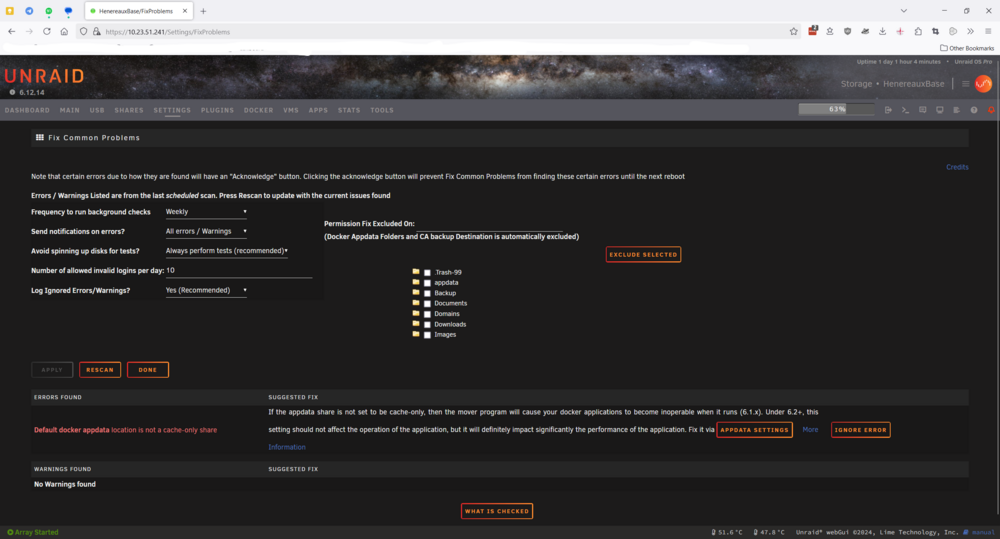
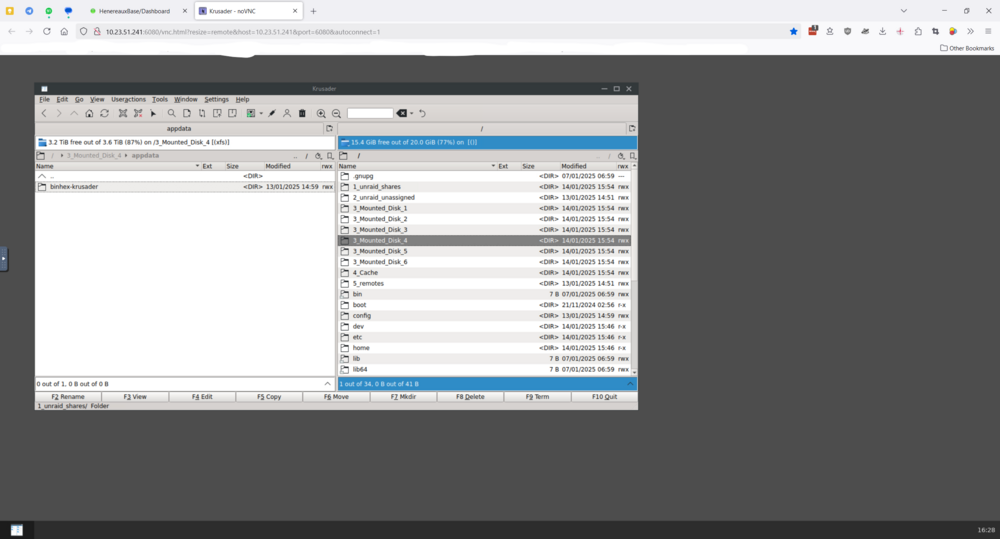
Hi Enabled User Share Assignment I can now choose Cache as the primary and Array as secondary, However the original error "Default docker appdata location is not a cache only share" still appears when I run Fix Common Problems. (see screenshot below) FYI : Yesterday I had installed binhex-Krusader as a test docker install. At that time the appdata directory was created on Disk4/appdata in the array. In that install I had set up some bookmarks which were different from the ones I usually use in Krusader. Once the cache issue was "fixed" per your solution Krusader automatically picked up my regular bookmarks from the cache/appdata. After applying your solution I also reinstalled the following - binhex-Krusader - ich777's SABnzbd, radarr & sonarr All of them worked with their previous configs including bookmarks in Krusader, server passwords in SABnzbd, also the indexers and download clients were picked up from cache/appdata in radarr and sonarr icluding monitored. Since test installs configs are picked up from cache/appdata I assume cache/appdata is able to be read by docker containers. Please review and see if you can provide further help!
-
Hi Diagnostics zip file attached. Thanks for taking the time to review the issue. Some other notes When upgrading the system, I stop the array and reboot manually. When the error occurred in 7.0.0 I rebooted the system with the array stopped and then rebooted with the array started. Then power-cycled the system with the array stopped and array started. When I downgraded the system to 6.12.14 and faced the same cache disk error, I rebooted and then power-cycled the system with the array stopped and array started both times. henereauxbase-diagnostics-20250114-1158.zip
-
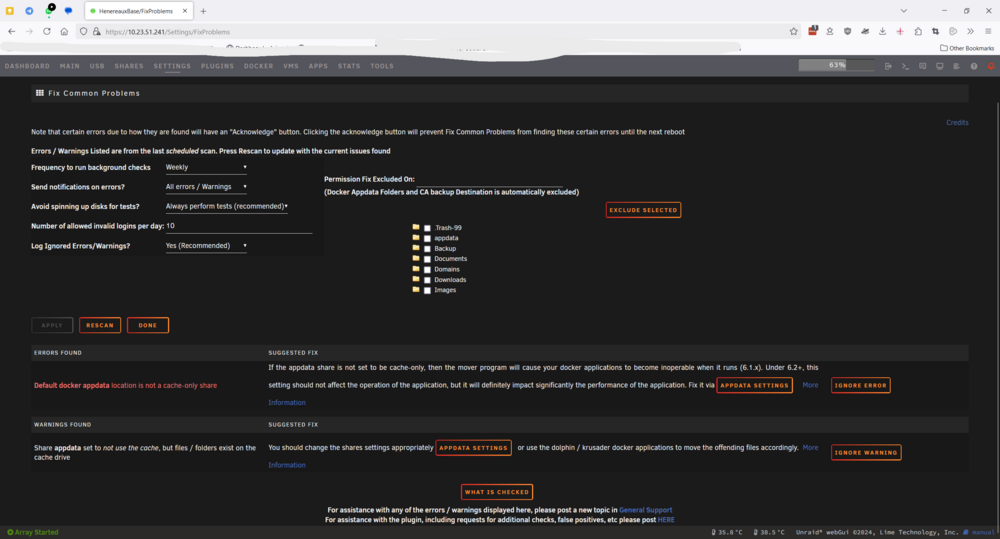
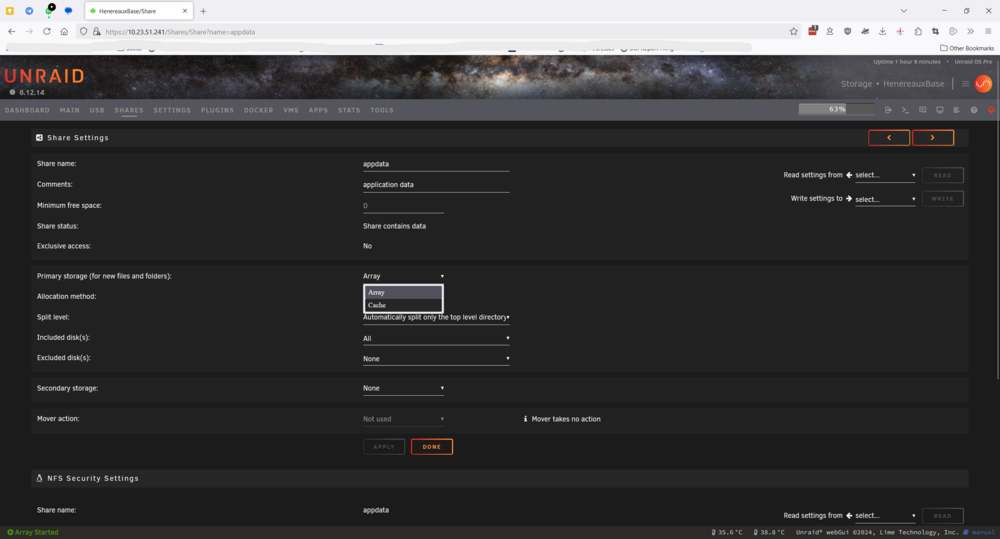
Hi I updated to 7.0.0 and got an error message which stated appdata should be set to cache disk. All my docker containers were not visible. I went into the shares/appdata page but the option to select cache was grayed out. Thinking there was probably some install error I downgraded back to 6.12.14. It was set to cache in 6.12.14 before I upgraded to 7.0.0 however after downgrading back to 6.12.14 I still get the same error message and the option to select cache is grayed out here too. I cannot figure out any method select the cache disk for appdata. Could someone please look into this and let me know what I am doing wrong. Screenshots from shares/appdata and Fix common problems is attached. PS: the first message in Fix Common Problems page is the same as the one I received in 7.0.0, the second message is a new one I received when I downgraded to 6.12.14
-
This error no longer appears after I rescanned with Fix Common Problems today. Resolved (for now).
-
Hi Just received this message from Fix Common Problems. Machine Check Events detected on your server Your server has detected hardware errors. The output of mcelog has been loggeg. Post your diagnostics and ask for assistance on the Unraid forums Syslog shows the following error Jan 21 04:30:35 HenereauxBase root: Fix Common Problems: Error: Machine Check Events detected on your server Jan 21 04:30:35 HenereauxBase root: mcelog: ERROR: AMD Processor family 25: mcelog does not support this processor. Please use the edac_mce_amd module instead. Jan 21 04:30:35 HenereauxBase root: CPU is unsupported NerdTools does not list edac_mce_amd as a downloadable action. What can I do? Please help!





