





joshsalvi
Members
-
Joined
-
Last visited
Everything posted by joshsalvi
-
Right, the problem is that if I want to continue seeding, it's helpful to have a copy in the Downloads directory and in the corresponding media directory. The other reason is that this speeds up importing the file to nearly instantaneous when using radarr/sonarr/lidarr, as opposed to moving the file itself. The guide I linked above delves into this a bit, but perhaps I'm complicating it too much?
-
If I don’t have this setup right now, using top level shares for movies, downloads, tv, etc… is there a straightforward way to convert to hardlinks like this, without breaking my system? Sent from my iPhone using Tapatalk
-
I’m also looking to do this in case anyone has any recommendations! Currently have top level shares and would like to follow the guide you linked but don’t know an easy way to rebuild the file structure… Sent from my iPhone using Tapatalk
-
Hi, my setup currently has a number of top-level shares, eg /mnt/user/downloads/mnt/user/tv/mnt/user/movies/mnt/user/music However, this leads to full copies of files rather than Hardlinks in multiple directories. I’d like to restructure my directories according to trash guides here https://trash-guides.info/Hardlinks/How-to-setup-for/Unraid/ Is there a straightforward way to take my many TBs of existing data and restructure them using hardlinks per the guide above? I imagine this has been done before but didn’t find a guide for this specific case. Thank you! Happy to provide more details as needed!
-
I’ll give this a shot. Right now it’s been turning on and off repeatedly, so I’ll try this again tonight. If I need to replace the motherboard, I might seek guidance on a good option in another thread. One that can accommodate 8 HDDs, 2 SSDs, 1-2 NVMe, and preferably still use my ECC RAM. I’ve had good luck with Xeon processors but variable with ASRock boards. Sent from my iPhone using Tapatalk
-
As in the title, something happened to my server yesterday, and when I try to boot up, I'm stuck at the unRAID blue screen (https://imgur.com/a/P7YDL1x). I tried recreating the USB Drive with the unRAID USB creator on both Mac and Windows, again running into the same issue. Would this occur if I have an issue with RAM, too? Any specific thoughts for solutions? More recently, I also tried starting up and pressing Return/Enter repeatedly, which led to the system proceeding to load bzimage, and bzroot, but it then hangs on another screen. Here’s a screenshot: https://imgur.com/a/Xf3NBhc I wonder if my motherboard is having an issue of some type? Or if there's an issue with the RAM? (Though memtest86 looked okay when I initially started it, but only completed one pass). Any thoughts?
-
Yes apologies Sent from my iPhone using Tapatalk
-
Hi, i currently run an unRAID server for running home automations and a heft media server (movies, television, music, books, etc) and a few other self hosting needs. however, my case is a SilverStone CS381B, which runs very hot. So I’m looking to replace the case. But I’m also hoping to upgrade my CPU and Motherboard, as my current board needed a bit of modding to get enough drives available and isn’t a true server board. here’s what I currently have in the setup: * ASRockRack C246 WSI * Intel® Xeon® E-2146G CPU @ 3.50GHz * Crucial RAM 32GB Kit (2x16GB) DDR4 2400 MHz CL17 Desktop Memory CT2K16G4DFD824A * 8x HDDs * 2x SSDs * 1x NVMe one if the drives often runs 46-48C unless I really crank up the fans, which becomes very loud. So I’m looking for a board that would allow for at least that number of drives, along with having expandability in a ?rack mount configuration for a GPU for example. Probably 12 hot swap bays in a Rosewill 4U chassis or something like a Fractal Design ATX tower, though I prefer having hot swap bays… unless you have a better recommendation! I already have a few spare HDDs to add to the server. any thoughts? thanks in advance!
-
So I have an update. Even when stopping Radarr and Sonarr, the problem persists. This all began after installing HassOS on a VM. I have updated diagnostics here. Perhaps there is something wrong with Home Assistant as a VM? the process that eats up CPU is qemu-system-x86_64 when I checked the terminal. It looks like it’s being run by the “homeassistant” user tower-diagnostics-20230423-1248.zip
-
I see. They hadn't caused issues at all in the past... so I wonder what is different now.. I'll take a closer look. Perhaps there is an issue with the indexers or the like. Thank you
-
Hi, I've noticed that my system will suddenly jump to 100% CPU usage on all cores periodically, most recently after installing a new VM for HassOS. A quick restart tends to fix this. I also tried disabling Docker when this occurred earlier today, around 10am is when I noticed it, and there was no improvement. I'm wondering if there is an issue with my cache or other storage, or if the VM is hogging the CPU (I pinned two cores to the VM and have no other VMs running, but perhaps that's not adequate?). Diagnostics attached. Thanks! tower-diagnostics-20230420-1207.zip
-
Here's what I was initially doing: Initial Steps to Change a Disk in the Array Stopped the array Unassigned the 4TB disk (disk2) - Disk2 is then listed as "missing" (which is expected, I'm essentially following the steps here: https://wiki.unraid.net/Replacing_a_Data_Drive) Shut downoff the server Adding new disk to array: Pulled out the 4TB disk (formerly disk2). Inserted the new 10TB disk in the same location (thus, it will be rebuilt as the new disk2) Powered on the server. ERROR Arose Here! Upon powering on the server with the new 10TB disk replacing the 4TB, the 10TB disk made a strange "chirping" noise. The server successfully booted, and disk2 was listed as "missing", as per the plan. When I went to to assign the 10TB disk as disk2, I was unable to do so. What happened was that I saw the 10TB disk in the dropdown menu for disk2, but when I clicked on the 10TB disk, the 10TB disk then disappeared from the list. The 10TB disk was listed as being on standby under Unassigned Devices. After multiple attempts (rebooting, powering down and checking the drive and cables to ensure a good connection), the same issues occurred (chirping on boot, then unable to assign the disk OR complete a SMART test). The disk logs were filled with errors, which I believe should be in the syslog. It was at this point I sent my initial message on this forum. Reverting the process: Powered down the server Pulled the 10TB disk Inserted the old 4TB in the same location Powered on the server - there was no chirping Reassigned the 4TB disk as disk2 Started the array At this point, the server was functioning normally as it was before. There were previously no issues with the 4TB disk.
-
I was able to assign / mount the old 4TB HDD, and the array started up just fine. I was not able to do this with the new 10TB HDD.
-
Hi, Thank you - I tried re-seating the device multiple times, and when I placed the old 4TB HDD back in the same NAS bay, the 4TB HDD worked just fine. Perhaps this is a faulty drive? There's also another two-pin header on the back of the drive, which my Seagate drives do not have, so I wonder if that is just a diagnostic port, or if I need to connect something there too?
-
Hi, I just tried to replace my old 4TB Seagate IronWolf with a 10TB WD Red Plus. However, the device is making a chirping(?) sound, which persists even after trying to reseat the drive multiple times. Because of some issue, I'm unable to mount the drive on Unraid. diagnostics are attached. Thank you! tower-diagnostics-20221130-0903.zip
-
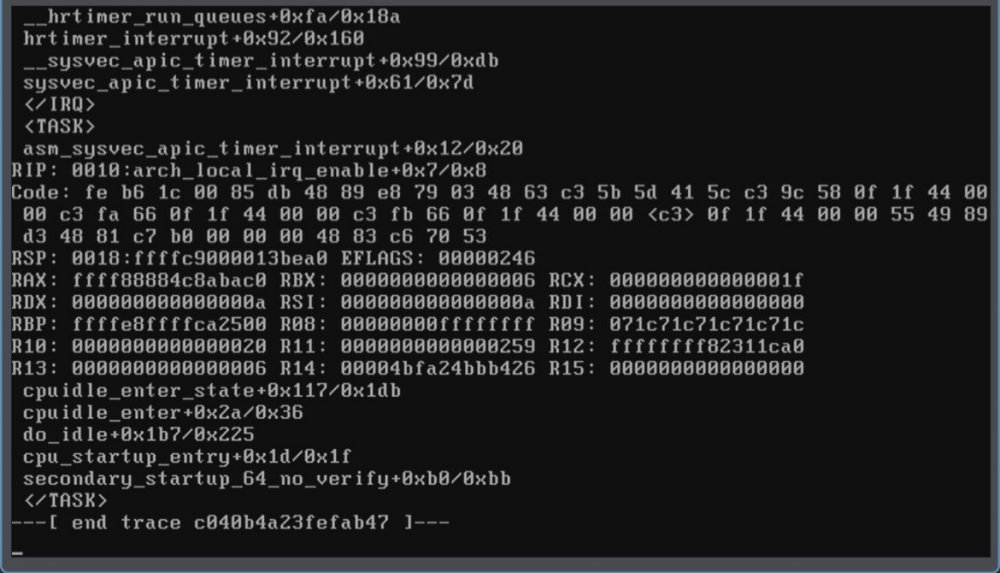
Unfortunately I do not know the exact time. Not sure if the screenshot from the KVM is also helpful? This appears to have started after I upgraded the OS to the latest RC.
-
Okay here it is. tower-diagnostics-20220610-1154.zip
-
Hello, I recently updated the server to the newest version, and now I am seeing frequent crashes of the system. Not sure what is happening here, but I've attached a screenshot from the KVM and the syslog. Should I downgrade the system again? Or is there possibly something wrong with one of my disks? Thank you! syslog-192.168.1.209.log
-
Great, I'll try that then.
-
Great, thank you! So I can run echo "blacklist i915" > /boot/config/modprobe.d/i915.conf and that should blacklist the i915 driver? It seems like this might be the easiest solution, but I also want to be cautious and not break the system!
-
So it looks like I should disable the i915 module? I don't see that in my go file: #!/bin/bash # Start the Management Utility /usr/local/sbin/emhttp & Or is there another place I should look? It looks like this might be a BTRFS balance loop?
-
It was around 10am this morning. I had another one last night too. Would more information about the setup be helpful?
-
Hello, I'm receiving frequent crashes on my unRAID setup, unclear why. Diagnostics and syslog are attached here. It does look like there's one error that pops up that could be a culprit: pam_elogind(sshd:session): Failed to release session: Interrupted system call But I'm not sure if that's what's causing the issue. When the crash occurs and I try to KVM into the server, there is no signal, so it seems like there is a kernel panic of some sort. Any help would be appreciated! thank you! tower-diagnostics-20220510-1251.zip syslog-192.168.1.209.log
-
Thank you! I checked the filesystem on sdg1, and all looks okay. root@Tower:~# xfs_repair -v /dev/sdg1 Phase 1 - find and verify superblock... - block cache size set to 1514888 entries Phase 2 - using internal log - zero log... zero_log: head block 0 tail block 0 - scan filesystem freespace and inode maps... - found root inode chunk Phase 3 - for each AG... - scan and clear agi unlinked lists... - process known inodes and perform inode discovery... - agno = 0 - agno = 1 - agno = 2 - agno = 3 - process newly discovered inodes... Phase 4 - check for duplicate blocks... - setting up duplicate extent list... - check for inodes claiming duplicate blocks... - agno = 0 - agno = 1 - agno = 2 - agno = 3 Phase 5 - rebuild AG headers and trees... - agno = 0 - agno = 1 - agno = 2 - agno = 3 - reset superblock... Phase 6 - check inode connectivity... - resetting contents of realtime bitmap and summary inodes - traversing filesystem ... - agno = 0 - agno = 1 - agno = 2 - agno = 3 - traversal finished ... - moving disconnected inodes to lost+found ... Phase 7 - verify and correct link counts... XFS_REPAIR Summary Mon May 2 08:40:12 2022 Phase Start End Duration Phase 1: 05/02 08:40:11 05/02 08:40:11 Phase 2: 05/02 08:40:11 05/02 08:40:11 Phase 3: 05/02 08:40:11 05/02 08:40:12 1 second Phase 4: 05/02 08:40:12 05/02 08:40:12 Phase 5: 05/02 08:40:12 05/02 08:40:12 Phase 6: 05/02 08:40:12 05/02 08:40:12 Phase 7: 05/02 08:40:12 05/02 08:40:12 Total run time: 1 second done I'll change the docker custom network type now and see if this fixes the problem. I'll report back!
-
Hi, I keep having an issue where my unRAID machine keeps crashing, about once per day. It remains turned on, but subsequently disconnects. I'm not really sure what is wrong with the device, though I do have a number of standard apps and plugins installed. I was wondering if anyone might be able to help decode the diagnostics (attached here) to get down to the problem with the device. This is for a home server, primarily for media, backup, and sharing. I've also included a longer syslog for these purposes. The machine appears to have crashed sometime overnight. It does look like there are numerous calls to the My Servers plugin, along with the cache being full, but I'm not sure how that would cause the system to crash. Perhaps related to this portion of the log? Apr 30 00:00:02 Tower Docker Auto Update: Community Applications Docker Autoupdate running Apr 30 00:00:02 Tower Docker Auto Update: Checking for available updates Apr 30 00:00:51 Tower flash_backup: adding task: /usr/local/emhttp/plugins/dynamix.my.servers/scripts/UpdateFlashBackup update Apr 30 00:01:10 Tower Docker Auto Update: Stopping netdata Apr 30 00:01:31 Tower Docker Auto Update: Stopping nzbget Apr 30 00:01:41 Tower kernel: veth49d3dc1: renamed from eth0 Apr 30 00:01:41 Tower kernel: docker0: port 9(veth5093395) entered disabled state Apr 30 00:01:43 Tower kernel: docker0: port 9(veth5093395) entered disabled state Apr 30 00:01:43 Tower kernel: device veth5093395 left promiscuous mode Apr 30 00:01:43 Tower kernel: docker0: port 9(veth5093395) entered disabled state Apr 30 00:01:49 Tower Docker Auto Update: Stopping sonarr Apr 30 00:01:51 Tower flash_backup: adding task: /usr/local/emhttp/plugins/dynamix.my.servers/scripts/UpdateFlashBackup update Apr 30 00:01:57 Tower kernel: veth21be5a4: renamed from eth0 Apr 30 00:01:57 Tower kernel: docker0: port 12(veth327a7f5) entered disabled state Apr 30 00:01:59 Tower kernel: docker0: port 12(veth327a7f5) entered disabled state Apr 30 00:01:59 Tower kernel: device veth327a7f5 left promiscuous mode Apr 30 00:01:59 Tower kernel: docker0: port 12(veth327a7f5) entered disabled state Apr 30 00:02:04 Tower Docker Auto Update: Stopping tautulli-1 Apr 30 00:02:14 Tower kernel: veth2de64d5: renamed from eth0 Apr 30 00:02:14 Tower kernel: docker0: port 14(vethecd6efb) entered disabled state Apr 30 00:02:17 Tower kernel: docker0: port 14(vethecd6efb) entered disabled state Apr 30 00:02:17 Tower kernel: device vethecd6efb left promiscuous mode Apr 30 00:02:17 Tower kernel: docker0: port 14(vethecd6efb) entered disabled state Apr 30 00:02:23 Tower Docker Auto Update: Stopping thelounge Apr 30 00:02:30 Tower kernel: veth426e084: renamed from eth0 Apr 30 00:02:30 Tower kernel: docker0: port 15(veth5b5be94) entered disabled state Apr 30 00:02:33 Tower kernel: docker0: port 15(veth5b5be94) entered disabled state Apr 30 00:02:33 Tower kernel: device veth5b5be94 left promiscuous mode Apr 30 00:02:33 Tower kernel: docker0: port 15(veth5b5be94) entered disabled state Apr 30 00:02:44 Tower Docker Auto Update: Installing Updates for netdata nzbget sonarr tautulli-1 thelounge Apr 30 00:02:51 Tower flash_backup: adding task: /usr/local/emhttp/plugins/dynamix.my.servers/scripts/UpdateFlashBackup update Apr 30 00:04:51 Tower flash_backup: adding task: /usr/local/emhttp/plugins/dynamix.my.servers/scripts/UpdateFlashBackup update Apr 30 00:05:51 Tower flash_backup: adding task: /usr/local/emhttp/plugins/dynamix.my.servers/scripts/UpdateFlashBackup update Apr 30 00:06:51 Tower flash_backup: adding task: /usr/local/emhttp/plugins/dynamix.my.servers/scripts/UpdateFlashBackup update Apr 30 00:10:51 Tower flash_backup: adding task: /usr/local/emhttp/plugins/dynamix.my.servers/scripts/UpdateFlashBackup update Apr 30 00:11:51 Tower flash_backup: adding task: /usr/local/emhttp/plugins/dynamix.my.servers/scripts/UpdateFlashBackup update Apr 30 00:12:52 Tower flash_backup: adding task: /usr/local/emhttp/plugins/dynamix.my.servers/scripts/UpdateFlashBackup update Apr 30 00:13:29 Tower root: /etc/libvirt: 920.1 MiB (964812800 bytes) trimmed on /dev/loop3 Apr 30 00:13:29 Tower root: /var/lib/docker: 5.3 GiB (5717483520 bytes) trimmed on /dev/loop2 Apr 30 00:13:29 Tower root: /mnt/cache_bak: 48.4 GiB (51929731072 bytes) trimmed on /dev/sdg1 Apr 30 00:13:29 Tower root: /mnt/cache: 370.1 GiB (397339983872 bytes) trimmed on /dev/sdf1 Apr 30 00:13:52 Tower flash_backup: adding task: /usr/local/emhttp/plugins/dynamix.my.servers/scripts/UpdateFlashBackup update Apr 30 00:14:52 Tower flash_backup: adding task: /usr/local/emhttp/plugins/dynamix.my.servers/scripts/UpdateFlashBackup update Apr 30 00:15:38 Tower Docker Auto Update: Restarting netdata Apr 30 00:15:51 Tower Docker Auto Update: Restarting nzbget Apr 30 00:15:51 Tower kernel: docker0: port 9(veth3e21fc5) entered blocking state Apr 30 00:15:51 Tower kernel: docker0: port 9(veth3e21fc5) entered disabled state Apr 30 00:15:51 Tower kernel: device veth3e21fc5 entered promiscuous mode Apr 30 00:15:51 Tower kernel: docker0: port 9(veth3e21fc5) entered blocking state Apr 30 00:15:51 Tower kernel: docker0: port 9(veth3e21fc5) entered forwarding state Apr 30 00:15:51 Tower kernel: docker0: port 9(veth3e21fc5) entered disabled state Apr 30 00:15:52 Tower flash_backup: adding task: /usr/local/emhttp/plugins/dynamix.my.servers/scripts/UpdateFlashBackup update Apr 30 00:16:26 Tower kernel: eth0: renamed from veth0139892 Apr 30 00:16:26 Tower kernel: IPv6: ADDRCONF(NETDEV_CHANGE): veth3e21fc5: link becomes ready Apr 30 00:16:26 Tower kernel: docker0: port 9(veth3e21fc5) entered blocking state Apr 30 00:16:26 Tower kernel: docker0: port 9(veth3e21fc5) entered forwarding state Apr 30 00:16:30 Tower Docker Auto Update: Restarting sonarr Apr 30 00:16:30 Tower kernel: docker0: port 12(vethcfd084f) entered blocking state Apr 30 00:16:30 Tower kernel: docker0: port 12(vethcfd084f) entered disabled state Apr 30 00:16:30 Tower kernel: device vethcfd084f entered promiscuous mode Apr 30 00:16:30 Tower kernel: docker0: port 12(vethcfd084f) entered blocking state Apr 30 00:16:30 Tower kernel: docker0: port 12(vethcfd084f) entered forwarding state Apr 30 00:16:30 Tower kernel: docker0: port 12(vethcfd084f) entered disabled state Apr 30 00:16:32 Tower nginx: 2022/04/30 00:16:32 [error] 13521#13521: *176353 FastCGI sent in stderr: "Primary script unknown" while reading response header from upstream, client: 127.0.0.1, server: , request: "GET /admin/api.php?version HTTP/1.1", upstream: "fastcgi://unix:/var/run/php5-fpm.sock:", host: "127.0.0.1" Apr 30 00:16:32 Tower nginx: 2022/04/30 00:16:32 [error] 13521#13521: *176355 FastCGI sent in stderr: "Primary script unknown" while reading response header from upstream, client: 127.0.0.1, server: , request: "GET /admin/api.php?version HTTP/1.1", upstream: "fastcgi://unix:/var/run/php5-fpm.sock:", host: "localhost" Apr 30 00:16:52 Tower flash_backup: adding task: /usr/local/emhttp/plugins/dynamix.my.servers/scripts/UpdateFlashBackup update Apr 30 00:16:56 Tower kernel: eth0: renamed from veth97e4f51 Apr 30 00:16:56 Tower kernel: IPv6: ADDRCONF(NETDEV_CHANGE): vethcfd084f: link becomes ready Apr 30 00:16:56 Tower kernel: docker0: port 12(vethcfd084f) entered blocking state Apr 30 00:16:56 Tower kernel: docker0: port 12(vethcfd084f) entered forwarding state Apr 30 00:17:01 Tower Docker Auto Update: Restarting tautulli-1 Apr 30 00:17:01 Tower kernel: docker0: port 14(vethf9fe2e8) entered blocking state Apr 30 00:17:01 Tower kernel: docker0: port 14(vethf9fe2e8) entered disabled state Apr 30 00:17:01 Tower kernel: device vethf9fe2e8 entered promiscuous mode Apr 30 00:17:27 Tower kernel: eth0: renamed from veth762c43a Apr 30 00:17:27 Tower kernel: IPv6: ADDRCONF(NETDEV_CHANGE): vethf9fe2e8: link becomes ready Apr 30 00:17:27 Tower kernel: docker0: port 14(vethf9fe2e8) entered blocking state Apr 30 00:17:27 Tower kernel: docker0: port 14(vethf9fe2e8) entered forwarding state Apr 30 00:17:32 Tower Docker Auto Update: Restarting thelounge Apr 30 00:17:32 Tower kernel: docker0: port 15(vethebe6890) entered blocking state Apr 30 00:17:32 Tower kernel: docker0: port 15(vethebe6890) entered disabled state Apr 30 00:17:32 Tower kernel: device vethebe6890 entered promiscuous mode Apr 30 00:17:32 Tower kernel: docker0: port 15(vethebe6890) entered blocking state Apr 30 00:17:32 Tower kernel: docker0: port 15(vethebe6890) entered forwarding state Apr 30 00:17:32 Tower kernel: docker0: port 15(vethebe6890) entered disabled state Apr 30 00:18:10 Tower kernel: eth0: renamed from vethde6f2f1 Apr 30 00:18:10 Tower kernel: IPv6: ADDRCONF(NETDEV_CHANGE): vethebe6890: link becomes ready Apr 30 00:18:10 Tower kernel: docker0: port 15(vethebe6890) entered blocking state Apr 30 00:18:10 Tower kernel: docker0: port 15(vethebe6890) entered forwarding state Apr 30 00:18:16 Tower Docker Auto Update: Community Applications Docker Autoupdate finished Apr 30 00:18:52 Tower flash_backup: adding task: /usr/local/emhttp/plugins/dynamix.my.servers/scripts/UpdateFlashBackup update Apr 30 00:19:52 Tower flash_backup: adding task: /usr/local/emhttp/plugins/dynamix.my.servers/scripts/UpdateFlashBackup update Apr 30 00:20:52 Tower flash_backup: adding task: /usr/local/emhttp/plugins/dynamix.my.servers/scripts/UpdateFlashBackup update Apr 30 00:21:52 Tower flash_backup: adding task: /usr/local/emhttp/plugins/dynamix.my.servers/scripts/UpdateFlashBackup update Apr 30 00:22:52 Tower flash_backup: adding task: /usr/local/emhttp/plugins/dynamix.my.servers/scripts/UpdateFlashBackup update Apr 30 00:23:52 Tower flash_backup: adding task: /usr/local/emhttp/plugins/dynamix.my.servers/scripts/UpdateFlashBackup update Apr 30 00:24:52 Tower flash_backup: adding task: /usr/local/emhttp/plugins/dynamix.my.servers/scripts/UpdateFlashBackup update Apr 30 00:26:52 Tower flash_backup: adding task: /usr/local/emhttp/plugins/dynamix.my.servers/scripts/UpdateFlashBackup update Apr 30 00:27:52 Tower flash_backup: adding task: /usr/local/emhttp/plugins/dynamix.my.servers/scripts/UpdateFlashBackup update Apr 30 00:28:52 Tower flash_backup: adding task: /usr/local/emhttp/plugins/dynamix.my.servers/scripts/UpdateFlashBackup update Apr 30 00:29:52 Tower flash_backup: adding task: /usr/local/emhttp/plugins/dynamix.my.servers/scripts/UpdateFlashBackup update Apr 30 00:30:52 Tower flash_backup: adding task: /usr/local/emhttp/plugins/dynamix.my.servers/scripts/UpdateFlashBackup update Apr 30 00:31:52 Tower flash_backup: adding task: /usr/local/emhttp/plugins/dynamix.my.servers/scripts/UpdateFlashBackup update Apr 30 00:32:52 Tower flash_backup: adding task: /usr/local/emhttp/plugins/dynamix.my.servers/scripts/UpdateFlashBackup update Apr 30 00:33:52 Tower flash_backup: adding task: /usr/local/emhttp/plugins/dynamix.my.servers/scripts/UpdateFlashBackup update Apr 30 00:34:52 Tower flash_backup: adding task: /usr/local/emhttp/plugins/dynamix.my.servers/scripts/UpdateFlashBackup update Apr 30 00:35:52 Tower flash_backup: adding task: /usr/local/emhttp/plugins/dynamix.my.servers/scripts/UpdateFlashBackup update Apr 30 00:36:52 Tower flash_backup: adding task: /usr/local/emhttp/plugins/dynamix.my.servers/scripts/UpdateFlashBackup update Apr 30 00:37:52 Tower flash_backup: adding task: /usr/local/emhttp/plugins/dynamix.my.servers/scripts/UpdateFlashBackup update Apr 30 00:38:52 Tower flash_backup: adding task: /usr/local/emhttp/plugins/dynamix.my.servers/scripts/UpdateFlashBackup update Thanks! I'm also going to temporarily disable the My Servers plugin to see if that helps. tower-diagnostics-20220430-1705.zip syslog.txt syslog-2 syslog-192.168.1.209.log
