






SpaceGator
Members
-
Joined
-
Last visited
Everything posted by SpaceGator
-
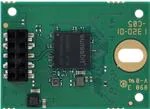
I wonder how well something like this would work. USB Flash Drives Industrial Embedded USB module
-
It is a good thing i waited a few days to buy all the stuff to make one of those, i have everything sitting in my amazon cart right now haha. I guess ill wait for another adapter option or for the cheaper version of the Swissbit mlc usb drives to come back in stock. Thanks for the heads up.
-
I enabled the syslog files to write to the flash drive after updating to v6.12.4 from v6.11.5 because of all the bugs i was having. I turned it off soon after i doubled checked to make sure it was off when i noticed the writes getting high and it was off. I just check the flash backup i did yesterday and the old syslog files were there but no new ones. Could this be a corrupted flash drive problem ? My server forgot its name like maybe 2 month ago and i had to correct it and its remembered it ever sense. I've noticed when i leave the server alone the writes slowly go up but still more than normal, but when I'm opening pages like apps and docker the writes jump by 20 or 100 writes and im not adjusting anything just viewing the page. here is the diagnostics neo-diagnostics-20231210-1422.zip Thanks for the reply
-
My writes on my boot usb have been climbing higher than normal lately and something is writing to my usb boot drive here and there a few KBs at a time. Also every time i open the apps page or the docker page the writes jump up by 100 or so for the apps and 50 or so for the docker. I don't remember seeing this before but i cant remember. This doesn't happen for the other menu pages on the server gui. Ive tried stoping all my docker containers and it keeps happening. The first images is from a few days ago when i noticed the writes being high. The second image was taken just now after i did a flash a back up just in case. The third one is after clicking around the server for a bit. My uptime is 20 days and im on v6.12.5 This first images is from a few days ago when i noticed the writes being high. This second image was taken just now after i did a flash a back up just in case. This third one is after clicking around the server for a bit.



-
I couldn't get any data to transfer to a media share so i ran the new update to see if that could fix it and when the server rebooted a cache pool ssd was missing and after trouble shooting turned out that one of my sata ssds in a btrfs raid one cache pool died. (which was weird because it was pretty new and had very little wear) So i changed some share setting to get around not having a temp cache pool until i figure out what im going to do about that problem, but my server is very unstable crashes or hangs constantly. I thought it may be the macvlan bug but even with the array off line and docker off its doing the same thing. The only way i can get back into my sever is to reboot my mac laptop and that only works for a bit then it will eventually kick me off again saying "Not Found The requested URL /Apps was not found on this server." When the server was running today plex would not be available and then be available off and on. I found logged into the sever it would help for a bit and once someone (locally) was watching a movie plex would work for bit but after crash again. I assume my best option is to revert back to 6.11.5, but is there something i should know before going back ?
-
I only have one file saved on Plex right now ( Big buck bunny) with one custom poster to test every thing out. the media plays fine and trans codes down fine as well but Im having trouble telling if somethings are setup correctly. I also used lscr.io/linuxserver/Plex Version of Plex because I needed quick sync support and I was told that has the best support for it. I think I have that working. I fallowed I guid on how to do it. 1. I'm having trouble telling were the app data is going. How do I tell if the Plex app data is being stored on my cache pool ? will I be able to see the data on the share assigned to the cache pool? in the app data part of the docker setup page I changed /mnt/user/appdata/plex to /mnt/cache/appdata/plex I was told to do this from a guid but don't think thats right. also the app data share name is Plex_appdata. 2. Does the lscr.io/linuxserver/Plex Version default to ram trans coding ? I didn't see a option to change that in the docker setup page. I would maybe like it to only use 50% of the ram I know its like dev/shm or something right.


