





thekiefs
Members
-
Joined
-
Last visited
-
They have custom folder management on the roadmap: https://github.com/rommapp/romm/issues/2050
-
Great, thanks for confirming. /mnt/cache/data is an empty directory. I deleted it and now my User data share is marked as protected.
-
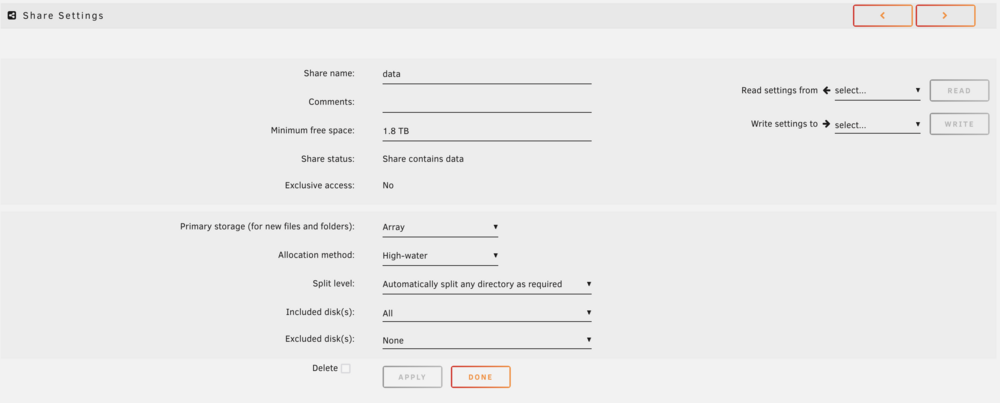
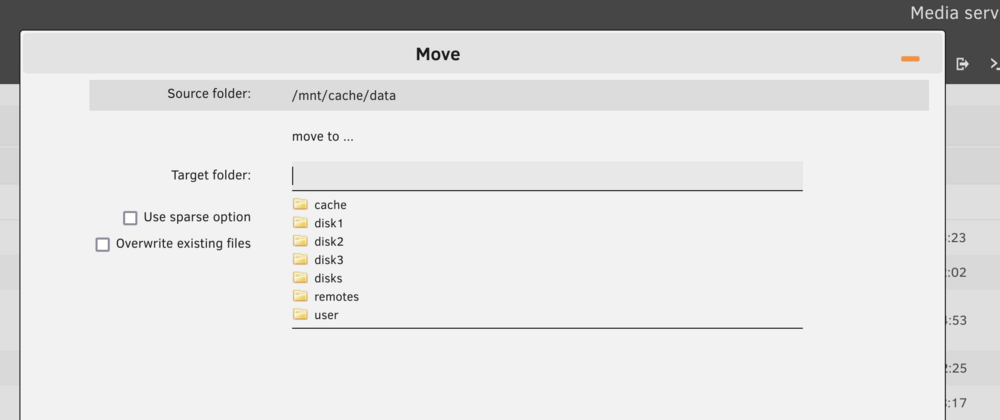
Hi - my current /user/data share I have set to primary storage on the array: However, I'm getting "Some or all files unprotected" error for my main /user/data share. I found that cache is indicated as having storage on /user/data/ But I think that's just the actual /user/data/ directory itself, which for whatever reason is on the cache drive. Is it safe to move this folder to any of the other disks OR delete it completely? Just want to double check I won't mess anything up by deleting /mnt/cache/data.

-
What version was affected? I'm having similar problems here
-
Bumping this up - anyone know how I can stop relying on the script to build MergerFS? The script on boot is not very stable and I sometimes have to go in to force start it on occasion.
-
Thanks. Is this meant to replace the script entirely? Or if we use it, what do we need to change in the script? I'm looking forward to not having to install MergerFS on boot via script.
-
thekiefs changed their profile photo
-
I would like to see native support of Docker compose as well
-
I still have a problem stopping the array with the default script. Does this issue persist for anyone? Even with the above script I still get a hang on the array. Jun 19 09:54:55 Kiefhost emhttpd: shcmd (1320): /usr/local/sbin/mover stop Jun 19 09:54:55 Kiefhost root: mover: not running Jun 19 09:54:55 Kiefhost emhttpd: Sync filesystems... Jun 19 09:54:55 Kiefhost emhttpd: shcmd (1321): sync Jun 19 09:54:55 Kiefhost emhttpd: shcmd (1322): umount /mnt/user0 Jun 19 09:54:55 Kiefhost emhttpd: shcmd (1323): rmdir /mnt/user0 Jun 19 09:54:55 Kiefhost emhttpd: shcmd (1324): umount /mnt/user Jun 19 09:54:55 Kiefhost root: umount: /mnt/user: target is busy. Jun 19 09:54:55 Kiefhost emhttpd: shcmd (1324): exit status: 32 Jun 19 09:54:55 Kiefhost emhttpd: shcmd (1325): rmdir /mnt/user Jun 19 09:54:55 Kiefhost root: rmdir: failed to remove '/mnt/user': Device or resource busy Jun 19 09:54:55 Kiefhost emhttpd: shcmd (1325): exit status: 1 Jun 19 09:54:55 Kiefhost emhttpd: shcmd (1327): /usr/local/sbin/update_cron Jun 19 09:54:55 Kiefhost emhttpd: Retry unmounting user share(s)... Jun 19 09:55:00 Kiefhost emhttpd: shcmd (1328): umount /mnt/user Jun 19 09:55:00 Kiefhost root: umount: /mnt/user: target is busy. Jun 19 09:55:00 Kiefhost emhttpd: shcmd (1328): exit status: 32 and found this guide https://forums.unraid.net/topic/104780-cant-stop-array-failed-to-remove-mntuser-device-or-resource-busy/?do=findComment&comment=968144 Added this line to fix: umount -l /mnt/user
-
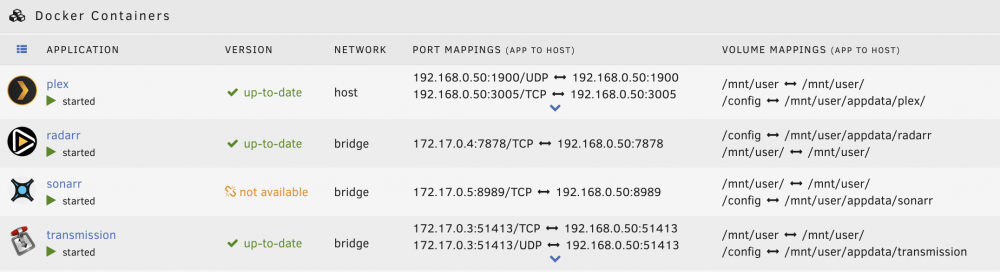
Any other ideas on fixing hard links? I'm stuck. It also impacts Sonarr.
-
Yes, to both
-
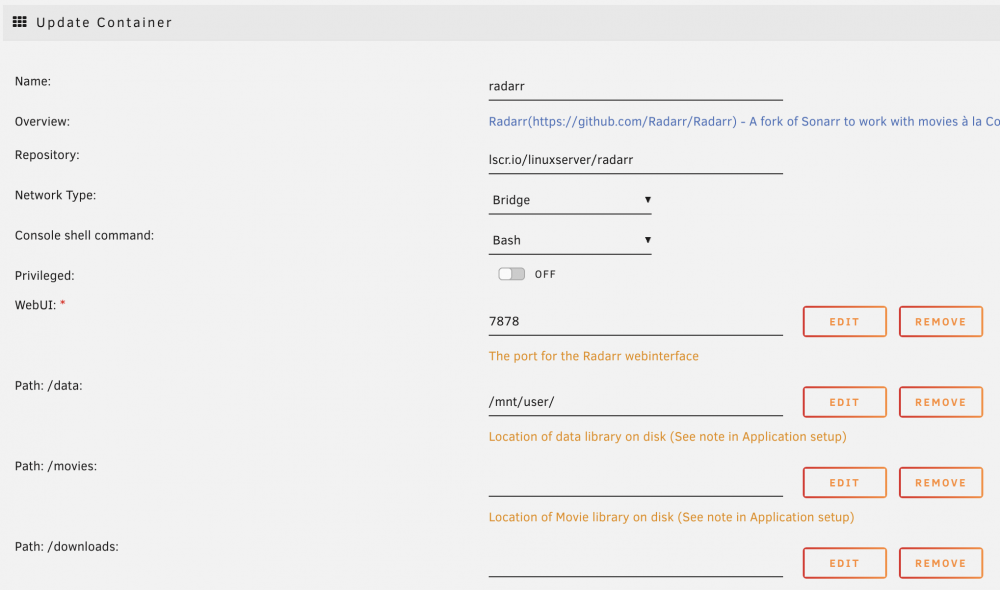
I have that same structure but hard links don't work. I'm using transmission transmission download location - /mnt/user/mergerfs/downloads/torrents/complete/movies/file.mkv radarr media location - /mnt/user/mergerfs/gd/Movies/movie folder/file.mkv Root folders in Radarr show /mnt/user/mergerfs/gd/Movies Here are the rest of my settings:
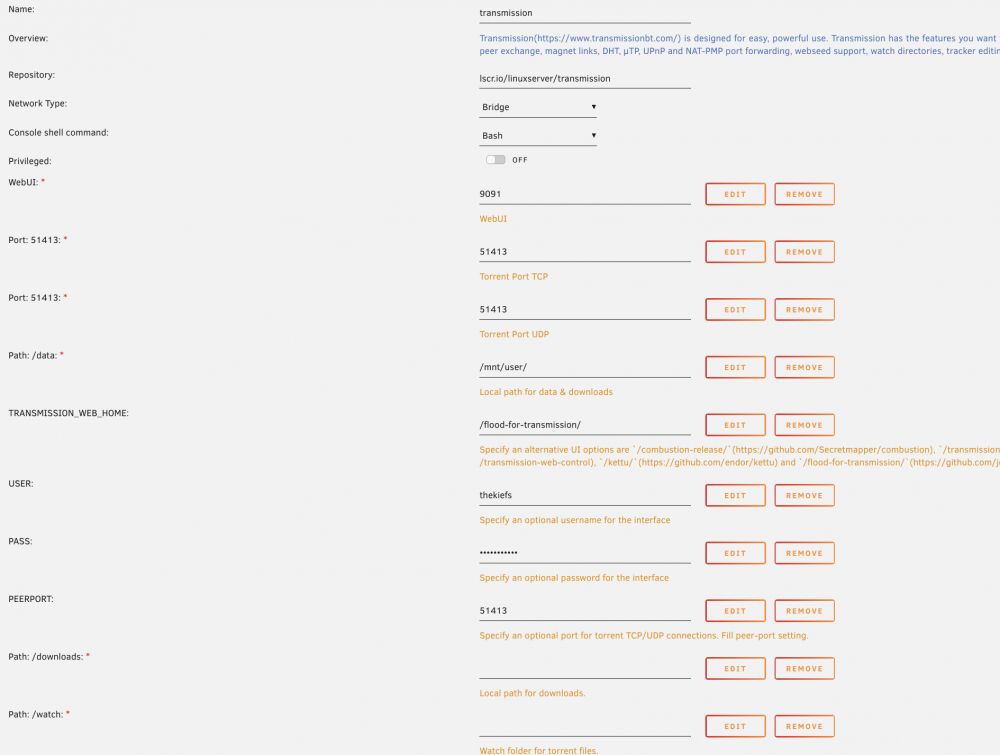
-
Ok thanks. Few basic questions: 1) why have mergerfs in the first place? Can't you just set Radarr/Sonarr to hard link files once they are completed downloading, and then have rclone follow those links to upload eventually without using MergerfS? 2) Also, I didn't see it in the guide, but do any of you set the share cache to be preferred for any of the shares? I would think that the rclone cache makes sense to configure that way? 3) My file structure is as follows: Rclone mount for media - /mnt/user/mergerfs/gd/* <movies/music/shows Download folder - /mnt/user/mergerfs/downloads/* <torrents/music/movies/shows I notice that after a download is completed, Sonarr/Raddarr is not hard linking (checked with ls -i). Does the download folder need to be in the rclone mount folder?

-
I have this same problem: 2022/03/19 16:16:26 DEBUG : 4 go routines active 19.03.2022 16:16:26 INFO: *** Creating mount for remote gd 19.03.2022 16:16:26 INFO: sleeping for 5 seconds 2022/03/19 16:16:26 NOTICE: Serving remote control on http://localhost:5572/ 19.03.2022 16:16:31 INFO: continuing... 19.03.2022 16:16:31 CRITICAL: gd mount failed - please check for problems. Stopping dockers I set RcloneCacheMaxSize="20G", but it's still failing on first boot. Any other guidance here for fixing this?
-
I'm having some trouble with permissions since the last update. I can't download anything: [2022-03-12 14:24:10.974] Couldn't create "/mnt/user": Permission denied (/home/buildozer/aports/community/transmission/src/transmission-3.00/libtransmission/file-posix.c:243) [2022-03-12 14:24:10.974] Couldn't create "/mnt/user/mergerfs/gd/Downloads/torrents/incomplete/linuxfx 10.6.1001 cinnamon win10 theme XZ": Permission denied (/home/buildozer/aports/community/transmission/src/transmission-3.00/libtransmission/fdlimit.c:174) Also getting this error in Radarr You are using docker; download client transmission places downloads in /mnt/user/mergerfs/gd/Downloads/torrents/complete/movies but this directory does not appear to exist inside the container. Review your remote path mappings and container volume settings. Transmission Mappings in docker /data -> /mnt/user/mergerfs/ /downloads -> /mnt/user/mergerfs/gd/ /watch -> /mnt/user/mergerfs/gd/Downloads/torrents/watch/ /config -> /mnt/user/appdata/transmission Radarr mappings in docker /data -> /mnt/user/mergerfs/ /movies -> /mnt/user/mergerfs/gd/ /downloads -> /mnt/user/mergerfs/gd/Downloads/ /config -> /mnt/user/appdata/radarr
-
Thanks - it seems like mergerfs keeps getting rebuilt from source and installed everytime I reboot and run the script. Perhaps there is a more stable way to do this that doesn't involve a script. I'm very unfamiliar with unRAID. Any idea why that is happening? Also, the script is creating the title of my rclone remote folder in the local folder and the mergerfs folder. This happens on every reboot: Script Starting Feb 27, 2022 18:18.03 Full logs for this script are available at /tmp/user.scripts/tmpScripts/rclone_mount/log.txt 27.02.2022 18:18:03 INFO: Creating local folders. 27.02.2022 18:18:03 INFO: Creating MergerFS folders. 27.02.2022 18:18:03 INFO: *** Starting mount of remote gd 27.02.2022 18:18:03 INFO: Checking if this script is already running. 27.02.2022 18:18:03 INFO: Script not running - proceeding. 27.02.2022 18:18:03 INFO: *** Checking if online 27.02.2022 18:18:04 PASSED: *** Internet online 27.02.2022 18:18:04 INFO: Mount not running. Will now mount gd remote. 27.02.2022 18:18:04 INFO: Recreating mountcheck file for gd remote. 2022/02/27 18:18:04 DEBUG : rclone: Version "v1.57.0" starting with parameters ["rcloneorig" "--config" "/boot/config/plugins/rclone/.rclone.conf" "copy" "mountcheck" "gd:" "-vv" "--no-traverse"] 2022/02/27 18:18:04 DEBUG : Creating backend with remote "mountcheck" 2022/02/27 18:18:04 DEBUG : Using config file from "/boot/config/plugins/rclone/.rclone.conf" 2022/02/27 18:18:04 DEBUG : fs cache: adding new entry for parent of "mountcheck", "/usr/local/emhttp" 2022/02/27 18:18:04 DEBUG : Creating backend with remote "gd:" 2022/02/27 18:18:04 DEBUG : mountcheck: Modification times differ by -11m38.700701001s: 2022-02-27 18:18:04.225701001 -0800 PST, 2022-02-28 02:06:25.525 +0000 UTC 2022/02/27 18:18:04 DEBUG : mountcheck: md5 = d41d8cd98f00b204e9800998ecf8427e OK 2022/02/27 18:18:05 INFO : mountcheck: Updated modification time in destination 2022/02/27 18:18:05 DEBUG : mountcheck: Unchanged skipping 2022/02/27 18:18:05 INFO : Transferred: 0 B / 0 B, -, 0 B/s, ETA - Checks: 1 / 1, 100% Elapsed time: 0.9s 2022/02/27 18:18:05 DEBUG : 4 go routines active 27.02.2022 18:18:05 INFO: *** Creating mount for remote gd 27.02.2022 18:18:05 INFO: sleeping for 5 seconds 2022/02/27 18:18:05 NOTICE: Serving remote control on http://localhost:5572/ 27.02.2022 18:18:10 INFO: continuing... 27.02.2022 18:18:10 CRITICAL: gd mount failed - please check for problems. Stopping dockers plex transmission Script Finished Feb 27, 2022 18:18.10 Full logs for this script are available at /tmp/user.scripts/tmpScripts/rclone_mount/log.txt Also, this happens, presumably because dockers_started and mount_running do not get removed on reboot. Script Starting Feb 27, 2022 19:02.14 Full logs for this script are available at /tmp/user.scripts/tmpScripts/rclone_mount/log.txt 27.02.2022 19:02:14 INFO: Creating local folders. 27.02.2022 19:02:14 INFO: Creating MergerFS folders. 27.02.2022 19:02:14 INFO: *** Starting mount of remote gducla 27.02.2022 19:02:14 INFO: Checking if this script is already running. 27.02.2022 19:02:14 INFO: Exiting script as already running. Script Finished Feb 27, 2022 19:02.14 Full logs for this script are available at /tmp/user.scripts/tmpScripts/rclone_mount/log.txt


