





matt3
Members
-
Joined
-
Last visited
Everything posted by matt3
-
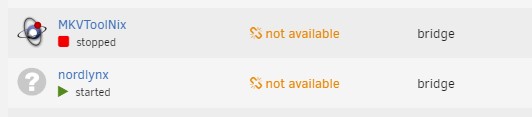
Hi, Two of my docker containers are showing the version as "not available", does this mean they're no longer being updated? Firstly it was nordlynx that showed as it and now MKVToolNix. I have tried restarting Unraid but that didn't do anything. Thanks
-
Hi, I have a script that I found either from these forums or on Reddit that I have running with the User Script plugin that restarts Unraid on a schedule of once a week on a Sunday at 3am. However, I would like to know if it's possible to ignore the script if a parity check is running? The script I'm using is the following: #!/bin/bash /sbin/reboot Thanks
-
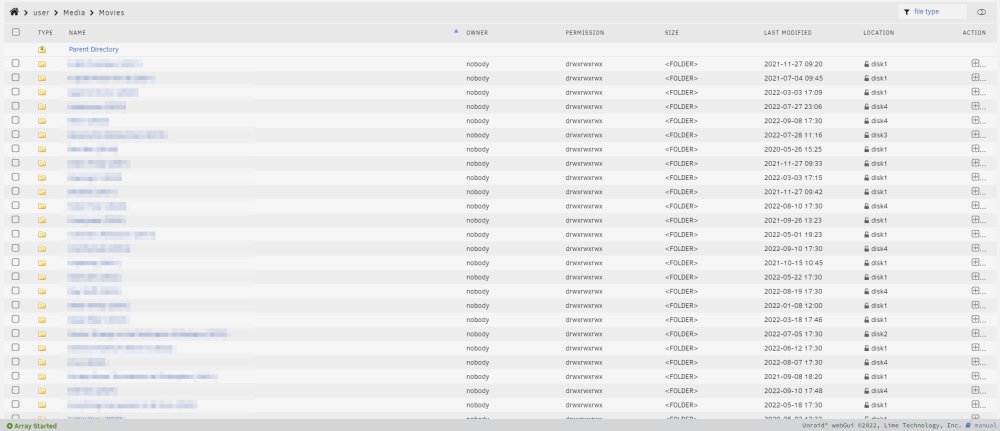
I just installed it and it looks like a great addition to Plex and I like that you don't have to open a separate window to use it. This is what I see when accessing my share folders.
-
I'm the only one that has access to the share, no other users on the Unraid server. I just tested editing the name of a new file and it worked OK for me. Do you think I should still install the plugin you mentioned above though?
-
Hi Frank1940, Thanks, I have installed the Fix Common Problems docker plugin and run the Docker Safe New Perms under Tools and that looks like it has fixed it. I have been able to edit two file names I tested it on. Thanks
-
Hi, I have a share setup on my Windows 10 computer but when I try to edit file names it says the following: You need permission to perform this action You require permission from MATTPLEX\root to make changes to this file. Is there a setting somewhere I need to enable to allow me to edit file names? It would be a lot easier for me to use windows rather than Krusader as I'm unable to copy and paste text using Krusader. Thanks
-
Hi, I tried installing the NordVPN docker container by bubuntux but I haven't got a clue how to use it, I thought it was going to have a webUI where I could connect and disconnect, but that's not the case. Does anyone know how I can get this to work with my NordVPN account? I would like to use it to when connected to FTP (using FileZilla) as well as when using rclone scripts. Thanks
-
Ah, OK I'll have to upgrade my license to allow 7 devices. Thanks
-
Hi, I have been setting up my unRAID plex server over the last few months (I had trouble with HDDs and returning them to manufacturer so that's why it's taken forever). I have almost finished copying everything over and I have the basic license with 6 HDDs attached, however, I am getting Too many attached devices error. Does the USB and M.2 count towards the amount of drives? I have attached the diagnostics if these are needed. Thanks Matt mattplex-diagnostics-20220611-1209.zip
-
Krusader looks good! Just watched this video on YouTube and it's very similar to an FTP client so that's great! Thanks for letting me know about it.
-
Thanks I'll have a look at them and see which one I think looks best for me.
-
That's what I meant, yes. I've not used Linux before so that might be a bit too much for me. Are the file explorers on unraid similar to Windows or Mac where I can just drag and drop the files?
-
Thanks, I'll take a look Yeah, I've been connected to Ethernet for years and now moved and the router is downstairs so having to use WiFi. I could try and move the PC next to the router for the transfer but wouldn't then be able to use the computer for anything else. I'm guessing I can't take the HDD that has been in the unraid server and put it into my Windows computer to transfer everything over and then put it back?
-
What's turbo mode for parity? Does it help with the transfer speed? All my drives are 8TB. I actually need to purchase 2 more so I can get all info transferred across. I'm currently transferring over the network using a terrible WiFi USB as my computer is too old for WiFi built in . I've been using Terracopy and it seems to be quicker but still not super fast.
-
It starts of between 15 MB/s and 22 MB/s and then drops down between 5 MB/s and 10 MB/s. This is on WiFi as well. Ah yeah! I didn't think of it that way. I would imagine this will be the quicker way of the two as it wouldn't have to use the internet to transfer the files. I would probably have to use the file managers as I'm not sure how to transfer with command line.
-
If I unassign the parity drive, would I then have to run the parity again? It took about 10 hours to complete so wouldn't want to do it again. I've no problem removing the drives and putting them into the server but how would I then transfer everything across to the new drives without having to wipe or format the drives before. Thanks
-
Hi all, I currently have two 8TB hdds installed in my unraid machine and I have two in my computer that I need to transfer all the files to and then format those to add to the unraid machine. What I would like to know is what is the quickest way to move everything across. There's about 11TB of data. I have setup the share with Windows but this looks like it will take forever to transfer everything across. Is there a better way to do it? I'm new to unraid so don't know everything to do with it so go easy on me
-
OK, I'll get onto the company I purchased it from. Thanks for your help ChatNoir, I appreciate it
-
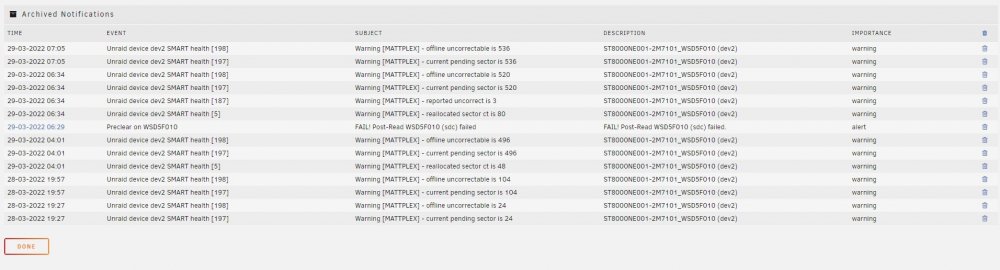
The pre-clear has finished on the drive that is erroring. There's been more errors and the post read failed. I have attached the preclear log, the notifications and the diagnostics. Thanks preclear_disk_WSD5F010_5213.txt mattplex-diagnostics-20220329-0858.zip
-
Oh god really! The drive is brand new as well, well all drives are. I'm still running the pre-clear on the drives, should I wait for that to finish? I'm new to Unraid (first time using it and i'm currently using the trial), how do I do the extended smart test and disable spin down on the drive? Thanks
-
Sure, Diagnostics attached mattplex-diagnostics-20220328-2141.zip
-
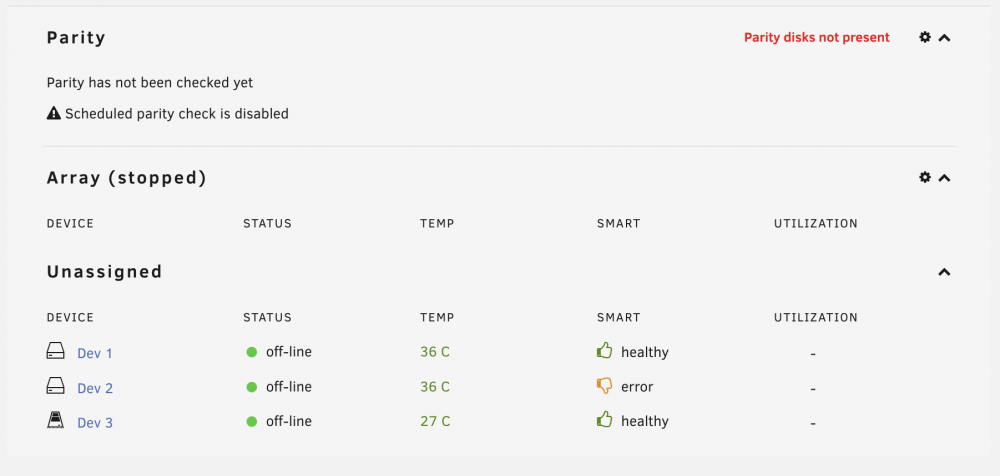
Hi, I'm currently running a pre-clear on my new hard drives and one of them has displayed this message a few times. Is it anything to worry about? I'm using the Unassigned Device Preclear plugin as I watched a YouTube video that said to do this before putting anything on the drives to see if they're good. Anyway, here's the error.. Unraid device dev2 SMART health [198]: 28-03-2022 19:57 Warning [MATTPLEX] - offline uncorrectable is 104 ST8000NE001-2M7101_WSD5F010 (dev2) Under the Assigned Devices section on the dashboard it states there's an error. Thanks Matt
-
No, that would be fine as I would move all the data across to the 2 new HDDs setup in Unraid. Oh awesome, sounds like it's pretty easy then. Great! Mine should work fine then as it's a Logitech with a dongle. Thanks for your help.
-
Awesome, I was worried it would be difficult to add the 2 8TB HDDs currently in use into the system. I would have 6 ports available but to begin with I would only be using 4 so good to know that I can easily add more. Is it as simple as plugging in or is there setting up to do as well? I would also run the Unraid server headless. Would I need to use a wired keyboard and mouse as I currently only have wireless to do the initial setup? Thanks
-
Hi, I am planning to purchase some parts for a Plex Media Server and thinking about using Unraid as the OS. I've never used any other OS other than Windows & MacOS so Unraid will be very new to me. I have a few questions to see if Unraid is OK for me. I already have 2 8TB HDDs in my Windows computer which I will be moving across to my NAS, I am going to be purchasing 2 more 8TB HDDs. Will I be able to setup Unraid with the 2 8TB HDDs, move across the files from my windows computer to the Unraid NAS and then add the other 2 8TB HDDs once they are wiped? Is it easy to add more drives as and when? Can I access the NAS via a Windows PC or Macbook or would everything have to be done by plugging the NAS into a screen? I think that's it for now. Thanks 🙂



