





matt3
Members
-
Joined
-
Last visited
Everything posted by matt3
-
Thanks 😊 I'll restart once the parity has completed.
-
Hi, My system is currently doing a parity check and I got a notification that the /var/log is getting full. What do I need to do? I haven't restarted my system in over 9 months, would that fix it? Thanks Matt mattplex-diagnostics-20260701-0809.zip
-
OK that's fine. Thanks for letting me know.
-
Oh OK I wasn't aware of that. Does it matter if new files are added whilst the rebuild is happening?
-
Awesome! Thanks for the help
-
OK, I would do a parity check to be safe. So, the process I said above would be correct? Also, when replacing a drive that isn't parity, do I copy over the data or does the parity drive handle that?
-
OK, so that would mean removing the 14TB parity drive and replace with the 24TB, then run a parity check, once that is done then replace the 6TB drive? Is that correct or am I over complicating it?
-
Hi, I’m considering upgrading my Unraid system. Currently, I have: 2 × 14TB drives (one used for parity) 3 × 8TB drives 1 × 6TB drive I was originally planning to upgrade with more 14TB drives, but I’ve come across 24TB drives and am considering using those instead. If I purchase two 24TB drives, what would be the correct process for upgrading? I’ve never replaced drives before, so I’d appreciate some guidance. Should I run a parity check beforehand to ensure everything is up to date and then replace the 6TB drive with a 24TB one? Or is there a specific order that works best when upgrading storage? Do I need to manually transfer data from the old drive, or will the parity drive handle that automatically? What’s the best approach for replacing multiple drives, given that my case only has space for six drives? Any advice would be greatly appreciated. Thanks 🙂
-
I too would like this option to choose a custom sound.
-
Oh, I don't use it to automatically download so I'm not too sure. Probably some info in tbr documentation about it though.
-
No you don't need to add this there. You add it to the command you run in the terminal.
-
https://github.com/get-iplayer/get_iplayer/wiki/filenames#filenames
-
Try adding --atomicparsley /usr/sbin/atomicparsley to the end of your command
-
Ah OK, the case I have is pretty small so I can't do any cable management. When I'm next cleaning the case out I'll make sure they're all pushed in correctly Thanks
-
Oh that's great! Thanks for confirming. I haven't had any other errors since that one yesterday. I will check the SATA connector although I haven't opened the machine for a few months so I don't think it would be that unless they can come loose over time? Thanks again
-
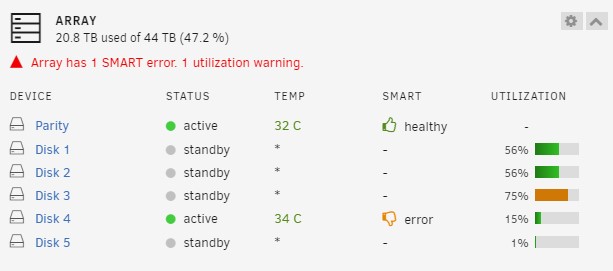
Hi, I had this error show up yesterday whilst I was transferring files to my Unraid server. One transfer was being done using the upload function in Dynamix File Manager and the other was using Windows, both transfers were being done at the same time and the files were exactly the same as I noticed Dynamix File Manager was a lot slower (they were being uploaded to different locations). I received this error udma crc error count is 1 ST8000NE001-2M7101_WKD2JTVD (sdf) does this mean that the drive is failing and needs replacing? In the screenshot attached is says the drive has an error... Thanks
-
Just upgraded from 6.11.5 to 6.12.6 and everything seems to be fine so far 😁
-
You're amazing! Thank you, the reason for manually downloading was this one didn't download due to me not setting it up correctly so I downloaded it using MeTube but it only did it as 720p. I ran the below command and it downloaded in 1080p get_iplayer --get 6401 --output "/unraidshares" --tv-quality="fhd" --force --overwrite Thanks again for your help.
-
Thank you so much! I just ran it manually and it worked although it downloaded in 720p whereas all the others have been in 1080p. Is there a way I can force it to grab the 1080p version or does it grab the highest quality available? Thanks again
-
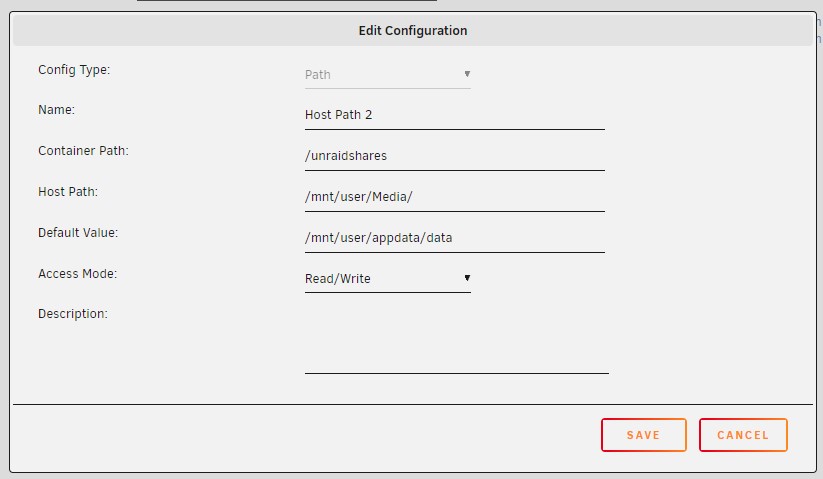
Hi binhex, thanks for coming back to me on this. This is all very confusing to me. Does the attached look OK? or should the host past just be /mnt/ The strange thing is that get_iplayer is automatically downloading new episodes of the show but it just doesn't allow me to download them manually. I have tried using MeTube but that doesn't download them in 1080p like get_iplayer does. Thanks
-
Is this script still OK to use? I think my database had become corrupt as it wasn't playing anything on the web but was OK on a Nvidia Shield. Luckily there was some sort of backup (I think Plex may have automatically did it) but I would also like to have another backup. Also, if there was a need to restore, as @randalotto mentioned above, how would this be done. Thanks
-
Following on from my post above, I have tried removing the docker container and re-adding it but I still don't have any item listed in the output folder. I also tried the following with the output command but it still does nothing. get_iplayer --get 6352 --output "/mnt/user/Media/" I noticed that the memory usage for Docker increases after running it, so not sure if there's any setting that need to be changed when setting it up. It would be great if someone could help me with this. Thanks
-
I installed this yesterday (not sure if I set it up properly) and I managed to get it working fine downloading the TV show Scam Interceptors, however I tried to download other shows to have a play around and then it no longer works. It doesn't give any errors. The below is what it shows when I tried to download the latest episode of Scam Interceptors, it says it converts to MP4 but I don't see any files saves. Matches: 6388: Scam Interceptors: Series 2 - Episode 5, BBC One, m001lmnh INFO: 1 matching programmes WARNING: A UK TV licence is required to access BBC iPlayer TV content legally INFO: Downloading tv: 'Scam Interceptors: Series 2 - 05. Episode 5 (m001lmnh) [original]' INFO: Downloaded: 1755.37 MB (00:44:01) @ 65.01 Mb/s (hlshd1/bi) [audio+video] INFO: Converting to MP4 INFO: Tagging MP4 Any help would be appreciated. I've been using unraid for months but still a noob at it.
-
I have the docker patch installed and today FileZilla is now displaying "not available". Does the patch need an update?
-
Thank you, that worked perfectly

