





jpw007
Members
-
Joined
-
Last visited
-
A quick clarification for anyone in the know: Does the 'Move' button on the 'Main' page follow the rules set via Mover Tuner? I confirm I have the relevant settings done (after quite a bit of fiddling and trial and error), so i know 100% that the 'Move Now' under the schedule settings works flawlessly and follows my custom settings, however I don't want to risk pressing the button on the main page unless i know for sure it will also follow those rules (as it means it will screw with my Sabnzbd etc and mean i have to manually move files to rectify it which means halting it and stuffing around with MC or dynamix again which i've done way too many times as i figured my way through the settings lol)
-
Ok, managed to fix mine. I have the Appdata backup plugin. I deleted the docker, restored it to a backup from 25/12/23, and redownloaded the docker with forcing it to version "3.0.10.1567-ls218". I noticed that version was issued ~2 weeks ago, and the latest version from ~2 days ago is some 4.XXX version. Looks like the corruption must have happened with the new main version #. Looks like i'll be sticking with forcing the current version to be safe!
-
Mine looks to have been corrupted also. I'm not savvy enough to know how to pull logs from docker, but can't seem to get it working.
-
Ok so an update. I discovered the handy little plugin called "Dynamix Active Streams". With it i was watching what was accessing the server via the network. I use File History of Windows and that share was being accessed. I disabled it in Windows and instantly everything went back to normal. I've run file history for ages but never had an issue so not sure why it started just now, but despite not writing much to the server it was absolutely choking the network...(write speeds were really low but it still crippled it). So after all this it now appears to be resolved. I might have to test it again to see whats up if it's still acting this way. but it definitely explained why it seemed to happen within an hour as it was setup for hourly snapshots (which also should have been pretty minimal in size)
-
Just following up if anyone has any further ideas? Still happening shortly after a reboot (within an hour), and only a reboot fixes it. I'm runnin an indepth smart report on all drives now but just can't figure this one out.
-
Tbh I’ve never experienced issues like this and have had unraid for over 2yrs. Its a very sudden change and it’s not just when server is being used, often im the only user and its super slow which is why its abnormal and has me stumped
-
I think i might be getting somewhere. I noticed that I think it may actually be Disk 4 (sdd) that could be the issue? I noticed both a file being pulled from it had issues and also trying to play a video using VLC also suffered significant stutters. I'm running a full smart report on it now. It's about 1 month old the disk. Interestingy though it's currently reading internally at 100MB/s as it looks to be writing something to parity. Maybe I should also force a party check and see. (EDIT: Unless that's the smart report causing the reads...I did forget about that when i saw it..EDIT2: Actually a smart wouldn't get reads and writes on other disks. Now i'm a bit lost)
-
Just started pooping itself again. Moving files from the array and it was sustained pretty perfectly until right now when it started doing the usual Are you thinking it's the SMR drives? I did check and the files it was pulling when speeds crashed didn't look to be hosted on either SMR jnas-diagnostics-20220423-1710.zip
-
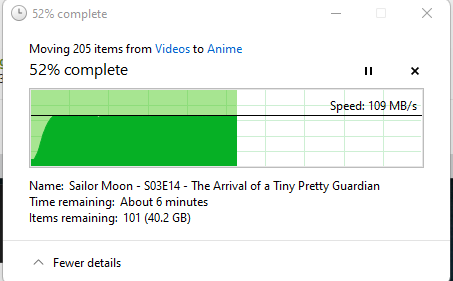
Rebooted and it's sustaining regular full gigabit transfer. I wont start any dockers and will see if it lasts or not...usually takes barely an hour or 2 to see slow downs
-
I have to duck out but quickly started one and same business. All dockers disabled and no one using the NAS except me transferring to cache - Let me know if i've let it go long enough but it's same thing from the get go jnas-diagnostics-20220423-1257.zip
-
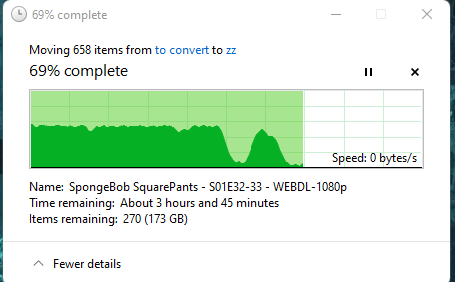
Oh, yes, the latter is a great idea and something i forgot about. I haven't needed to dive into settings in ages now. Quick screenshot and dump from current transfer. Been going for ages and as you can tell it slowed for ages and then somehow sped up to a lower max and is slow again (I definitely would have exhausted cache by this stage but i checked and it's empty because mover runs every 2hrs and so this has taken so long it's kicked in...) jnas-diagnostics-20220422-2038.zip
-
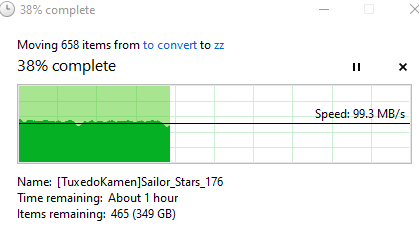
As an FYI, this is my usual speeds (read or write) via Windows. It Bounces between ~100 and 110
-
I don't specifically write to drives, only to my shares (I thought that was bad practice so never have tbh). It happens read or write, and it's specifically fine after a reboot. Experience it whether writing direct to array or to cache. Will definitely grab a diag whilst writing to array when i get the issue happening again. I'm just working atm so can't, but i'm pretty confident i can trigger it by getting sonarr/radarr to to start a new download. Thank you
-
Hi All, Been an Unraid user and lurker for a while now. Recently i've started to get extremely slow responsiveness that only seems to be fixed by a reboot of the unraid server. Nothing in my server has changed short of having more data. Basically it grinds to a halt when transferring stuff or from the server over the network. The whole navigation and even the 'preparing documents for copy' part is extremely slow and the file transfers themselves see constant speed ups/slow downs to 0. File sizes seem irrelevant, whether a couple hundred MB up to multiple GB...Transfer speeds usually in the vicinity of 2 to 3 MB/s instead of 110 like it always used to. I've tried changing to cache/no cache for shares. I've switched my SABNzbd to downloading straight to the cache (previously straight to array) but that hasn't changed anything. I'm unsure if it's time related or somehow SAB is doing it...I noticed it recently happening very quickly after i've pushed a couple shows to SAB via radarr/sonarr. I can confirm that the serve is not unpacking anything at the time and it stays like this until i reboot...It may be a coincidence but NFI really if it's got anything to do with SAB. This is a snippet of usual transfer speed/look...Sorry, i got impatient with letting it run longer to show but the trend never changes I have attached the diagnostics for those who can have a look and help please. Much appreciated. (i've also installed various plugins to see if any change but nothing) jnas-diagnostics-20220422-1209.zip
