





citizen_y
Members
-
Joined
-
Last visited
-
Hello, I recently started getting an error related to an error binding addresses. I'm not sure what change in configuration triggered it or what is causing it so I was hoping someone could point me in the right direction. I did a search but didn't see anything relevant. I'm working on Uraid 7.0.0 Mar 5 18:48:04 citizenUR ntpd[8689]: unable to create socket on br2 (2220) for 192.168.30.101:123 Mar 5 18:48:04 citizenUR ntpd[8689]: cannot bind address 192.168.30.101 Mar 5 18:53:05 citizenUR ntpd[8689]: bind(20) AF_INET 192.168.20.100:123 flags 0x19 failed: Address already in use Mar 5 18:53:05 citizenUR ntpd[8689]: unable to create socket on eth4 (2221) for 192.168.20.100:123 Mar 5 18:53:05 citizenUR ntpd[8689]: cannot bind address 192.168.20.100 Mar 5 18:53:05 citizenUR ntpd[8689]: bind(20) AF_INET 10.87.76.16:123 flags 0x19 failed: Address already in use Mar 5 18:53:05 citizenUR ntpd[8689]: unable to create socket on br0 (2222) for 10.87.76.16:123 Mar 5 18:53:05 citizenUR ntpd[8689]: cannot bind address 10.87.76.16 Mar 5 18:53:05 citizenUR ntpd[8689]: bind(20) AF_INET 192.168.30.101:123 flags 0x19 failed: Address already in use Mar 5 18:53:05 citizenUR ntpd[8689]: unable to create socket on br2 (2223) for 192.168.30.101:123 Mar 5 18:53:05 citizenUR ntpd[8689]: cannot bind address 192.168.30.101 Mar 5 18:57:42 citizenUR dhcpcd[1725]: br0: failed to renew DHCP, rebinding Mar 5 18:57:42 citizenUR dhcpcd[1725]: br0: leased 10.87.76.16 for 7200 seconds Mar 5 18:57:45 citizenUR ntpd[8689]: bind(20) AF_INET 192.168.20.100:123 flags 0x19 failed: Address already in use Mar 5 18:57:45 citizenUR ntpd[8689]: unable to create socket on eth4 (2224) for 192.168.20.100:123 Mar 5 18:57:45 citizenUR ntpd[8689]: cannot bind address 192.168.20.100 Mar 5 18:57:45 citizenUR ntpd[8689]: bind(20) AF_INET 10.87.76.16:123 flags 0x19 failed: Address already in use Mar 5 18:57:45 citizenUR ntpd[8689]: unable to create socket on br0 (2225) for 10.87.76.16:123 Mar 5 18:57:45 citizenUR ntpd[8689]: cannot bind address 10.87.76.16 Mar 5 18:57:45 citizenUR ntpd[8689]: bind(20) AF_INET 192.168.30.101:123 flags 0x19 failed: Address already in use Mar 5 18:57:45 citizenUR ntpd[8689]: unable to create socket on br2 (2226) for 192.168.30.101:123 Mar 5 18:57:45 citizenUR ntpd[8689]: cannot bind address 192.168.30.101 Mar 5 19:02:46 citizenUR ntpd[8689]: bind(20) AF_INET 192.168.20.100:123 flags 0x19 failed: Address already in use Mar 5 19:02:46 citizenUR ntpd[8689]: unable to create socket on eth4 (2227) for 192.168.20.100:123 Mar 5 19:02:46 citizenUR ntpd[8689]: cannot bind address 192.168.20.100 Mar 5 19:02:46 citizenUR ntpd[8689]: bind(20) AF_INET 10.87.76.16:123 flags 0x19 failed: Address already in use Mar 5 19:02:46 citizenUR ntpd[8689]: unable to create socket on br0 (2228) for 10.87.76.16:123 Mar 5 19:02:46 citizenUR ntpd[8689]: cannot bind address 10.87.76.16 Mar 5 19:02:46 citizenUR ntpd[8689]: bind(20) AF_INET 192.168.30.101:123 flags 0x19 failed: Address already in use Mar 5 19:02:46 citizenUR ntpd[8689]: unable to create socket on br2 (2229) for 192.168.30.101:123 Mar 5 19:02:46 citizenUR ntpd[8689]: cannot bind address 192.168.30.101
-
Ok, reporting back - I can definitively confirm this was the solution. I have confirmed in two ways: 1.) The drive throwing me errors that led to me initiating this post - I have completed a full parity rebuilt (it was the parity disk in the array) and the rebuild completed - corrected ~25k parity errors and the disk threw no errors during the whole rebuild (and hasn't throw any errors since) 2.) I put another white label drive that had persistently thrown COMRESET error the last time it was in service ( and I had given up) back in the server and successfully complete a full pre-clear cycle (pre-read, zeroing, and post-read) with out throwing any error. Thank you for the suggestion - looks like I fell victim to a cheap PSU purchase.
-
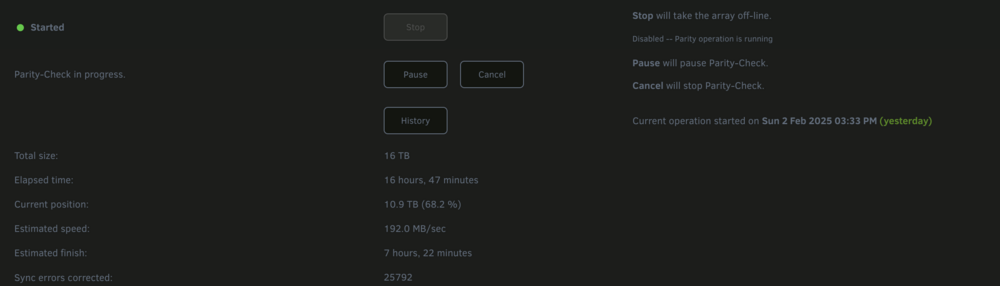
I'm not fully declaring victory yet - but a new PSU seems to have either fixed things or at the very least made things much better. I'm nearly 17 hours (68%) into a parity check and a few things of note: 1.) There have been no COMRESET errors (or any logged errors actually) for any of the drives 2.) The parity check is identifying and correcting quite a few sync errors (presumably those created from the disk / comm issues experienced on the parity rebuild that was occuring when I was seeing a high number of COMRESET errors) I'll report back when the parity check is complete and after I've had time to add one of the other drives I gave up on due to this issue in the past. At that point I'm hopeful I'll be able to mark the new PSU as the solution this this issue thread.
-
Ok, I'm going to give this a try. I don't have a spare one lying around, but I have one arriving tomorrow that I'll give a go and report back
-
Unfortunately no. I think this has happened to 3-4 drives over the last two years. I believe two of them were white label, but the other was manufacturer WD.
-
Hi all, Over the course of my time using Unraid (~2 years) I've had a recurring issue whereby a drive (usually only 1 at any given time) will start to regularly have the following errors kernel: ata4: COMRESET failed (errno=-16) kernel: ata4: hard resetting link Each time I've tried multiple SATA cords and power cords, and eventually chalk them up to drive degredation (as I have purchased manufacturer refurbished drivers in the past). A couple of things though, this is most commonly happening on the newer drivers (not the oldest in the array), this has occurred on multiple motherboards and there respective SATA controllers. It started to happen against about 36 hours ago on one of my drivers and I thought its time to see if someone else could see something I'm not. I'm positing the diagnostics - but I'd appreciate any input on whether: 1.) The drive (or any of the drives) look bad and needs to be replaced 2.) What else may be occuring that I should look into remedaiting Please note - I am running this instance Unraid as a virtual VM on Proxmox, but I am passing through the onboard SATA controller directly. Also, this was occuring even a few months ago when I had Unraid running on bare metal. -W citizenur-diagnostics-20250131-1302.zip
-
Thanks for the reply. Sorry it took me so long, attached are the diagnostics with onboard NICs enabled. tower-diagnostics-20250107-2200.zip
-
As a follow-up, I hooked up a USB ethernet adapter and disabled the two onboard NICs and was able to get into the system to download diagnostics, which I have attached below. tower-diagnostics-20250107-0020.zip
-
Hello, I'm using 6.12.14 Yesterday I swapped out the motherboard and ram in mu unraid server (all drives stayed exactly as is). When I booted initially, everything worked find. System came right up, onboard NIC were identified, disks we assigned appropriately and I began running a parity check. About 3 hours before the parity check finished the NICs stopped being recognized so I could access the web interface (I was able to monitor progress via command line through my KVM). I tried to reboot and had no luck. I rebooted again and this time I noticed at the command line the hostname had changed to Tower. Getting a bit concerned I booted into Safe More with GUI and see a few issues: 1.) the NICs are recognized by the OS, but are showing as not connected 2.) My two cache drives are being recognized but are showing up as unassigned, when I try to assign them to the right cache assignments I'm getting a warning that they are new devices and would be erased if I started the arry 3.) The hostname is stil being listed as "Tower" I'm not sure the best steps to debug from here - I'd like to pull the diagnostics, but am not sure how to do so in Safe Mode. Any help would be appreciated.
-
Just a quick update - I really struggled to solve this, but read some other posts of people having issues with a slow performing zfs drive in the array so I decided to try and migrate my one zfs drive to xfs. Turns out this was a struggle, even copying the content from the zfs drive to another xfs formatted drive the best performance I could get was 2-3 Mb/s. I finally buckled down and copied only the irreplaceable content and blew up the rest when I erased that drive and reformatted under xfs. After doing so, I ran another speed check and voila, the drive was now showing speeds on speed tests that were inline with the other drives (4-5x what it had been under zfs). After that, I started another parity build, its not done yet, but its been maintaining speeds of 170-260 MB/s (inly really slowing as it comes to the later portions of any given drive size int he array). I'll report back when complete to confirm this was the fix - but right now its looking like another case of a a zfs drive in an array causing exceedingly slow performance.
-
If I pause the rebuild, and reboot will the build restart or will it maintain its position?
-
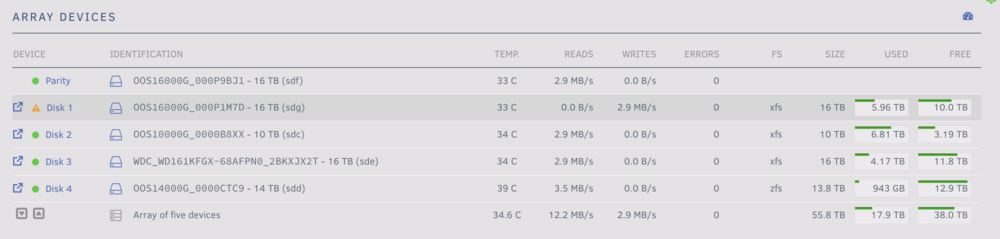
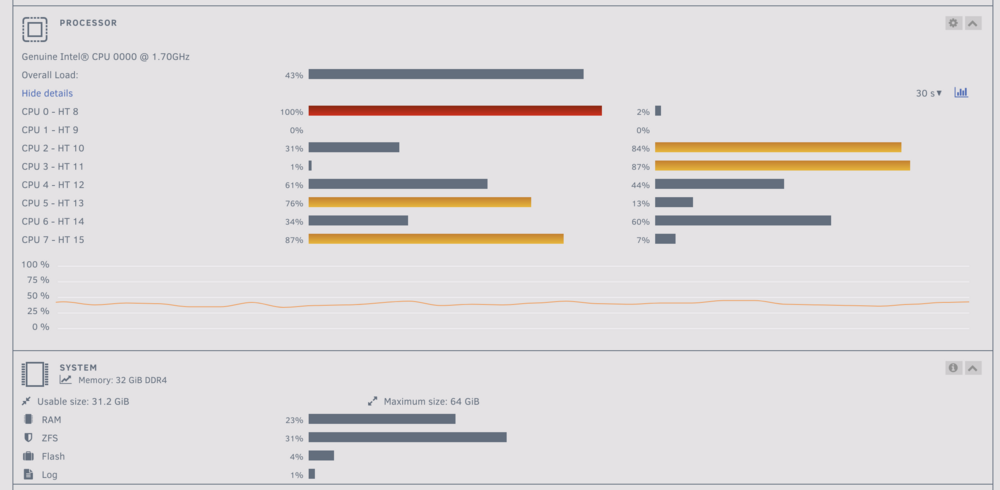
THanks much - I tried exploring that, but the file activity pluggin wasn't showing any disk activity. Also, when I look at the read / write speed per disk it looks like the parity writes are equivalent to the reads on all of the other disks except for disk 4 which is showing a slightly higher read speed. I ran the diskspeed test docker prior to starting the parity build and did find disk 4 operating at a much lower performance than the other drives but nothing even close to this slow. Do you think its prudent to run the diskspeed test again while still running the parity rebuild? One other item of note the CPU load on the system seems quite high given the fact that I don't have docker or vm services on - anything I should look at there that may be related to the slow rebuild speed?
-
Hello, I initiated a parity rebuild due to the replacement of a failing drive. The rebuild started relatively quickly but eroded to ~30-40MB/s after the first day. Unfortunately for the last two days the rebuild has been averaging aroun 2-3 MB/s. I'm not seeing any driver related errors in the logs. I have shutdown all VM and dockers services and have disabled all shares, but am having still seeing this exceptionally slow speed. I previously ran a drive speed check and did see that disk4 (the zfs disk I have in the array) had an average speed of <20% the speed of the rest of the drives. I assume this is part of the issue and want to test out migrating this disk away from zfs and potentially removing fromt he server entirely, but I need to finish this parity rebuild first. What else should I be considering to try and get this parity rebuild back to a relatively (or at least viable) speed. citizenur-diagnostics-20240516-2334.zip
-
Thanks for this - when I went to run without the "-n" option I got the following error. Recommendations on how to proceed?
-
Hey, thanks for replying. Right now I don't have any disk assigned as disk 1 (that was the disk that was failing). I have a disk currently in preclear that I intend to assign as disk 1 and rebuild from parity once preclear is completed. The array is currently stopped. Given that current situation, is it viable for me to run a check file system on disk 1? If so, is it the right step for me to bring the array online in maintenance mode with the disk 1 assignment empty and attempt to run a check filesystem on an emulated disk 1? I just want to make sure I'm clear on the steps to take so I can avoid losing the data if possible.




