BKG
Members
-
Joined
-
Last visited
Everything posted by BKG
-
Thanks trurl. makes perfect sense! It is all buttoned up now!
-
I am trying to understand what its the way to make the system (without the use of CLI) to create and keep ISO image share on the chosen disk. For some reason and as a default the system created the ISO share on Disk 1, even though I already had the cache pool when I created the unRAID. So, here is my case represented graphically (see attached PDF). I hope I am not overcomplicating things 🙂 case use (1).pdf
-
I don't work with disk shares and do work with user shares. I guess I used the wrong wording. At the moment isos share is on - /mnt/disk1 and want it to reside on - /mnt/disk3
-
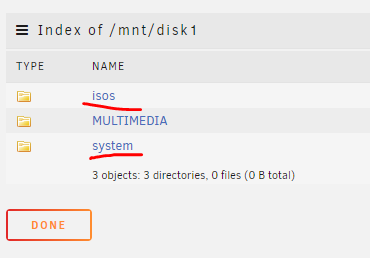
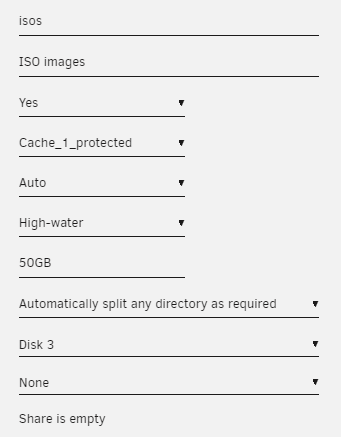
Perfect! Thank you Squid and trurl. I didn't know that. I disabled the Docker and VM and ended up having only isos on Disk 1 which is normal since the share is set to CACHE/YES. Now how do I make the isos share reside specifically on Disk 3? Do I just copy the folder on Disk 3 and then place the ISO image there? Also, I made the following settings in the share: Thanks
-
Hello, I am new to unRAID. I have an array of 4 disks and one SSD for cache pool. After reading the above thread I have two questions. I have noticed the same happening in my case(docker and VM ended up on Disk 1). As I was reading more about it I removed(uninstalled) the dockers and VM and cleaned the /mnt/user/appdata with rm -rfv. I then ran the MOVER but still have two folders on Disk 1. Question 1. Can I manually delete those two folders on Disk 1? Question 2. I want to have a cache pool made from two SSD drives formated in BTRFS. Based on the below quote, should I rename the pool to "cache" after I add the second SSD? Thanks,