





zhangliang5327
Members
-
Joined
-
Last visited
Everything posted by zhangliang5327
-
DSH (DeepSeek Harness) — repository URL change, same maintainer I renamed my GitHub account: 2220545672 → MeiXu6693 (2026-10-24). The repository moved with it: https://github.com/MeiXu6693/unraid-templates (image: ghcr.io/meixu6693/dsh; the old ghcr.io/2220545672/dsh path is gone — GitHub redirects repo URLs but not registry paths). CA still has the submission record under the old owner URL, so the template's <TemplateURL> and the stored repository URL now disagree. Could the repository URL be updated to https://github.com/MeiXu6693/unraid-templates? Nothing else changed: same template, same app name (DSH), same container name, same image.
-
DSH (DeepSeek Harness) is an open-source AI coding agent that runs in your browser: it reads and writes your project files, runs commands on your server, and keeps your session history. Image: ghcr.io/2220545672/dsh (amd64 + arm64) Template and docs: https://github.com/MeiXu6693/unraid-templates Install DSH is in Community Applications: open Apps and search for DSH. The template also lives in the repo if you would rather import it by hand. New in this image (2026-10-16) • DeepSeek account sign-in now works from the LAN, from Tailscale, or through a reverse proxy. Upstream asks the platform to deliver the login to the address you are browsing from, and the platform only accepts a local one, so a remote browser used to fail before the login page even opened ("Could not complete the operation. Try again."). The image now ships the dsh-remote-signin plugin: the login page opens as usual, and when that tab lands on the dead 127.0.0.1 page, a paste box has appeared in the DSH page. Paste the address into it and the dialog turns green. One paste is all it adds. Set REMOTE_SIGNIN=off to get upstream behaviour back. Plugin repository and details: https://github.com/MeiXu6693/dsh-remote-signin and docs/remote-signin.md in the repo above. • The container now serves its own password gate by default (AUTH_MODE=builtin), so a fresh install is not open to your whole network. Three things to know Change the default password. The template ships 12345678, and anyone who can reach the port knows it. Docker tab, then the container, then Edit, then the Password field, then Apply. If you leave the field empty the container generates a password instead and prints it once in the log. If something in front already authenticates (SWAG + Authelia, a VPN), set Authentication Mode to none, and do not stack two logins. Keep the Extra Parameters. Unraid kernels have no Landlock, so DSH's command sandbox depends on bubblewrap. The template ships the two --security-opt values it needs; without them commands fail with SANDBOX_UNAVAILABLE. Let your network in. ALLOWED_CLIENTS controls who may reach the UI and defaults to localhost only. Add your LAN subnet (for example 127.0.0.1,192.168.0.0/16) or your reverse proxy's address, or you will get 403. Behind a proxy, also set TRUSTED_PROXY_CIDRS to the proxy's network so the real client address is used. Updates The image is rebuilt automatically for every upstream release. Just use force update on the Docker tab; no configuration changes are needed. DSH(DeepSeek Harness)是开源的 AI 编码智能体,界面就在浏览器里:能读写你的项目文件、在你的服务器上执行命令,并保留会话历史。 镜像:ghcr.io/2220545672/dsh(amd64 + arm64) 模板与文档:https://github.com/MeiXu6693/unraid-templates 安装 DSH 已收录进 Community Applications:打开 Apps,搜索 DSH 即可。仓库里也有模板,想手动导入也行。 本次镜像新增(2026-10-16) • 用 DeepSeek 账号登录,现在从局域网、Tailscale 或反向代理后面也能走完。上游会把「你此刻打开界面的地址」交给平台,让平台把登录结果送回那里,而平台只接受本机地址——所以远程浏览器在登录页打开之前就失败了(提示「操作未完成,请重试。」)。镜像现在集成了 dsh-remote-signin 插件:登录页照常打开;当那个标签页停在打不开的 127.0.0.1 页面时,DSH 页面里已经出现一个粘贴框——把地址粘进去,对话框就变成已登录。只多这一步。设 REMOTE_SIGNIN=off 回到上游行为。插件仓库与说明:https://github.com/MeiXu6693/dsh-remote-signin ,以及上面仓库里的 docs/remote-signin.md。 • 容器默认自带口令门禁(AUTH_MODE=builtin),新装不会对整个网络敞开。 三点请注意 改掉默认口令。模板自带 12345678,能访问到端口的人都知道。Docker 页,然后选该容器,然后 Edit,然后改 Password 字段,然后 Apply。留空则由容器生成一个口令,并只在日志里打印一次。若前面已有认证(SWAG + Authelia、VPN),把 Authentication Mode 设为 none,别叠两层登录。 别删 Extra Parameters。Unraid 内核没有 Landlock,DSH 的命令沙箱依赖 bubblewrap,模板已带上它需要的两个 --security-opt;删掉就会报 SANDBOX_UNAVAILABLE。 把你自己放进来。ALLOWED_CLIENTS 决定谁能访问界面,默认只允许本机。请加上你的局域网网段(例如 127.0.0.1,192.168.0.0/16)或反向代理的地址,否则会返回 403;经代理访问时再设 TRUSTED_PROXY_CIDRS,让它读取真实客户端地址。 更新 镜像会跟随上游自动重建,在 Docker 页点 force update 即可,不需要改配置。
-
请问我的硬盘发生了什么错误,可以做什么措施去维护吗塔-智能-20221016-1557.zip
-
-
我也遇到过这个问题。现在怀疑是docker导致的,具体现象如下: docker拉取一个新的映像时很慢,浏览器无法打开unraid其他页面。清除浏览器的cookie缓存等后,可以访问,此时可以发现之前的docker拉取镜像进程仍在运行。
-
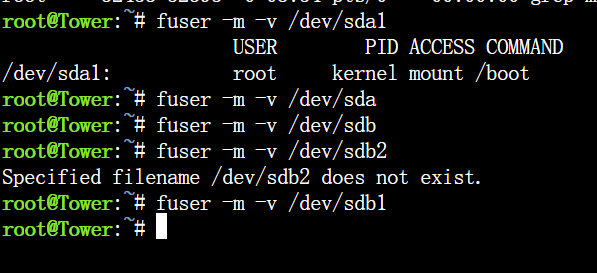
系统日志如下,无法停止阵列,提示“ 阵列正在停止•Retry unmounting disk share(s)...” 尝试运行fuser命令后显示如下: tower-syslog-20220820-1552.zip
-
例如"app.1.unraid.net"
-
系统给我分配远程访问域名类似"1.unraid.net",我想用二级域名反向代理我的其他web服务,请问可以申请开通二级域名的解析吗

