





Thitt0927
Members
-
Joined
-
Last visited
-
well..I think i figured it out. kind of embarrassed I did not think of this earlier. the only change I made was a few weeks ago I installed a new larger parity drive. didn't cross my mind because 1 it was new 2 it had been running for weeks 3 it precleared fine. but once I pulled the parity drive the array starts and unraid is stable again. Guess that drive is getting RMA'd Thank you for the replies and troubleshooting assistance
-
I disconnected the Netapp and it will not let me start the array says too many disks missing
-
the card should IT mode (atleast I assume it is the ad said it was when I bought it) it has also been running well for a few years. If i remove drives and start the array I am not at risk of losing any data correct? just want to make sure and not get ahead of myself
-
all drives are showing up, installed new cable, most of the drives are in a Nettapp ds4243 with it's own PSU's. but maybe PC PSU is failing? I tried to run a smart report but whenever the drives spin up it reboots.. Thank your for your help so far!
-
Thank you I will take a look at the cabling.. sorry if this is a dumb question but I have no clue how to check the health of the SAS controller. my only experience with them is buying it, installing it and it just working LOL.
-
to add I have had it in maintenance mode since I made the first post and it has not rebooted. now going on 15 minutes which is the most stable it has been since this started yesterday. but have a feeling as soon as I start a parity check it will reboot again.
-
The syslog that I attached was from mirroring to flash and it was after a reboot occured. I just have no clue how to read it to get any valuable information
-
afternoon all, I am having an issue where my server is consistently rebooting. at first I suspected the flash drive, made a back up and and got a new drive, no change. the server was running 6.12.6 so I decided to do a fresh install of unraid with the latest version it still reboots and it is pretty consistent that it reboots about 15-30 seconds after I start the array. I then tried to boot into safe mode, it stays alive a little longer, probably 3 or 4 minutes but then rebooted. If I reboot into safe mode and start the array in maintenance mode it stayed alive for about 5 minutes and rebooted after I started a parity check. Attached at the diags while in maintenance mode before the last reboot, as well as the syslog from the flash drive. any help would be greatly appreciated. still learning unraid troubleshooting.. thanks in advance. I would like to add as well that this server has ran flawlessly since 2022 hence why I am "new" to troubleshooting unraid. hittflix-diagnostics-20240916-1704.zip syslog
-
Ordered UPS today LOL... no usb in the array.. I have not done memtest
-
Good morning! I had an issue yesterday that I thought I solved with communities help. Parity sync was running fine at 130 mb/s My house lost power during the parity sync. now power is back but sync is now only running at 6mb/s. diags are attached any further assistance would be appreciated! hittnas-diagnostics-20220312-0909.zip
-
yup!! I got it all sorted and everything is working as it should! Thank you for all the help!!
-
disregard my last question that drive was my old parity drive.
-
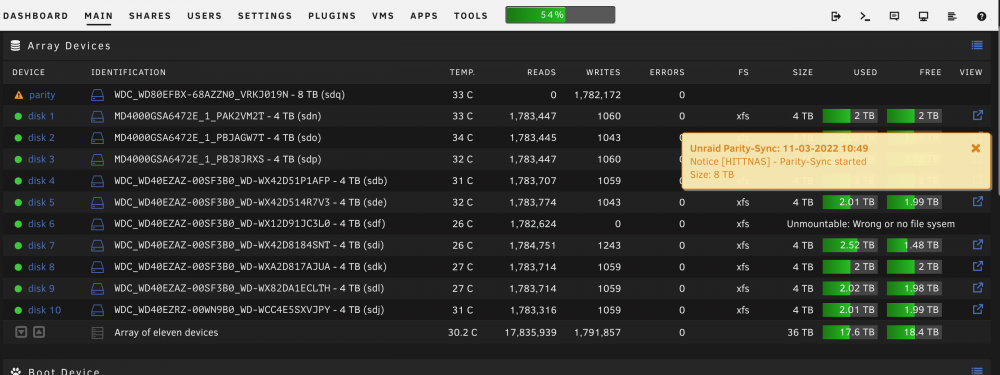
Thank you this is solved all my original issues parity sync is running at 130 mb/s and shows the correct size...the issue i have now is once i did the new config one my my drives is showing unmountable/ wrong or no file system. any insight on that? Again thank you for solving the other issues
-
This may sound like my best course of action.. couple questions.. how do I start a new config? did not seem obvious to me. Will it keep all my docker settings?
-
T Thank you.. so if i am understanding this correctly since the original parity was 4tb that is what it is rebuilding onto the new 8tb drive and i should not worry that the sync shows 4tb
