





newbie_dude
Members
-
Joined
-
Last visited
Everything posted by newbie_dude
-
Thanks! Guess I have to do funky business to get my data off the drive and format.
-
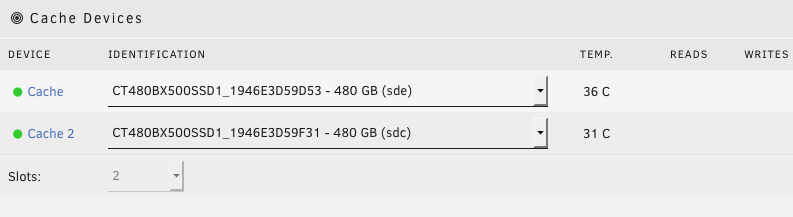
Same "Cache drive unmountable: No pool uuid" issue when I tried to add a second cache disk. Original was formatted XFS. Error occurred when I started the array after choosing two slots and added the second drive. Now I notice the option to format as XFS is gone and only BTRFS is available. Also I can't change slots back to 1 and just go back to the old configuration. Is there a way to revert back? Does this mean I cannot have XFS formatted cache drives and must have BTRFS if I want cache protection? While googling I saw others had mentioned issues with BTRFS and recommended XFS. Looks like that's where my screwup was? tower-diagnostics-20200111-0937.zip

-
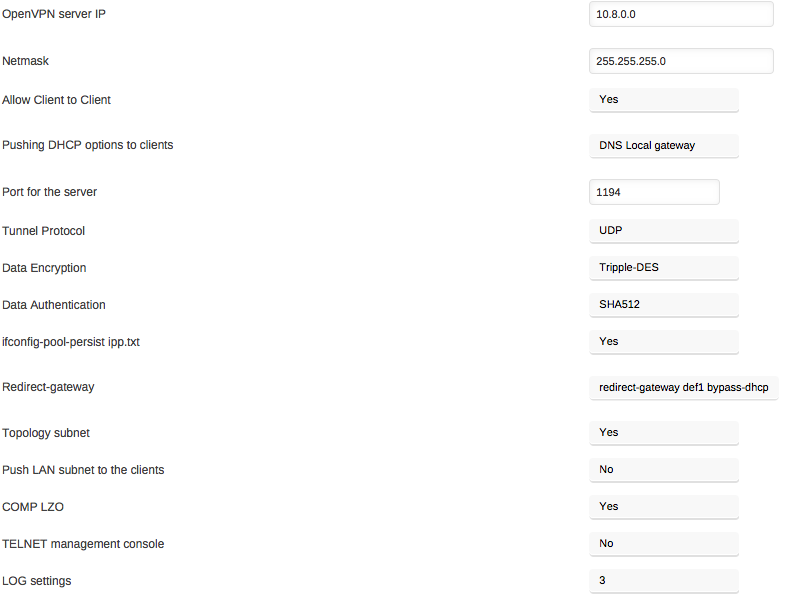
I hoping I'm doing something stupid. My server configuration is attached. I use Viscosity in my mac for VPN. But I can't seem to connect to my unraid server It fails on TLS handshake. I've opened port 1194 in my router. Here is what I see on client side: Jan 08 14:32:22: Viscosity Mac 1.5.11 (1314) Jan 08 14:32:22: Viscosity OpenVPN Engine Started Jan 08 14:32:22: Running on Mac OS X 10.7.5 Jan 08 14:32:22: --------- Jan 08 14:32:22: Checking reachability status of connection... Jan 08 14:32:22: Connection is reachable. Starting connection attempt. Jan 08 14:32:22: OpenVPN 2.3.8 x86_64-apple-darwin [sSL (OpenSSL)] [LZO] [PKCS11] [MH] [iPv6] built on Sep 23 2015 Jan 08 14:32:22: library versions: OpenSSL 1.0.2d 9 Jul 2015, LZO 2.09 Jan 08 14:32:23: Control Channel Authentication: using '/var/folders/zz/zyxvpxvq6csfxvn_n0000000000000/T/connection.puyVrx/ta.key' as a OpenVPN static key file Jan 08 14:32:23: UDPv4 link local: [undef] Jan 08 14:32:23: UDPv4 link remote: [AF_INET]99.XXX.XXX.XXX:1194 Jan 08 14:33:23: TLS Error: TLS key negotiation failed to occur within 60 seconds (check your network connectivity) Jan 08 14:33:23: TLS Error: TLS handshake failed Jan 08 14:33:23: SIGUSR1[soft,tls-error] received, process restarting Do I need to open more ports? Or is there something else with the configuration that's incorrect? Thanks for your help!
-
All you posted is the output of a smartctl report. It looks fine. What error are you seeing? Joe L. Oh. I thought the disk had errors. It was just listed on the final output. Things like Attribute NEW VAL OLD VAL FAILURE_THRESHOLD STATUS RAW_VALUE Raw_Read_Error_Rate = 118 101 6 OK 186259920 Spin_Retry_Count = 100 100 97 near_thresh 0 End-to-end_error = 100 100 99 near_thresh 0 Airflow_Temper_Cel = 66 69 45 near_thresh 34 Temper_Cel = 34 31 0 ok 34 I was worried about the near_threshold issues. Does it sort of mean the disk is not new if there are old smart attribtes? Sorry, this is really confusing! It indicates the current normalized value is close to the affiliated failure threshold set by that disks manufacturer. Nobody knows how the "raw" counts on those attributes equate to the normalized values, at they typically do not tell, but if we assume the normalized value will decrement by 1 every time the disk fails to spin up, then it would take three failures to spin up to get to the affiliated failure threshold of 97. To me, even one failure to spin up is an issue, so if you ever see that value increasing, keep an eye on it. HOWEVER, the starting value for spin-retry is 100, and there have been NO failures in the raw column, so the disk has never failed to spin-up. (a good thing) The "near_thresh" is just there to help you decide if you need to investigate further. If you are that interested, you really should learn hoe to interpret the full smartctl reports, and not the summary the preclear script gives to you in its attempt to show you the parameters that have changed in the before and after reports. basically, according to what I can see from that difference report, the disk is fine. Joe L. Thanks so much! I'm going to start looking up to read the reports now. I have a feeling my cache drive is acting up from the reports in the unmenu section and I'd really like to know what it's saying. Once again, thanks!
-
All you posted is the output of a smartctl report. It looks fine. What error are you seeing? Joe L. Oh. I thought the disk had errors. It was just listed on the final output. Things like Attribute NEW VAL OLD VAL FAILURE_THRESHOLD STATUS RAW_VALUE Raw_Read_Error_Rate = 118 101 6 OK 186259920 Spin_Retry_Count = 100 100 97 near_thresh 0 End-to-end_error = 100 100 99 near_thresh 0 Airflow_Temper_Cel = 66 69 45 near_thresh 34 Temper_Cel = 34 31 0 ok 34 I was worried about the near_threshold issues. Does it sort of mean the disk is not new if there are old smart attribtes? Sorry, this is really confusing!
-
I had some error that I don't remember seeing from my previous preclear run on other disks. Here is what I saw: 1 Raw_Read_Error_Rate 0x000f 118 100 006 Pre-fail Always - 186259920 3 Spin_Up_Time 0x0003 092 092 000 Pre-fail Always - 0 4 Start_Stop_Count 0x0032 100 100 020 Old_age Always - 10 5 Reallocated_Sector_Ct 0x0033 100 100 010 Pre-fail Always - 0 7 Seek_Error_Rate 0x000f 100 253 030 Pre-fail Always - 542595 9 Power_On_Hours 0x0032 100 100 000 Old_age Always - 37 10 Spin_Retry_Count 0x0013 100 100 097 Pre-fail Always - 0 12 Power_Cycle_Count 0x0032 100 100 020 Old_age Always - 10 183 Runtime_Bad_Block 0x0032 100 100 000 Old_age Always - 0 184 End-to-End_Error 0x0032 100 100 099 Old_age Always - 0 187 Reported_Uncorrect 0x0032 100 100 000 Old_age Always - 0 188 Command_Timeout 0x0032 100 100 000 Old_age Always - 0 0 0 189 High_Fly_Writes 0x003a 100 100 000 Old_age Always - 0 190 Airflow_Temperature_Cel 0x0022 066 060 045 Old_age Always - 34 (Min/Max 25/40) 191 G-Sense_Error_Rate 0x0032 100 100 000 Old_age Always - 0 192 Power-Off_Retract_Count 0x0032 100 100 000 Old_age Always - 2 193 Load_Cycle_Count 0x0032 100 100 000 Old_age Always - 19 194 Temperature_Celsius 0x0022 034 040 000 Old_age Always - 34 (0 19 0 0 0) 197 Current_Pending_Sector 0x0012 100 100 000 Old_age Always - 0 198 Offline_Uncorrectable 0x0010 100 100 000 Old_age Offline - 0 199 UDMA_CRC_Error_Count 0x003e 200 200 000 Old_age Always - 0 240 Head_Flying_Hours 0x0000 100 253 000 Old_age Offline - 37h+21m+26.922s 241 Total_LBAs_Written 0x0000 100 253 000 Old_age Offline - 7815643906 242 Total_LBAs_Read 0x0000 100 253 000 Old_age Offline - 23849293036 Is that something to be worried about? Did I purchase a bad drive? I'll post my full log here: Disk: /dev/sdg smartctl 6.2 2013-07-26 r3841 [i686-linux-3.9.11p-unRAID] (local build) Copyright (C) 2002-13, Bruce Allen, Christian Franke, www.smartmontools.org === START OF INFORMATION SECTION === Model Family: Seagate Desktop HDD.15 Device Model: ST4000DM000-1F2168 Serial Number: S3008HXA LU WWN Device Id: 5 000c50 06d3abfb6 Firmware Version: CC54 User Capacity: 4,000,787,030,016 bytes [4.00 TB] Sector Sizes: 512 bytes logical, 4096 bytes physical Rotation Rate: 5900 rpm Device is: In smartctl database [for details use: -P show] ATA Version is: ACS-2, ACS-3 T13/2161-D revision 3b SATA Version is: SATA 3.1, 6.0 Gb/s (current: 6.0 Gb/s) Local Time is: Wed Jul 16 12:36:47 2014 EDT SMART support is: Available - device has SMART capability. SMART support is: Enabled === START OF READ SMART DATA SECTION === SMART overall-health self-assessment test result: PASSED General SMART Values: Offline data collection status: (0x00) Offline data collection activity was never started. Auto Offline Data Collection: Disabled. Self-test execution status: ( 0) The previous self-test routine completed without error or no self-test has ever been run. Total time to complete Offline data collection: ( 97) seconds. Offline data collection capabilities: (0x73) SMART execute Offline immediate. Auto Offline data collection on/off support. Suspend Offline collection upon new command. No Offline surface scan supported. Self-test supported. Conveyance Self-test supported. Selective Self-test supported. SMART capabilities: (0x0003) Saves SMART data before entering power-saving mode. Supports SMART auto save timer. Error logging capability: (0x01) Error logging supported. General Purpose Logging supported. Short self-test routine recommended polling time: ( 1) minutes. Extended self-test routine recommended polling time: ( 512) minutes. Conveyance self-test routine recommended polling time: ( 2) minutes. SCT capabilities: (0x1085) SCT Status supported. SMART Attributes Data Structure revision number: 10 Vendor Specific SMART Attributes with Thresholds: ID# ATTRIBUTE_NAME FLAG VALUE WORST THRESH TYPE UPDATED WHEN_FAILED RAW_VALUE 1 Raw_Read_Error_Rate 0x000f 118 100 006 Pre-fail Always - 186259920 3 Spin_Up_Time 0x0003 092 092 000 Pre-fail Always - 0 4 Start_Stop_Count 0x0032 100 100 020 Old_age Always - 10 5 Reallocated_Sector_Ct 0x0033 100 100 010 Pre-fail Always - 0 7 Seek_Error_Rate 0x000f 100 253 030 Pre-fail Always - 542595 9 Power_On_Hours 0x0032 100 100 000 Old_age Always - 37 10 Spin_Retry_Count 0x0013 100 100 097 Pre-fail Always - 0 12 Power_Cycle_Count 0x0032 100 100 020 Old_age Always - 10 183 Runtime_Bad_Block 0x0032 100 100 000 Old_age Always - 0 184 End-to-End_Error 0x0032 100 100 099 Old_age Always - 0 187 Reported_Uncorrect 0x0032 100 100 000 Old_age Always - 0 188 Command_Timeout 0x0032 100 100 000 Old_age Always - 0 0 0 189 High_Fly_Writes 0x003a 100 100 000 Old_age Always - 0 190 Airflow_Temperature_Cel 0x0022 066 060 045 Old_age Always - 34 (Min/Max 25/40) 191 G-Sense_Error_Rate 0x0032 100 100 000 Old_age Always - 0 192 Power-Off_Retract_Count 0x0032 100 100 000 Old_age Always - 2 193 Load_Cycle_Count 0x0032 100 100 000 Old_age Always - 19 194 Temperature_Celsius 0x0022 034 040 000 Old_age Always - 34 (0 19 0 0 0) 197 Current_Pending_Sector 0x0012 100 100 000 Old_age Always - 0 198 Offline_Uncorrectable 0x0010 100 100 000 Old_age Offline - 0 199 UDMA_CRC_Error_Count 0x003e 200 200 000 Old_age Always - 0 240 Head_Flying_Hours 0x0000 100 253 000 Old_age Offline - 37h+21m+26.922s 241 Total_LBAs_Written 0x0000 100 253 000 Old_age Offline - 7815643906 242 Total_LBAs_Read 0x0000 100 253 000 Old_age Offline - 23849293036 SMART Error Log Version: 1 No Errors Logged SMART Self-test log structure revision number 1 No self-tests have been logged. [To run self-tests, use: smartctl -t] SMART Selective self-test log data structure revision number 1 SPAN MIN_LBA MAX_LBA CURRENT_TEST_STATUS 1 0 0 Not_testing 2 0 0 Not_testing 3 0 0 Not_testing 4 0 0 Not_testing 5 0 0 Not_testing Selective self-test flags (0x0): After scanning selected spans, do NOT read-scan remainder of disk. If Selective self-test is pending on power-up, resume after 0 minute delay. Thanks so much for your help!
-
My cache_dirs seems to be ignoring exclude rules my drives haven't spun down in days and I just realized what the problem was. This is what I have in my go script: /boot/cache_dirs -e "z_*" -e "personal" -e "plugins" -w But as you can see, it's scanning a share beginning with z_ Those are massive windows and macbook backups with millions of files that I don't want cached. root@Tower:~# lsof | grep mnt cache_dir 3156 root cwd DIR 0,1 0 5676 /mnt/disk1 find 16192 root cwd DIR 9,1 360 3441818 /mnt/disk1/z_old_macbook/Time To Pretend/.AppleDouble sleep 16655 root cwd DIR 0,1 0 5676 /mnt/disk1 Is there something wrong with my setup? Please help!! Thankyou!
