





dskblh
Members
-
Joined
-
Last visited
Everything posted by dskblh
-
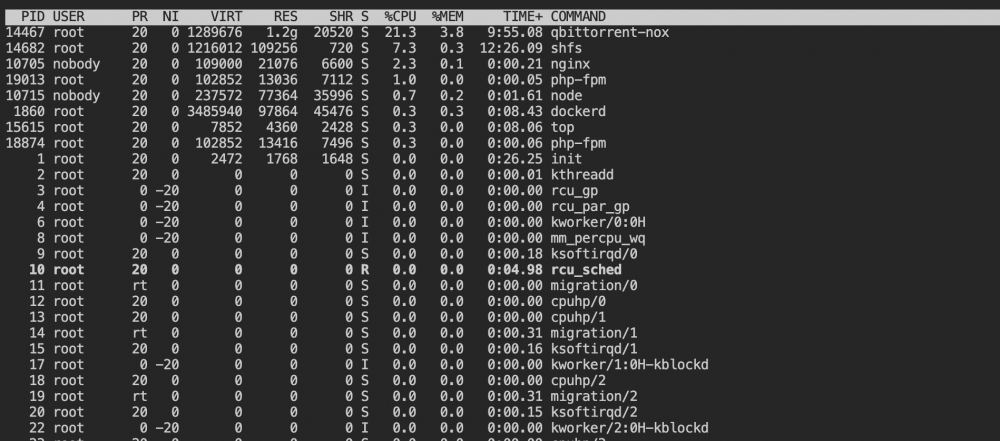
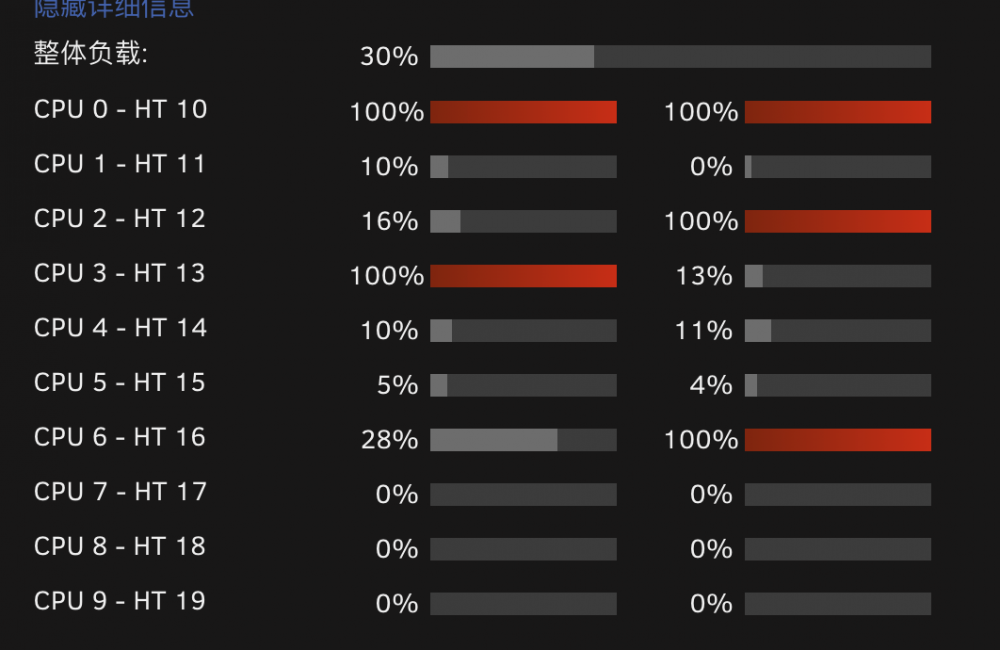
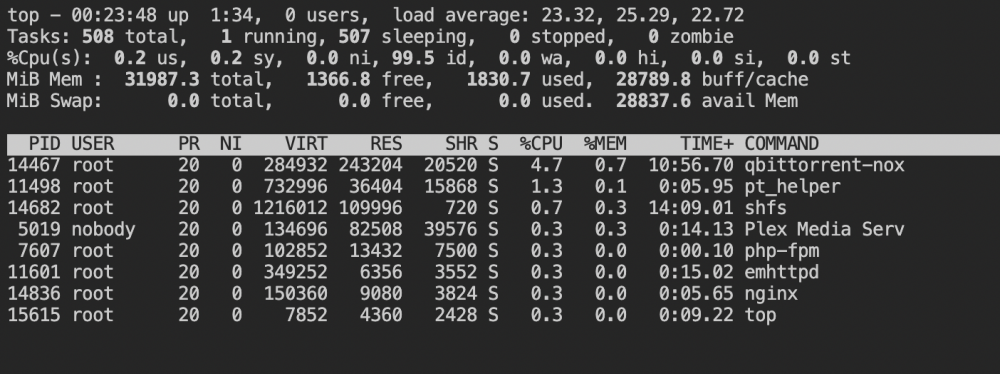
测试了几天,头两天好象情况有改观,但是今晚又出现同样的情况,多个线程不明原因占满。top界面和webui的cpu负载界面显示信息显示信息不一致,不知道是怎么回事。按理说top显示的情况不应该带来这么高的系统负载。
-
OK, I see. So that maybe the device cannot be supported. I will change some another device to try it. Thanks for your help.
-
Yes, I just want to be able to use this NIC in a VM, but no matter what I can't use it, as I mentioned above, truenas VM has no way to get the ip address, windows VM can see this NIC and I have installed the NIC drivers through a third party driver, but the network still says not connected, I'm pretty sure the network is connected. The lights on both the switch and the card are on, and I have replaced serval network cables to use them, all without success. And this NIC, which was previously used as a NIC for the unraid system (not doing pass-through), is perfectly fine.
-
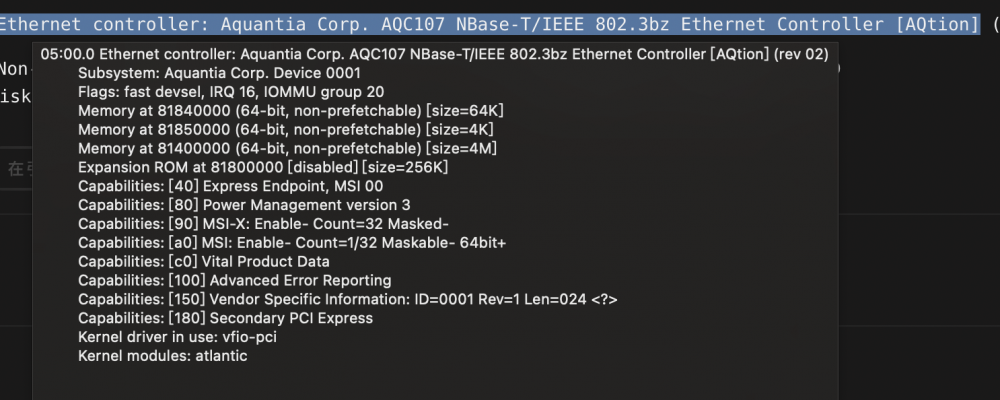
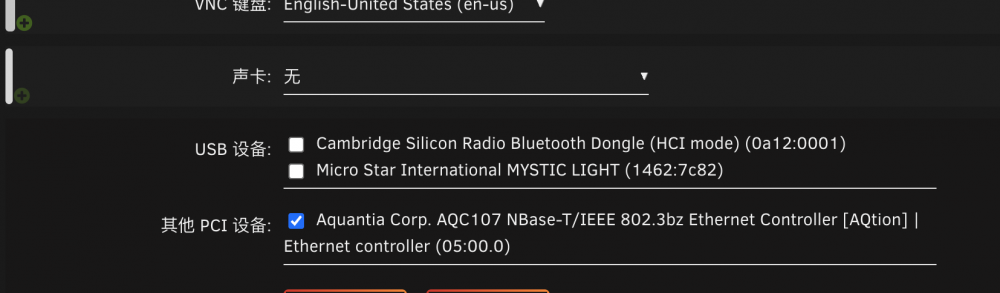
I have an Ethernet controller identified by Unraid as: Aquantia Corp. AQC107 NBase-T/IEEE 802.3bz Ethernet Controller [AQtion], brand name Comfast. I ran into a problem when using Unraid NIC passthrough, it looks like none of my settings seem to be wrong, but the NIC is unable to get an IP address, I have used Truenas and Windows VMs, specifically, a NIC device is found in Windows but no driver, and Truenas is unable to get an IP address, either through DHCP or manual mode. So I'm wondering if Unraid can't support this brand of NIC, can any of you answer my confusion? Thanks very much. Here is the device information about this NIC.
-
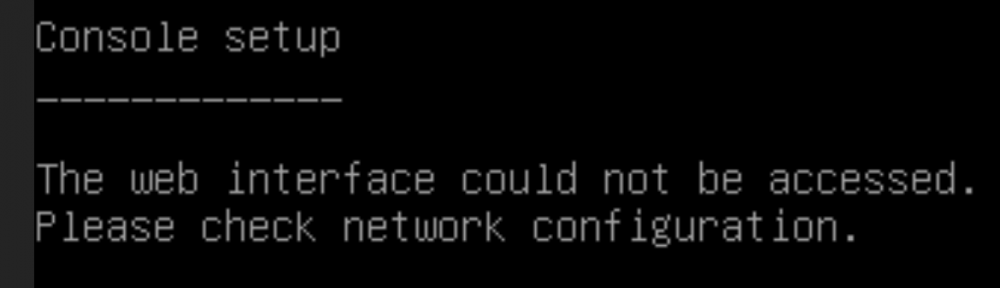
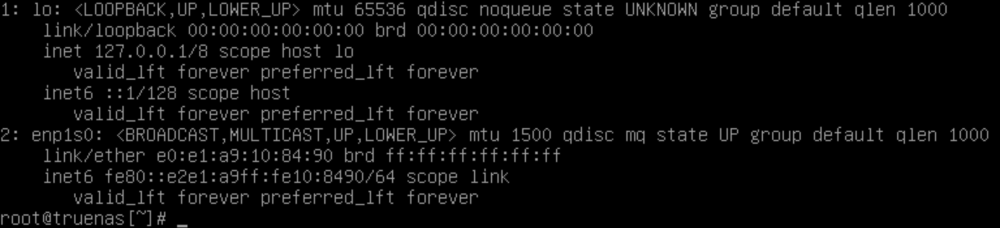
如图,Unraid虚拟机设置里面已经做了网卡直通。 安装Truenas后,面板提示无网络,按1手动配置网络后,面板可以正常显示IP地址,但是无法访问,路由器中查询也无此IP地址。 进CLI查看IP地址,反馈如下信息 网线已插好并检查过,主机及交换机上信号灯均亮起,该网卡在Unraid下不屏蔽可以正常使用。 不知道问题在哪里,能否帮忙解答一下,谢谢!
-
经测试似乎确实是这个问题导致的,我关闭可调式(支持硬链接)设置后,shfs不再影响系统,但是我有相当部分文件是需要使用硬链接的,关闭该设置后无法再生成硬链接文件,请问这个问题能否有什么两全其美的方案吗? 我很奇怪的是,我一旦打开这项设置,即使我的系统当前没有硬链接文件的读写,也会导致资源瞬间上升。这又是为什么呢?
-
好的,我尝试一下,看是否能解决这个问题。想请问下,如果设置为否,硬链接是否还能正常使用?
-
刚查了一下设置,全局共享设置之前选用的就是这个模式,那您所指的这个转移使用SMB,是否是指所有连接到UNRAID系统的设备都是通过SMB来连接?如果是这个问题的话,UNRAID的NFS共享设置是否需要关闭?
-
如图,我的unraid近期经常卡死,出现此类情况时后台查看资源应用,发现显示SHFS占用很高,时常在80-90%左右,有时候还会到120-140%的CPU占用,系统内无虚拟机,DOCKER也只开了少量,经查阅资料后发现这个可能是UNRAID的文件系统?我已经把非必要的程序尽量关闭了,MOVER周期也拉长了,仍未能完全解决。 想请教一下如何解决这个问题?

-
-
请教一下Unraid的权限问题,smb和nfs都是通过系统新建的帐号连接的(非root),该帐号已查过uid是1000,gid是100 docker创建时puid和pgid无论是写99/100,还是1000/100,所生成的文件在nfs和smb里都无法修改和删除,该帐号所有共享文件夹都具有读写权限。 请问一个这个问题应该怎么解决?
-
另外想问一下,应用市场内有否可以同时查看系统资源和docker资源的插件,图形化的插件比较清晰,主要想看哪些程序的cpu、内存、网络占用情况,docker stats只能查看docker的,而且输入命令行确实有点麻烦。我知道这不属于unraid本身系统内的问题,仅仅是希望您能够推荐。谢谢!
-
-
我是10核20线程,6789目前是灰色的,是不是就是2核心4线程的意思?你的意思再给1核2线程?
-
请教一下,如图是不是代表灰色的几个线程是给unraid系统独享的?

-
传输速度慢的问题我找了很久了,没找到解决方案,你说的方法我确认了之后再来反馈,如果能解决是最好了。
-
CPU绑定没有设置,但是我CPU完全没有跑满,这也有影响? 上面说的Intel GVT-g和Intel-GUP-TOP我稍后试一下,但是显卡的问题会影响传输吗?总觉得不太对。
-
已发送,另,系统日志里面几乎没有红色错误,除了一个disk2报错,是因为我在复制盘满了。 unraid-diagnostics-20220317-1333.zip
-
另外还有一个问题,unraid在复制文件时,系统资源完全没有跑满,但是系统响应速度极慢,比如webui点了就半天没反应,其它docker应用也基本打不开,不知道怎么解决。
-
unraid一台,群晖一台,两台nas间对传文件,速度不正常
-
如题,传输文件大概都在20-50之间。 iperf3测过网速。 群晖至unraid ===== [ 5] local 192.168.2.253 port 48634 connected to 192.168.2.12 port 5201 [ ID] Interval Transfer Bitrate Retr Cwnd [ 5] 0.00-1.00 sec 107 MBytes 901 Mbits/sec 597 335 KBytes [ 5] 1.00-2.00 sec 51.2 MBytes 430 Mbits/sec 666 11.3 KBytes [ 5] 2.00-3.00 sec 10.0 MBytes 83.9 Mbits/sec 726 7.07 KBytes [ 5] 3.00-4.00 sec 53.8 MBytes 451 Mbits/sec 660 209 KBytes [ 5] 4.00-5.00 sec 104 MBytes 870 Mbits/sec 348 317 KBytes [ 5] 5.00-6.00 sec 97.5 MBytes 818 Mbits/sec 173 209 KBytes [ 5] 6.00-7.00 sec 101 MBytes 849 Mbits/sec 560 311 KBytes [ 5] 7.00-8.00 sec 102 MBytes 860 Mbits/sec 695 337 KBytes [ 5] 8.00-9.00 sec 105 MBytes 881 Mbits/sec 418 218 KBytes [ 5] 9.00-10.00 sec 108 MBytes 902 Mbits/sec 3 215 KBytes - - - - - - - - - - - - - - - - - - - - - - - - - [ ID] Interval Transfer Bitrate Retr [ 5] 0.00-10.00 sec 840 MBytes 705 Mbits/sec 4846 sender [ 5] 0.00-10.53 sec 828 MBytes 660 Mbits/sec receiver ====== Mac至Unraid ==== [ 4] local 192.168.2.222 port 49852 connected to 192.168.2.253 port 5201 [ ID] Interval Transfer Bandwidth [ 4] 0.00-1.00 sec 116 MBytes 973 Mbits/sec [ 4] 1.00-2.00 sec 112 MBytes 940 Mbits/sec [ 4] 2.00-3.00 sec 112 MBytes 940 Mbits/sec [ 4] 3.00-4.00 sec 112 MBytes 940 Mbits/sec [ 4] 4.00-5.00 sec 112 MBytes 940 Mbits/sec [ 4] 5.00-6.00 sec 112 MBytes 940 Mbits/sec [ 4] 6.00-7.00 sec 112 MBytes 940 Mbits/sec [ 4] 7.00-8.00 sec 112 MBytes 940 Mbits/sec [ 4] 8.00-9.00 sec 112 MBytes 940 Mbits/sec [ 4] 9.00-10.00 sec 112 MBytes 940 Mbits/sec ==== 传输的都是大文件,没有碎片化的小文件。 不知道是哪里的原因导致的传输速度不行


