





Guri
Members
-
Joined
-
Last visited
Everything posted by Guri
-
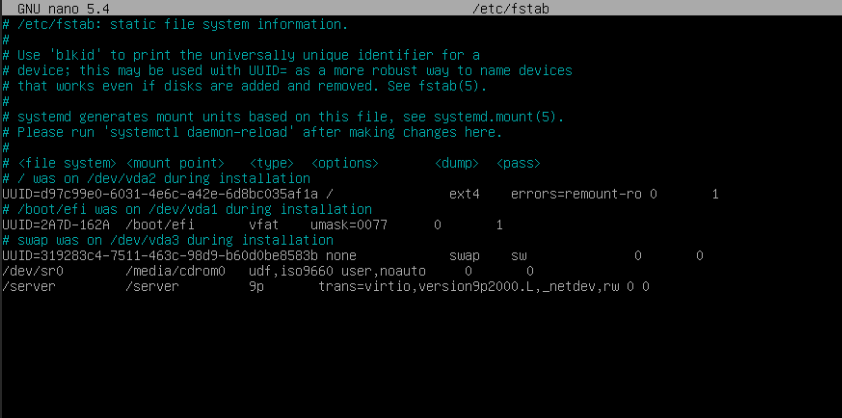
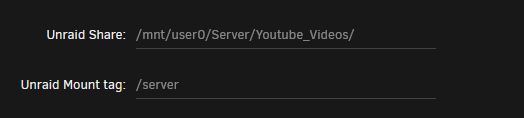
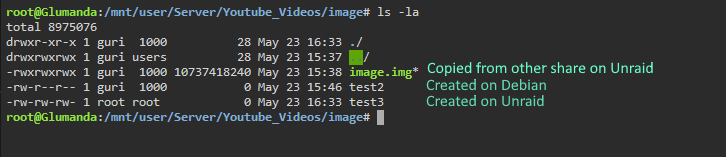
Well, the VM share folder is inside one of the shares. See Screenshots I actualy thought that Unraid would deal with that. But you are right: The files are on the cache drive, i started mover and now everything is there. Thanks.
-
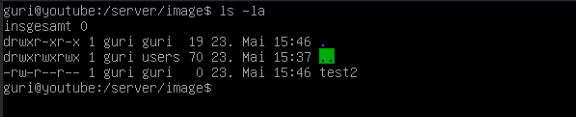
Hi, I'm somewhat new to Unraid so maybe this a obvious thing but i couldn't find anything on the Forum or Google. I want to mount a Unraid VM Share to a Debian VM, mounting worked fine but i can't see new files that are created by Unraid on the Debian-VM. I can see other files that where there before and can write files on it. In Debian created files are visible on Unraid but not the other way arround. I thought it has something to do with owner of the files so i changed it but that didn't work. I also tried remounting and restarting but still no files there. I use Unraid 6.9.2 and the VM is Debian 11. I attached some screenshots.
-
I used the official jellyfin docker before but without hardware encoding. So no. I don't know what i should try.
-
Well yes and no, did some testing and nothing over 720p 4mbits works, but everything on and under that. I thought its not using nvenc there but it clearly does according to nvidia-smi. It's disabled. I use the standard configuration, so it should use my cache drive with over 300 GB free. 510.54 I add two new FFmpeg logs one that did work on 720p 4mbit and one that doesn't on 720p 6mbit. doeswork720p.txt doesnotwork720p.txt
-
Hi, I have a problem with the transcoding on a new install. I use NVENC with a Quadro M4000 and get this FFmpeg error: frame= 1 fps=0.0 q=0.0 size=N/A time=00:00:00.00 bitrate=N/A speed= 0x [h264 @ 0x55d7dfcd99c0] No decoder surfaces left [h264 @ 0x55d7dfcf6840] No decoder surfaces left frame= 21 fps=0.0 q=11.0 size=N/A time=00:00:00.85 bitrate=N/A speed=1.05x Error while decoding stream #0:0: Invalid data found when processing input [h264 @ 0x55d7dfcbcc40] No decoder surfaces left Error while decoding stream #0:0: Invalid data found when processing input [h264 @ 0x55d7dfcd99c0] No decoder surfaces left Impossible to convert between the formats supported by the filter 'Parsed_scale_cuda_0' and the filter 'auto_scaler_0' Error reinitializing filters! Failed to inject frame into filter network: Function not implemented Error while processing the decoded data for stream #0:0 [aac @ 0x55d7dee47b40] Qavg: 65536.000 [aac @ 0x55d7dee47b40] 2 frames left in the queue on closing Conversion failed! I add the complete log of FFmpeg and excerpt of the Jellyfin log. My configuration is standard, nothing special anywhere. I double checked the guide and everything seems to be right, just doesn't want to work. Really don't know what I could do, I played arround with pretty much every option that exists. Thanks in advance! FFmpeg.Transcode-2022-03-25_16-56-30_4e8ec9ec401afbecd4331aa4826a071d_323a07e4.log jellyfin log.txt
