




Skip to content
View in the app

A better way to browse. Learn more.

Unraid

A full-screen app on your home screen with push notifications, badges and more.

To install this app on iOS and iPadOS
  1. Tap the Share icon in Safari
  2. Scroll the menu and tap Add to Home Screen.
  3. Tap Add in the top-right corner.
To install this app on Android
  1. Tap the 3-dot menu (⋮) in the top-right corner of the browser.
  2. Tap Add to Home screen or Install app.
  3. Confirm by tapping Install.

PeeLoW

Members
  • Joined

  • Last visited

  1. Thanks for the insights i will look in to this! Really appriciate your help!
  2. Thanks for the help so far! I can't check the bios right now but will later today. Here is the diagnostics. peelow-diagnostics-20231011-0856.zip
  3. I have changed back to the old slot which has been working before and the bios is at the same version it worked before.
  4. I did swap the slot (and back again). So there is a slight chans i fucked up...
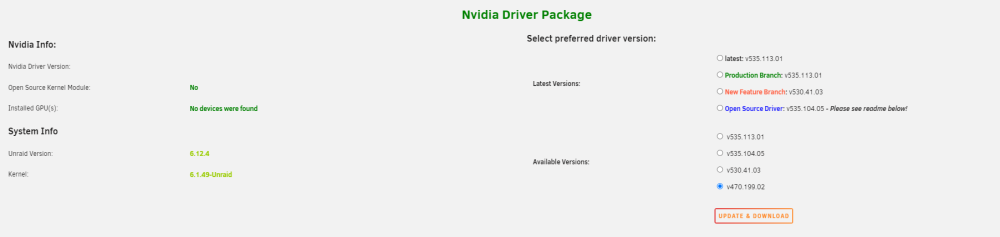
  5. Hi I have an issue were my GPU is not found. Im not certain if this is caused by an update of the plugin and (or) driver version. This used to work in an earlier driver version. Or could this be caused by a faulty card? Thanks alot for any help. /P peelow-diagnostics-20231010-2219.zip
Account

Navigation

Search

Search

Configure browser push notifications

Chrome (Android)
  1. Tap the lock icon next to the address bar.
  2. Tap Permissions → Notifications.
  3. Adjust your preference.
Chrome (Desktop)
  1. Click the padlock icon in the address bar.
  2. Select Site settings.
  3. Find Notifications and adjust your preference.