





wildc4t
Members
-
Joined
-
Last visited
-
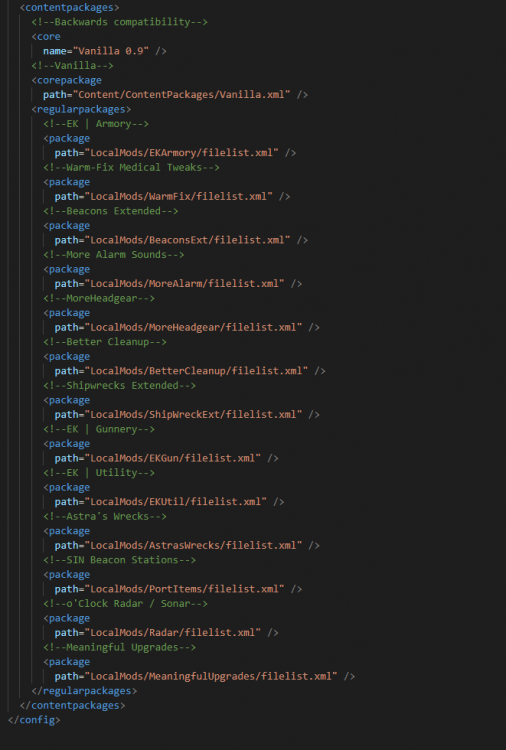
Got the mods working in a workaround kind of way, in case anyone stumbles on this thread. I took all my client downloaded mods (after booting client into the game and enabling them in the main menu -> steam workshop menu) and copied them to my server folder path "LocalMods" (if you don't know where your client folders are, right-click Barotrauma in the Steam Library page and click "Manage" -> "Browse Local Files"). They will copy over with their steam ID (i.e. "2651474931"). I then renamed the containing mod folders so that the game would consider them a Local Mod and not a steam workshop mod. For instance the folder named "2651474931" was renamed to "Radar". Then, back in the main directory, open config_player.xml: 1. Change the language from "None" to "[your language]" 2. Go to your client directory and open it's config_player.xml and copy everything between <contentpackages> and </contentpackages> 3. Open the server file version of config_player.xml. 4. Paste the section in between the <contentopackages> and change all the mod directories from the client side (i.e. path="C:/Users/Name/AppData/........../filelist.xml") to the correct path in the server directory for all the folders that you renamed (i.e. path="LocalMods/Radar/filelist.xml") 5. Complete step 3 for all mods in your modlist and save the server file. 6. Restart Barotrauma docker if you accidentally left it running If you see your server listed on the server browser in Baro, click on it and look to the bottom right pane and it will show the mods that are currently running. That's how you know it's worked. Also, if you get an error that says something along the lines of <StartGame>d__95 has failed, you need to ensure that the language is not still set to "none" in the config_player.xml file. See the attached image if you need more help. I'm sure they'll patch the game soon to fix this for dedicated server users, but this should help people get going again.
-
I'm still pretty new to the whole thing, but it looks like my file path should be correct then on this line of the player_config.xml file, right? Thanks for all your help.
-
Sure. Before yesterday's update you could follow the guide here: https://barotrauma.fandom.com/wiki/Enabling_Mods_on_a_Dedicated_Server With the new update, there is a new filepath called "Workshop Mods" and its path is called out in the config_player.xml file under the main directory. The section in the config_player file that calls out mods looks like this: <contentpackages> <!--Backwards compatibility--> <core name="Vanilla 0.9" /> <!--Vanilla--> <corepackage path="Content/ContentPackages/Vanilla.xml" /> <regularpackages> <!--o'Clock Radar / Sonar--> <package path="/serverdata/serverfiles/WorkshopMods/Installed/2651474931/filelist.xml" /> </regularpackages> </contentpackages> Where the filelist.xml indexes the mod and the folder number relates to a steam workshop ID. What I pasted above is just one of the mods I'm trying to get working. I'm almost positive I've written the filepath incorrectly, because if I self-host on my client I can get the mods working on my self-hosted server. This may be fixed in a hot-fix from the devs, I just want to verify that my pathing is correct.
-
Good evening and thank you for the hard work on these. Barotrauma just released an update today that caused my perfectly working server to not be able to use mods anymore. The devs on discord said that the update added a "LocalMods" directory under what typically falls under my User/Appdata/... file on my windows machine/client. It seems that the way that the docker container handles that is under a container path of /serverdata/serverfiles/.... Well, the problem is that within the file structure, there is an .xml file that points to the LocalMods directory and I've tried to point it to /mnt/cache/......../Local Mods and /serverdata/serverfiles/...../Local Mods/ but it still doesnt seem to pull in the mods. The config files entries and the mod file folders are copied directly from my client (my windows machine) which can self-host with mods no problem. Is my filepath correct in the config file like this? Nothing has been changed on the Barotrauma template: path="/serverdata/serverfiles/WorkshopMods/Installed/2651474931/filelist.xml"

