





Bovin
Members
-
Joined
-
Last visited
Everything posted by Bovin
-
I upgraded OS by Update OS Tool. I cannot find stable version, only 6.10.2-rc3, so I upgraded to it. After reload, cache disk is not able to mount. I tried to delete cache pool and create it again, but the problem is persisted. Please help. bovin-lab-diagnostics-20220605-1158.zip
-
这个应该只能联系官方处理了。试用页面购买的也有邮件恢复,如果找不到了,应该可以提供原来U盘ID来给客服查。
-
My spin up issue resolved. Docker.img file change sometimes. By default, it should in cache pool. But in my box, I bring up array, then add cache. Since docker engine runs all the time, so mover are not able to move docker.img to cache disk. But in this situation, file activity plug are not able to detect any docker.img file change. My workaround: Check if VM or docker.image file in spin up disk. If it is, then stop docker engine/vm and run mover to save them to cache disk.
-
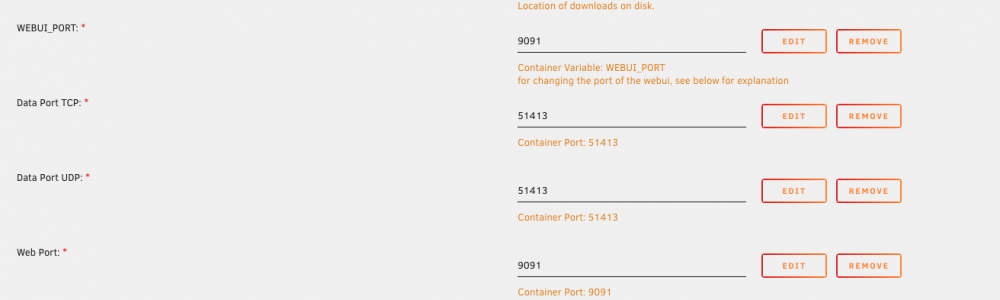
APP store默认的模版需要修改下。创建容器时候,打开高级模式,以下位置需要修改

-
从RC1到目前RC4的更新频率,看起来不会很快发布。这种服务器系统更新不会太快,稳定为主
-
Thanks for your finding and suggestion. Let me check this. My box to github connection is unstable due to government firewall. That's what I thought it was issue for Unknown o Community warning.
-
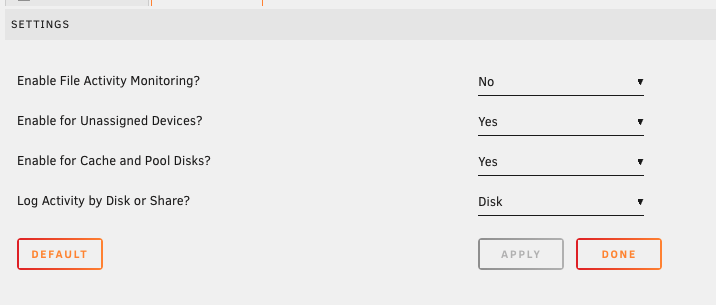
After disable unassigned devices and cache/pool disks. It works now.
-
Now I use default. Also tried to disable cache and pool disks.
-
thanks for your quick response. I use the default value 524288. Now I tried 1524288. The problem is persisted. By the way, I am run on 6.10.0-rc4. Any known compatible issues?
-
Plugin will not start in my box. no any error in cli or syslog. Please help check this. root@Bovin-lab:~# /usr/local/emhttp/plugins/file.activity/scripts/rc.file.activity 'start' Starting File Activity... root@Bovin-lab:~# /usr/local/emhttp/plugins/file.activity/scripts/rc.file.activity 'start' Starting File Activity... root@Bovin-lab:~# ps aux | grep inotif root 12345 0.0 0.0 3984 2352 pts/0 S+ 18:09 0:00 grep inotif bovin-lab-diagnostics-20220404-1812.zip
-
Update: From tip and tweaks plug post, Intel newer CPU run with P-state driver, it is sensitive. The workaround to disable Intel p-state driver works. The CPU runs at low frequent 800Mhz. I suspect dir cache plug spike CPU, so CPU are not able to run at base frequent. then I disabled dir cache plug, but the problem is persisted. I compare electricity consumed when enable or disable Intel P state driver, they are almost the same. This is unbelievable if CPU keep running at high frequency. then I use cpufreq-info cli to check, finds current CPU frequency is expected at 800MHz. watch command seem incorrect. But one more issue, if I uninstall tip and tweaks plug, then CPU governor set to performance. I do not know what is default value, but I think for most users, we want to save power at this moment. ### cpufreq-info cpufrequtils 008: cpufreq-info (C) Dominik Brodowski 2004-2009 Report errors and bugs to [email protected], please. analyzing CPU 0: driver: intel_pstate CPUs which run at the same hardware frequency: 0 CPUs which need to have their frequency coordinated by software: 0 maximum transition latency: 4294.55 ms. hardware limits: 800 MHz - 3.80 GHz available cpufreq governors: performance, powersave current policy: frequency should be within 800 MHz and 3.80 GHz. The governor "powersave" may decide which speed to use within this range. current CPU frequency is 800 MHz.>>>>>>>>>>>>>>>>>>>>>>>>>>>>>>>> Every 2.0s: grep "cpu MHz" /proc/cpuinfo Wed Apr 6 21:44:22 2022 cpu MHz : 800.134 cpu MHz : 3800.000 cpu MHz : 3800.000 cpu MHz : 3800.000 =============================================================================== Media server Unraid OS Trial Version 6.10.0-rc4 CPU: Intel G5420 New to unraid, I found my machine consume two times power than ubuntu, even all disks already spin down. After check, I found the frequent of most CPU cores high to 3800, but all 800 for my CPU at low load. All VMs and container stopped. Every 2.0s: grep "cpu MHz" /proc/cpuinfo Bovin-lab: Mon Apr 4 10:09:09 2022 cpu MHz : 3800.000 cpu MHz : 800.102 cpu MHz : 3800.000 cpu MHz : 3800.000 Top Tasks: 229 total, 1 running, 228 sleeping, 0 stopped, 0 zombie %Cpu(s): 1.1 us, 1.3 sy, 0.0 ni, 97.4 id, 0.2 wa, 0.0 hi, 0.0 si, 0.0 st top - 10:10:06 up 43 min, 0 users, load average: 0.08, 0.11, 0.34 Tasks: 225 total, 1 running, 224 sleeping, 0 stopped, 0 zombie %Cpu(s): 1.0 us, 1.1 sy, 0.0 ni, 97.9 id, 0.0 wa, 0.0 hi, 0.0 si, 0.0 st MiB Mem : 15568.4 total, 14179.1 free, 340.6 used, 1048.8 buff/cache MiB Swap: 0.0 total, 0.0 free, 0.0 used. 14259.2 avail Mem I installed fix common problem, no issue reported. I installed tips and tweaks, CPU already set to power save mode. I tried performance or schedule, no different. also tried to reboot it.


