elverion
Members
-
Joined
-
Last visited
-
Thank you, ich777. I still have not been able to identify exactly what is going on in my specific case, but I do think at this point it is either something fucky with my router, or my ISP blocking it somehow. My unRAID server is what I use in my home network behind said router, so I tried spinning up a Longvinter server instance in one of my dedicated servers rather than in-home. It showed up without any fuss at all. Maybe it is because my router doesn't support loopback? Sorry for having wasted your time.
-
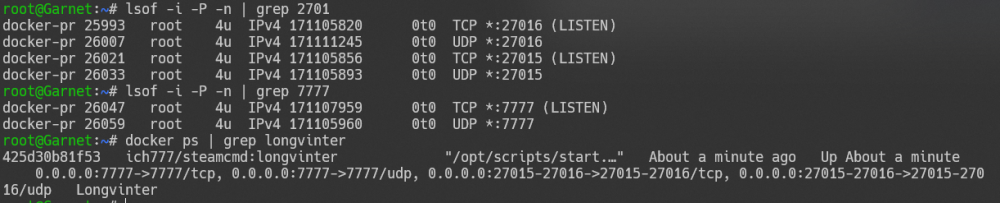
I added those ports only because the server wasn't showing up in the server list, so checked what other ports that it may need. It was worth a try at least. Thank you for the confirmation. I thought that was correct, but again was following general Longvinter server setup guides as it wasn't working for me; several of them mentioned forwarding both TCP and UDP, so again I thought it was worth a shot. They don't report doing so, no. https://www3.bellmts.ca/mts/support/internet/security/blocked+or+restricted+ports I do not have any other services on UDP to verify that. I did previously WireGuard over UDP and last time I checked it was working. I completely wiped my container and re-pulled, keeping only the config files. UDP 27016 forwarded to the UnRAID server but it still does not show up in the in-game server browser. Could it be something dumb like a game version mismatch? The logs show: > [2022.04.05-17.16.52:010][ 0]LogNetVersion: Longvinter 1.0.0, NetCL: 0, EngineNetVer: 16, GameNetVer: 0 (Checksum: 1263331118) But the menu shows the game version as 1.0.2 edit: I can still connect to the server using the session ID that shows in the Steam Server Browser's LAN list so the server is fully starting correctly, just not showing in the server browser for some reason.
-
I just installed ich777/steamcmd:longvinter onto my Unraid server. I also forwarded relevant ports for this game (both TCP & UDP for 27015, 27016, 7777) in my router. I also added ports 27015 and 7777 to the container to see if that would help. Try as I might, I cannot get this game to show up in the server list in-game, but it does show up in the Steam LAN list in the Steam Server browser. I do see that someone else is running a server named "Longvinter Docker" with the default "Docker" password so clearly somebody was able to set this up correctly. Anyone else been able to make progress here?