





MrCakeSlayer
Members
-
Joined
-
Last visited
Everything posted by MrCakeSlayer
-
I've replaced the PSU and ran extended tests on all the drives, they seem to be functioning as expected now. I did the new configuration stuff as you described and I'm currently waiting on the rebuild (~11h to go). Thanks for all of the help to everyone who contributed. ❤️
-
I ran the extended on that drive by itself and it still occurred, so unrelated to all drives being tested at once. Though testing it by itslef did cause it to spam a few Apr 28 12:45:05 Vortex kernel: sd 12:0:5:0: [sdg] tag#4591 UNKNOWN(0x2003) Result: hostbyte=0x00 driverbyte=0x08 cmd_age=3s Apr 28 12:45:05 Vortex kernel: sd 12:0:5:0: [sdg] tag#4591 Sense Key : 0x2 [current] Apr 28 12:45:05 Vortex kernel: sd 12:0:5:0: [sdg] tag#4591 ASC=0x4 ASCQ=0x0 Apr 28 12:45:05 Vortex kernel: sd 12:0:5:0: [sdg] tag#4591 CDB: opcode=0x88 88 00 00 00 00 04 8c 3f ff 40 00 00 00 08 00 00 Apr 28 12:45:05 Vortex kernel: blk_update_request: I/O error, dev sdg, sector 19532873536 op 0x0:(READ) flags 0x80700 phys_seg 1 prio class 0 Errors before throwing the power on reset message again. Since swapping the power cables around didn't seem to swap the issue to another drive I guess I'll swap the sata cables around again and see what that does. vortex-diagnostics-20220428-1255.zip
-
Thanks for the steps. I decided to run an extended test across all drives before trying to do a rebuild and I noticed Apr 28 12:36:01 Vortex kernel: sd 12:0:1:0: Power-on or device reset occurred Apr 28 12:36:01 Vortex rc.diskinfo[10243]: SIGHUP received, forcing refresh of disks info. Showing in the logs and it canceling the test for a specific drive (Parity 1) due to "Interrupted (host reset)". I swapped power cables around and received the same issue when trying to run extendeds or even shorts on all of the drives at once. Is this something I need to be concerned about before rebuilding? Would this be a PSU issue? I have a 500w power supply I'm using attached to a UPS.
-
I've gone ahead and updated the Firmware to 20.00.07.00, should I also upgrade the BIOS or should that be fine? Also while I have a decent idea of how I should do the config stuff, would you mind providing more explicit steps as I'd really prefer not to lose more data than needed. Num Ctlr FW Ver NVDATA x86-BIOS PCI Addr ---------------------------------------------------------------------------- 0 SAS2308_2(D1) 20.00.07.00 14.01.00.06 07.39.00.00 00:0a:00:00
-
Upgraded to an LSI SAS 9207-8i, booted up, all drives appeared, threw it into maintenance mode, logs and everything looked good. started sync, and it instantly killed another drive with errors. So now I have 2 emulated drives and a disabled drive. vortex-diagnostics-20220427-1946.zip

-
The problem is too many disks are having connection issues to rebuild anything. I bought a JMB585 controller from the recommended list linked above. It's even more broken, almost never gets detected when booting or only shows 1 or 2 disks connected to it when booting (only once did it show all 5), and the detected disks random changes every boot/restart. The marvel and motherboard controllers detect all the disks and allows booting. So I'm returning the JMB controller. I currently have 4 disks back on the other sata card and 2 disks plugged into the mother board so it actually detects all the disks and boots. I've attached the most recent diagnostics. Not that it's much help, the drives spamming errors changes randomly on each restart anyways though parity 2 disk (6TK) and the disk 4 (NCM) disk seem to be the most consistent with it. Basically I'm wondering what do I actually need to do to get unraid to actually come back online and work again? I've had literally nothing but issues for the past month that I've been using unraid and had zero issues with the 2 years prior while running windows. Surely all of my drives didn't decide to just all die at the same time and I've swapped out sata cables from multiple brands like 6 times at this point plus the brand new drive also had the same issue with unraid. How can I actually narrow down what specifically is causing the issue and fix that? The data is just movies/TV shows so it's non-critical but it'd be a pain to redownload everything. vortex-diagnostics-20220420-2230.zip
-
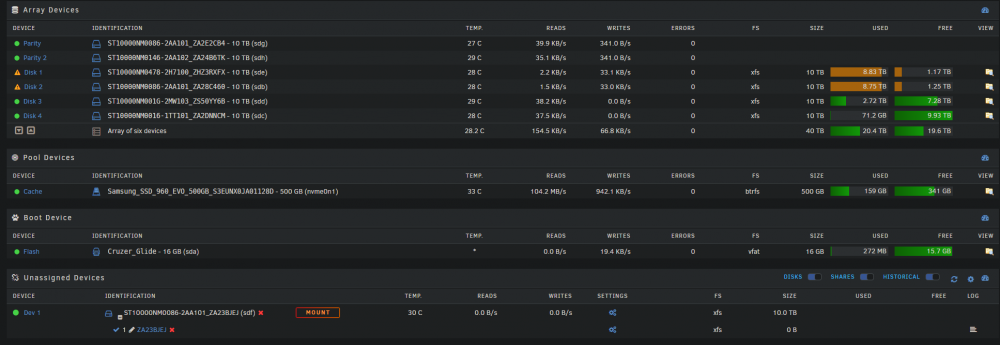
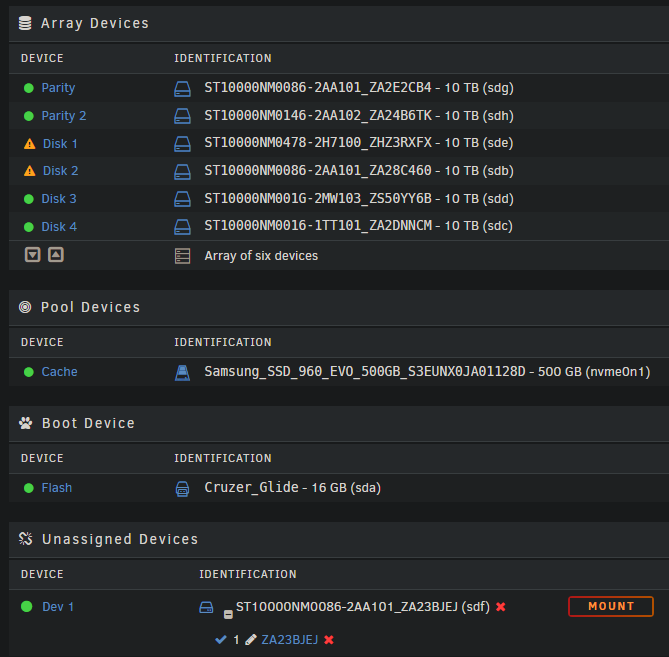
I'm not quite sure what your suggesting I do. However I currently only have a single disk that isn't in the array and unless I'm mistaken I currently couldn't swap the parity disk with another drive anyways since I have 2 emulated data disks. So what is the best path/steps forward to resolve this without data loss? I do currently have another sata controller on the way that I purchased from the list reccomended above and will be moving all sata cables/hdds off the motherboard as well. Should I go ahead and purchase another drive? I'd rather not due to how expensive the 10tb drives are but I can if that's the only solution. Its also worth noting that the currently out-of-array JEJ drive was having the same issues as the current parity #2 drive which is why I swapped it out of the array with the brand new disk.
-
Hello, I've started the array in normal mode and have attached the related diagnostics for that. It did try to start parity rebuild but I canceled it. vortex-diagnostics-20220416-1107.zip
-
Hello, I was unable to find any ASPM settings in the BIOS for this motherboard. I'm also unable to swap around any more disks. I currently have 2 emulated data disks and the only disk throwing the drive errors currently is a parity disk. I've uploaded a new diagnostics file while the array is running in maintenance mode. From what I can tell, I need to do a rebuild to get the current drives running however the rebuild runs at like 30kb's while the parity disk spams errors if I attempt to. As it stands with the current configuration all disks are working properly without spamming the previous errors except for parity disk 2. vortex-diagnostics-20220416-1055.zip
-
Updated pcpartpicker, it's now public. Yes, I would have enough ports on the motherboard. However as previously stated the issue is occurring with HDDs attached directly to the motherboard. All HDDs on the controller are working perfectly. This issue was also occurring BEFORE the sata card was ever installed.
-
Thanks I appreciate the guide to other controllers. Though I was wondering if you guys had any insight into the errors I'm having or should I just throw a second sata card in there and move everything off the mobo sata ports? I'd prefer to just solve the root issue if possible though so I cna just get it back up and running tonight. I also appreciate all of the quick answers.
-
I don't know off the top of my head, however if it's not in the logs I can check when I get off work. Here's the original pcpartpicker list for the components including the motherboard: https://pcpartpicker.com/user/MrCakeSlayer/saved/fN72Vn The ssd is used as cache drive though I've installed a newer 500gb that I'm active using.
-
Be that as it may, the controller isn't causing the issue. All 4 drives plugged into the 4 port controller are working perfectly. It's the ones plugged into the motherboard having problems. These issues were also occurring before I even installed the sata card. Also if you have a reccomendation for another card, I don't mind buying a different one at a later point however I'm more concerned with the root issue erroring the mobo connected drives atm.
-
Hello, Yes this is one of the things I considered. It's currently on a 500w PSU with an average usage of about 170w according to the connected UPS. Up until today there were no power splitters though I did connect one to preclear the new disk. All disks in the array are connected directly to the psu cable and not to the splitter. 3 power cables for sata, 2 ports on each. So 6 drives total connected to the psu. As stated above the splitter is currently used to power 1 drive outside of the array but this issue persistent long before that. And it is connected to a UPS to prevent unclean shutdowns but this should also mean the psu is getting "clean" / steady power as well
-
I've been having some weird issues with my drives. As far as I can tell based on SMART reports and the fact that the drives can be connected to and can be read from, the drives appear to be healthy and not actually failing. However, they seem to randomly spam disk errors. From reading around this seems to be related to the sata cables and appears to behave that way as different drives will have the issue if I swap out a bunch of cables or switch them around however it seems that no matter how many cables I swap I still end up with 1 or 2 drives with the issue. I believe this also leads to the parity rebuild being extremely slow (i.e. 143kb/s). This is all assumptions based on some trial and error however I've been dealing with this issue for a week. I've bought a sata controller to confirm it wasn't the motherboard ports being weird, I've bought 3 new packs of sata cables from different stores and have even bought an entirely new drive to swap and attempt a rebuild to no avail. I've run out of ideas of how to fix or and haven't had any luck in actually narrowing down the issue and hopefully someone here can help point me in the right direction. I've uploaded the latest diagnostics. At the current time, Parity Disk #2 (2AA102_ZA24B6TK) & Disk #1 (2AA101_ZA23BJEJ) being the two spamming errors. While Disk #2 (2AA101_ZA28C460) currently requires a rebuild as it was previously one of the drives spamming these same errors until it became disabled. Disk #2 was originally (2H7100_ZHZ3RXFX) but I swapped it with the new drive to see if that would fix anything (which I of course precleared the new drive) vortex-diagnostics-20220415-1421.zip



