





jaimbo
Members
-
Joined
-
Last visited
-
Agreed, this issue has been reported multiple times over the last 2+ years without acknowledgement that it's a real issue. @limetech How can we move forward with getting this issue resolved?
-
Current release of 6.12.x only supports Intel Arc with a 3rd party kernel Closed beta release of 6.13.x which should apparently be open beta soon™️ supports Intel Arc natively
-
This plugin is currently broken on 6.13.0-beta.2 I think due to the mover binary being relocated: <6.12: /usr/local/bin/move >6.13: /usr/libexec/unraid/move Just making sure this is on the radar to be fixed before release
-
You could likely follow the same guide but substitute the 6.12.2 server files and the subsequent references in the commands with the 6.11.5 download and directories
-
Ah okay, I think the guide is right then - No ZFS support if you follow the guide. That's fine for me though 🤷♂️

-
Not sure why it wouldn't but I don't use ZFS and not sure of the best way to test it?
-
Not really sure what the question is here? If you follow the linked guide, you'll be compiling a 6.2.16 kernel for Unraid based on the patches etc. for Unraid 6.12.2. It could be possible to substitute the kernel source and appropriate related directories in the commands given in the guide for a 6.3.13 kernel (I don't think 6.4 supports OpenZFS yet) but I'm by no means an expert and kernel 6.2.16 seems to be working perfectly for me. I won't push my luck for now and will stick with kernel 6.2.16.
-
I haven't given it a proper test yet - will try and see how many 4k>1080p transcodes I can get going on it this weekend, but from what I've seen in this thread and other places already, the Arc cards are no slouch for transcoding!
-
"Native Unraid" - I am running Plex using the built in Docker engine and passing through the card with --device /dev/dri/renderD128
-
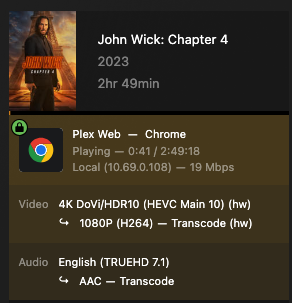
I'd tried this guide previously without any success but I've just given it a go now for 6.12.2 and it seems to be working perfectly! I can see the A380 in intel_gpu_top: I've passed through /dev/dri/renderD128 to my Plex container and can select the Arc card in Plex for HW transcoding: and I can see Plex is HW transcoding and HW tonemapping as well: Amazing, very happy


-
Looks like Plex have some dev builds available with the latest intel drivers (for fixing separate issues) and it might support hardware transcoding for ARC GPUs! https://forums.plex.tv/t/anybody-get-hw-transcoding-working-with-the-a380-on-ubunutu/823618/29 Anyone in this thread able to test/confirm this? Looking forward to Unraid moving to kernel 6.2 and hopefully seeing the new intel driver in the main Plex builds 😁




