





maxkoehler
Members
-
Joined
-
Last visited
Everything posted by maxkoehler
-
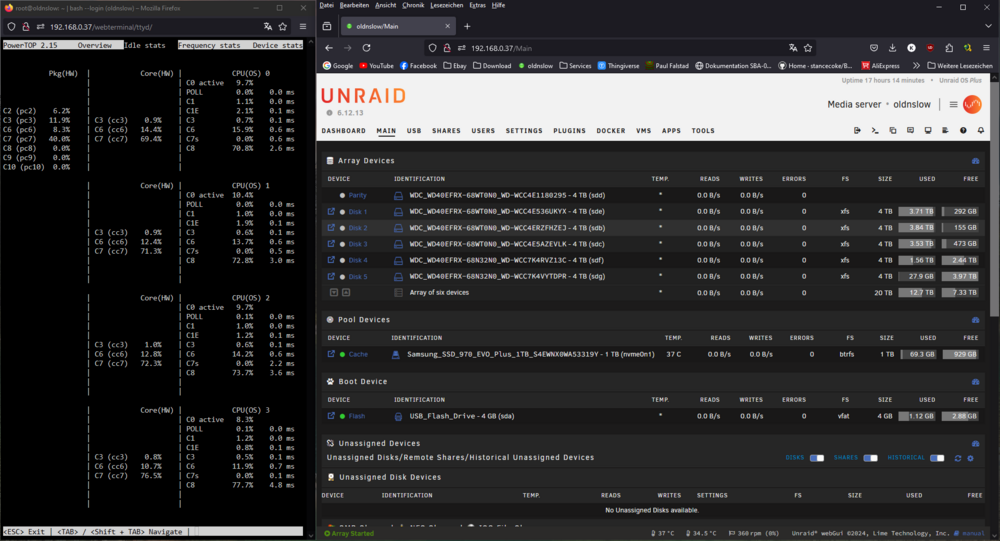
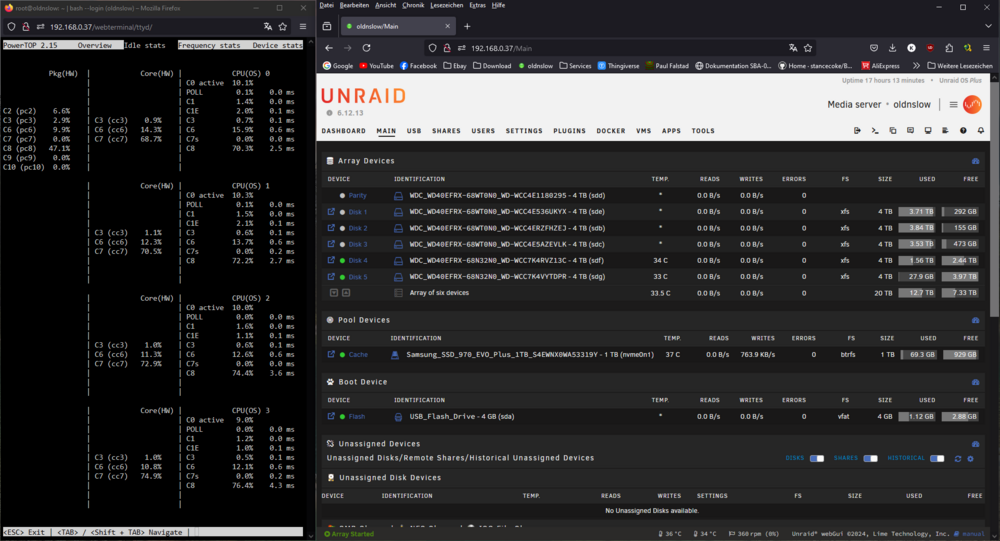
Hi all, I've observed an odd behaviour in the package C-States of my Unraid machine that's configured as follows: Unraid Version: 6.12.13 Mainboard: Fujitsu D3417-B2 (Bios Version V5.0.0.12 R1.26.0) CPU: Intel I5-7500 Memory: 32GiB DDR4 Array HDD: 6x 4 TB WD Red (WD40EFRX) Cache SSD: Samsung 970 Evo Plus 1 TB PSU: Corsair RM650x I extended my array of previously 4 Devices (4x WD40EFRX-68WTONO) with two more hard drives (2x WD40EFRX-68N32N0). As long as the new never devices are spinning, the system is able to enter Package state C8. As soon as one of the two newer drives is spinning down, the system is only able to reach Package state C7. Has anyone else ever experienced a similar behavior or does anyone know where it comes from and how to solve it? I attached two images, one where powertop is clearly indicating C7 as the highest C-State while the drives are down and one where powertop is indicating C8 while disk 4 and disk 5 are up and I attached some hard drive data obtained through hdparm (sde for comparison as well as sdf and sdg). Thanks for you help. Best, Max hdparm_dev_info.txt
-
Thanks for you replies! Sorry for starting a new topic instead of asking in the support thread, I'm new to posting in forums but I'll adhere to it in the future 👍.
-
Hi there, my question relates to power readings from nvidia-smi. Currently, I'm running a Nvidia Quadro P620 with the newest driver from the nvidia driver plugin (great work btw). In general, it all works fine! Transcoding for Jellyfin and tdarr works and the card also enters persistence mode when idle. No complaints so far. What bothers me a bit, is that my graphics card won't output power reading informations through nvidia-smi. I'm currently not aware if the Nvidia Quadro P620 is just not capabale of doing so, or if there's some issue going on. To give you a better overview, I attached the NVSMI Log. Thank you and best Regard ==============NVSMI LOG============== Timestamp : Mon May 2 02:51:24 2022 Driver Version : 510.68.02 CUDA Version : 11.6 Attached GPUs : 1 GPU 00000000:01:00.0 Product Name : Quadro P620 Product Brand : Quadro Product Architecture : Pascal Display Mode : Disabled Display Active : Disabled Persistence Mode : Enabled MIG Mode Current : N/A Pending : N/A Accounting Mode : Disabled Accounting Mode Buffer Size : 4000 Driver Model Current : N/A Pending : N/A Serial Number : 1421020068036 GPU UUID : GPU-1bb3e78e-770d-f7a6-affe-5dcd4be0292d Minor Number : 0 VBIOS Version : 86.07.90.00.A7 MultiGPU Board : No Board ID : 0x100 GPU Part Number : 900-5G178-2741-000 Module ID : 0 Inforom Version Image Version : G178.0505.00.02 OEM Object : 1.1 ECC Object : N/A Power Management Object : N/A GPU Operation Mode Current : N/A Pending : N/A GSP Firmware Version : N/A GPU Virtualization Mode Virtualization Mode : None Host VGPU Mode : N/A IBMNPU Relaxed Ordering Mode : N/A PCI Bus : 0x01 Device : 0x00 Domain : 0x0000 Device Id : 0x1CB610DE Bus Id : 00000000:01:00.0 Sub System Id : 0x126410DE GPU Link Info PCIe Generation Max : 2 Current : 1 Link Width Max : 16x Current : 16x Bridge Chip Type : N/A Firmware : N/A Replays Since Reset : 0 Replay Number Rollovers : 0 Tx Throughput : 0 KB/s Rx Throughput : 0 KB/s Fan Speed : 34 % Performance State : P8 Clocks Throttle Reasons Idle : Active Applications Clocks Setting : Not Active SW Power Cap : Not Active HW Slowdown : Not Active HW Thermal Slowdown : Not Active HW Power Brake Slowdown : Not Active Sync Boost : Not Active SW Thermal Slowdown : Not Active Display Clock Setting : Not Active FB Memory Usage Total : 2048 MiB Reserved : 48 MiB Used : 1 MiB Free : 1998 MiB BAR1 Memory Usage Total : 256 MiB Used : 4 MiB Free : 252 MiB Compute Mode : Default Utilization Gpu : 0 % Memory : 0 % Encoder : 0 % Decoder : 0 % Encoder Stats Active Sessions : 0 Average FPS : 0 Average Latency : 0 FBC Stats Active Sessions : 0 Average FPS : 0 Average Latency : 0 Ecc Mode Current : N/A Pending : N/A ECC Errors Volatile Single Bit Device Memory : N/A Register File : N/A L1 Cache : N/A L2 Cache : N/A Texture Memory : N/A Texture Shared : N/A CBU : N/A Total : N/A Double Bit Device Memory : N/A Register File : N/A L1 Cache : N/A L2 Cache : N/A Texture Memory : N/A Texture Shared : N/A CBU : N/A Total : N/A Aggregate Single Bit Device Memory : N/A Register File : N/A L1 Cache : N/A L2 Cache : N/A Texture Memory : N/A Texture Shared : N/A CBU : N/A Total : N/A Double Bit Device Memory : N/A Register File : N/A L1 Cache : N/A L2 Cache : N/A Texture Memory : N/A Texture Shared : N/A CBU : N/A Total : N/A Retired Pages Single Bit ECC : N/A Double Bit ECC : N/A Pending Page Blacklist : N/A Remapped Rows : N/A Temperature GPU Current Temp : 40 C GPU Shutdown Temp : 103 C GPU Slowdown Temp : 100 C GPU Max Operating Temp : N/A GPU Target Temperature : 83 C Memory Current Temp : N/A Memory Max Operating Temp : N/A Power Readings Power Management : N/A Power Draw : N/A Power Limit : N/A Default Power Limit : N/A Enforced Power Limit : N/A Min Power Limit : N/A Max Power Limit : N/A Clocks Graphics : 139 MHz SM : 139 MHz Memory : 405 MHz Video : 544 MHz Applications Clocks Graphics : 1265 MHz Memory : 2505 MHz Default Applications Clocks Graphics : 1265 MHz Memory : 2505 MHz Max Clocks Graphics : 1354 MHz SM : 1354 MHz Memory : 2505 MHz Video : 1341 MHz Max Customer Boost Clocks Graphics : 1354 MHz Clock Policy Auto Boost : N/A Auto Boost Default : N/A Voltage Graphics : N/A Processes : None


