





sailingbikeruk
Members
-
Joined
-
Last visited
-
In today's "least privilege" world that's pretty shocking ... It might even be a deal breaker.
-
I am using a number of AI agents in my lab and I'd like to give one of them restricted access to Unraid for resource checks. It has an account in the GUI but can't authenticate using SSH. I found this post from some years ago with the last update in 2025. https://forums.unraid.net/topic/59665-add-ssh-user/ Is there still no native way to allow SSH to a restricted account? I should make it clear this is all INTERNAL on my Lab network and my Unraid server is not exposed externally in anyway.
-
I have Graylog installed in an LXC on Proxmox and it is collecting logs from various platforms I have configured Unraid to send logs to this in Settings > Syslog server I am not receiving all the available logs that I can see in tools > log viewer Any ideas how I can configure things like dmesg and graphql-api logs to come to Graylog? Unraid 7.2.3
-
Apologies for the very late reply. I don't have any docker or VMs running, i've migrated them to Proxmox on a different host simply because I never really got to understand how they worked in Unraid. Any legacy ones that are still present because they are unraid related like Krusader and vm_custom_icons are all stopped as part of my own troubleshooting. I will have a look at your other suggestions, bizarrely it hasn't happened again since I made this post, after happening regularly for several months. I also now have the Unraid logs coming into Graylog so hopefully I can search these more easily and look for any anomalies Thanks for the response.
-
My Unraid system in the past few months has developed a situation whereby if left the GUI becomes very slow and sluggish eventually to the point of being unusable. The only cure I've found thus far is a reboot. if Im lucky I get to logon and reboot cleanly from the GUI (it can take 30minutes between clicking reboot and the system going down) but in recent days Ive had to shutdown from the console which continues to work fine throughout This evening I am struggling to do anything in he GUI at all and its looking like I may well have to reboot from the console again, this can't be doing the array any good although they are normally spun down. When I shutdown from the console I use powerdown I see a lot of these warnings every few seconds, but no errors per se Jan 16 17:16:32 Tower php-fpm[8834]: [WARNING] [pool www] child 2829636 exited on signal 9 (SIGKILL) after 62.915653 seconds from start Where do I start, what do you need to help me? I have no idea where to start looking/troubleshooting so any assistance you can give would be really appreciated. Unraid 7.14 Unraid OS Plus Model: Custom M/B: Gigabyte Technology Co., Ltd. A520M H Version x.x s/n Default string BIOS: American Megatrends International, LLC. Version F15 Dated 08/26/2022 CPU: AMD Ryzen 5 5500 @ 3600 MHz HVM: Enabled IOMMU: Enabled Cache: L1 - Cache: 384 KiB, L2 - Cache: 3 MiB, L3 - Cache: 16 MiB Memory: 8 GiB DDR4 (max. installable capacity 128 GiB) Network: bond0: fault-tolerance (active-backup), mtu 1500 Kernel: Linux 6.12.24-Unraid x86_64 OpenSSL: 3.5.0 Uptime: 14 days, 6 hours, 46 minutes
-
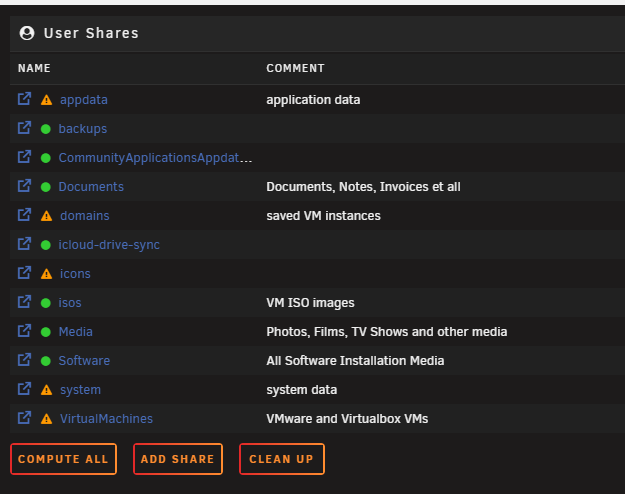
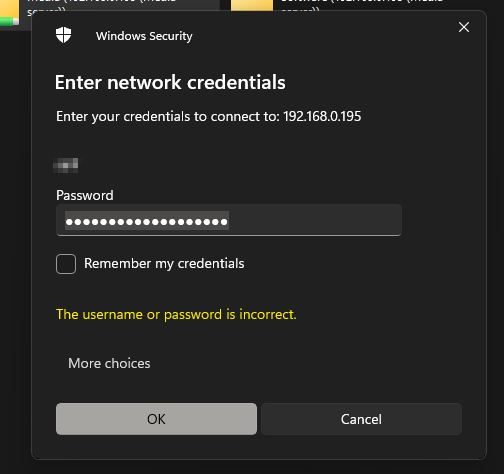
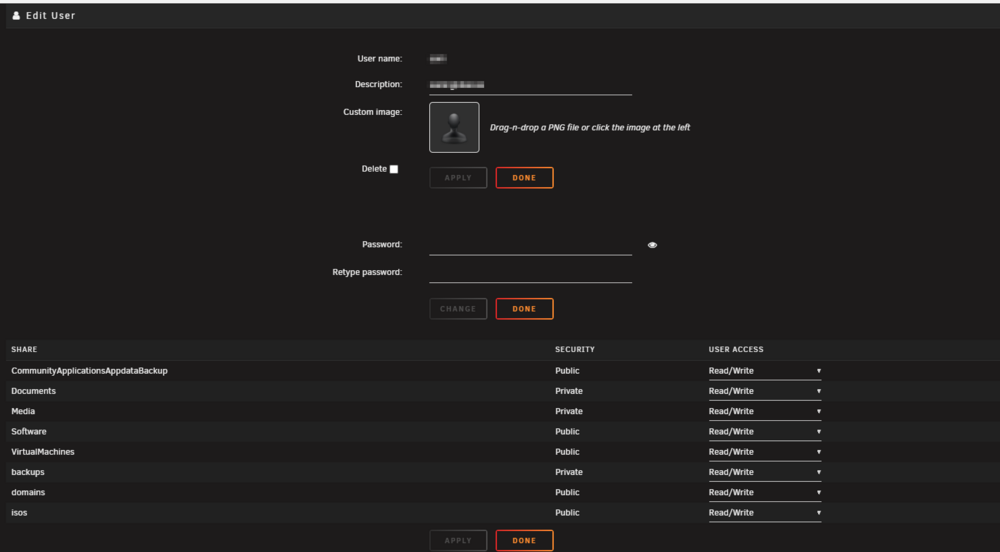
I have to admit that I've struggled with this since I started using Unraid and often revert to public shares just because this seems to be so temperamental, its about time I got this working and tried to understand what the issue is. I have several shares mostly default but some i've created myself: I try to make these private so that they are secured and inaccessible unless you have permissions but whenever I do so I get this error constantly: The password is correct, or at least it is the same password I copy/pasted into the users section of Unraid on this page, which also shows that the account should had read/write access. So how do I start to troubleshoot this I am now on 7.1.4, I've had this issues since I started in 2022 with Unraid 6.10 ... I really want to be able to reliably use credentials to secure share access from my windows 11 machine. Details: Unraid 7.1.4 OS Plus Fix Common problems doesn't report any issues All plugins and containers up to date Windows 11 pro fully patched I can access the Unraid Admin GUI from the windows 11 PC (as is demonstrated by the screenshots) so network is up and working If I make the shares public they are all accessible. I suspect this is a Windows 11 "feature" but I still don't know where to start looking
-
No I couldn't do anything, but having left it for a few hours it has stopped the windows VM and I have control of the system again. I don't understand why a Windows VM would cause Unraid to become completely unresponsive but it has happened twice now and I don't know how to troubleshoot this, once I start the vm I cant do anything so how do I get logs, screenshots anything that might be of use?
-
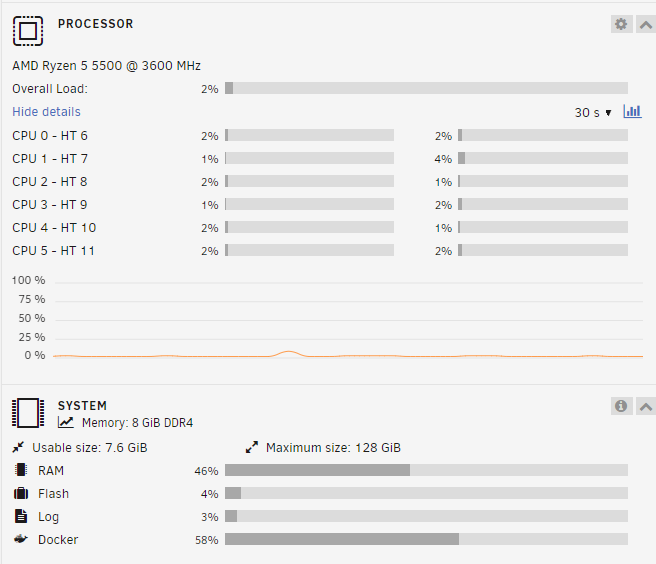
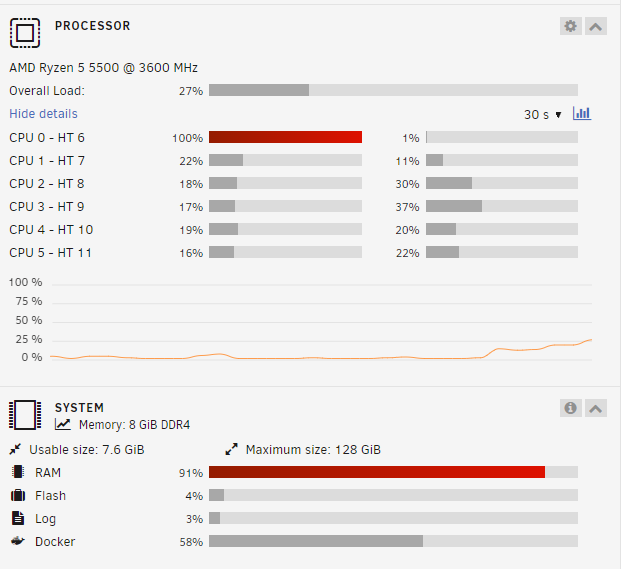
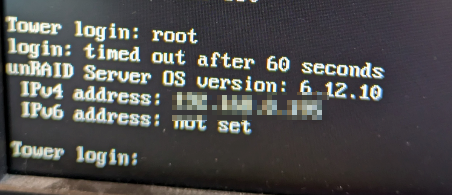
I built a windows 11 VM roughly following SpaceImvaderOne's older video here I already had an evaluation version and the virtio drivers have moved on a long way since this was made, but I followed it as closely as I could When Idle, my system looked like this: but as soon as I started the windows 11 VM I got Core 0 hitting 100%, memory at 91% and Unraid stopped responding completely At this point I lost the ability to do much, I attempted to power off the VM and it was just stuck with the waiting circle and my browser would not respond. Now the browser ended the session with a timeout error and will no longer connect, I can't connect using SSH and a local keyboard and monitor session fails to login due to a timeout ping still responds. How to I stop this without breaking my array?
-
Anybody gonna look at this or am I destined to quit Unraid because I can’t keep it up to date?
-
@phi643 have you made any progress? I got distracted by work and never followed up, the lack of any replies here suggests we aren't going to get an answer from the forums or developers.
-
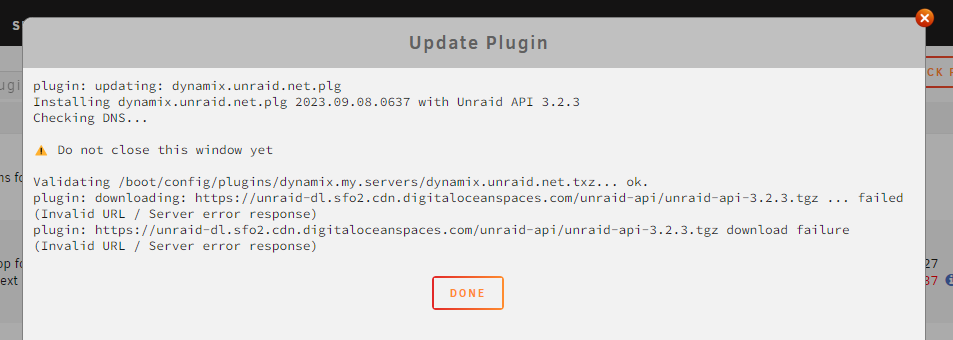
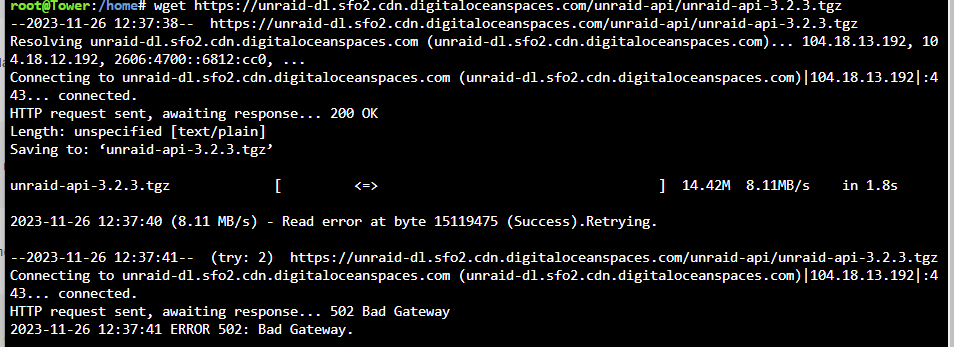
I am trying to update the Connect plugin and then complete the update to v6.12.4 but every time I try to update the plugin I get this error: Validating /boot/config/plugins/dynamix.my.servers/dynamix.unraid.net.txz... ok. plugin: downloading: https://unraid-dl.sfo2.cdn.digitaloceanspaces.com/unraid-api/unraid-api-3.2.3.tgz ... failed (Invalid URL / Server error response) plugin: https://unraid-dl.sfo2.cdn.digitaloceanspaces.com/unraid-api/unraid-api-3.2.3.tgz download failure (Invalid URL / Server error response) if I jump onto the terminal and use wget it appears to start to download the file quite happily then I get a read error followed by a 502 bad gateway. all suggestions, help, guidance appreciated. At this point I am stuck and can't see a way forward
-
Thats good to hear... no idea what happened, just lost the lot between power down and power on.
-
Whilst swapping a failed disk yesterday, I somehow managed to "blow" all the USB on my Unraid Server. none of the ports are working and the Unraid USB isnt recognised in any other computer. It doesnt even appear so that I can recreate it. I assume somehow I have damaged the motherboard, not sure how but I am now into full disaster recovery and potentially replacing the board. I have two backups a local one from what I believe to be the last hardware change in May 2022 and one from My Servers that I generated last night. I understand that I use these along with the Unraid USB creation tool to create new media. A couple of questions: 1) should I put the old failed disk back into the system so that it is in the state it was when I powered it down and replace it once I have it up and working again. 2) I can't buy the same MB so its likely that different drivers etc. will be needed. Are there likely to be any issues with using the old USB on a new MB? I dont need to rush the recovery, but do need to try and settle my mind that I havent lost everything, so before I go and make things worse anyone have experience of recovering in this situation? Any hints, tips, instructions or advice gratefully received? Ian
-
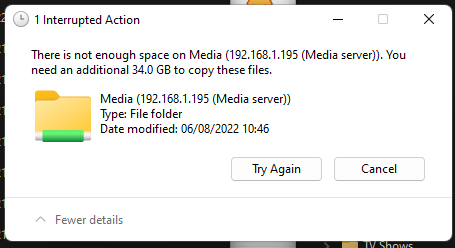
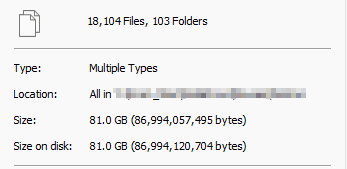
I am trying to move some media from windows to the media share on Unraid. when I try to move large volumes of selcted files Wwinodws tells me I need nGB of extra space. I am moving some music/video which is Gb in size. Unraid shows I have 5.11 Tb of free space on the media share. I am not using a cache as far as I can tell. any ideas what might be causing the "not enough space" error


-
I have a Debian linux VM built and I can connect using NoVNC but the clipboard doesn't work and a quick google search suggests that this is functionality that isn't available in Unraid. The posts are quite old (2015-2017) and some do suggest a kludgy workaround using Autokey but I thought I'd ask if this is still the case in 2022? Is it not possible to copy and paste between the host and guest or vice-versa, it seems kind of fundamental functionlaity that is available in every other hypervisor even if you have to install a plugin to the guest. I've seen one post that suggests it is NoVNC that doesn't support this, but I use NoVNC elsewhere and the Clipboard works very well albeit in a two step process. Has there been any forward movement on providing this copy/paste for VM's ... for me it could turn out to be a real blocker to adoption.


