





James Cavanagh
Members
-
Joined
-
Last visited
-
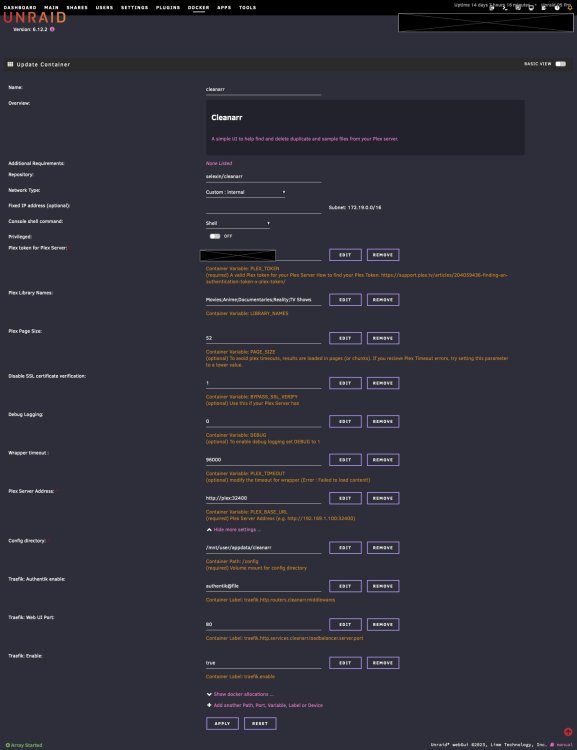
Hi, I've come across this thread while trying to work out how the sample search works, as I have some saved as TV Episodes, but they don't get detected. That being said, the Duplicates search does work for me. Here are my settings @eagle470, I hope they help you out. Some things to note... I access the app via a FQDN, eg https://cleanarr.mydomain.com that is served up using Traefik. Because of this, I don't expose a port to my LAN, only to the internal docker network. You may need to expose a port to your LAN to be able to access it. I also use an SSO authentication server, Authentik, that ties in with Traefik, so you may not need my last three "Traefik" settings My Plex server's docker container is called "plex", so I address it on the internal docker network as http://plex:32400 . The only downside for doing this is clicking on the Plex server name in the top-right of the page doesn't work for me, but I can live with that. If you're getting "Error : Failed to load content!", change the setting for the wrapper timeout (PLEX_TIMEOUT) If you're getting Plex Timeout errors, then look at the Plex Page Size (PAGE_SIZE) setting
-
The "Smart Queues" (AKA QoS) on my Ubiquity Unify Gateway is now giving a higher priority to the RClone traffic since the 1.59 update. Unfortunately I can't tweak "Smart Queues" to change this. Can you please allow the choice of "Stable", "Beta" & "Specific" where it would show a text field to type in a specified version? EDIT/UPDATE: I forked your plugin on GitHub and modified it so the "Beta" installed Rclone 1.58.1 to give a third option of v1.58.1, and that fixed the issue with my Ubiquity USG-Pro-4 gateway. Now to work out my next step, either to get Ubiquity to fix their firmware or I'm considering making a server running pfSense to replace the USG-Pro-4 gateway.

