






Dela7460
Members
-
Joined
-
Last visited
-
I got this resolved. The original power supply was still good; but since I already got a new one I went ahead and swapped it. The old power supply had a odd auto reset failure switch rather than a fuse and I just didn't want to mess with it. The real problem came out to be board tension. At the bottom of the board I had a USB adaptor that plugged into the motherboard. This adaptor sat at the very bottom of the board and held my Flash stick for Unraid. The metal housing of the adapter was making contact with the bottom of the case. Which was fine; but it was causing the board to be under tension. For some reason a motherboard support peg (stand off) between the ram and the SATA plugs was not exactly aligned and was a bit cocked eyed and the bolt holding down the board to it was not the right size and was causing the board to be off kilter. This was causing a short some how. Switching out the stand off and bolt and reseating everything seemed to have helped. I still have the USB adapter pugged into the same place but I plan on changing it to one that doesn't touch the case when plugged in their. Over all the sever got a good cleaning and I tossed in a 970TI that was laying around. I do have 2 more sticks of ram I want to toss in it but it seems that every time I do the server freezes a week later. I've done extended prime 95 test for over a week on each stick and can't find any faults. Without fail each time those addition sticks are in the slots the server freezes with in a week. Other wise it go's without issue for years. Even if I swap out the current sticks with the new ones it still eventually freezes. Yes same brand, same everything on the ram. Way to late to RMA them. Board ram max is 128g I currently have 32g in it and wanted to upgrade that to 64g. Ram is mainly used for my VM's. Back in the day when I ran a Ark server that thing would gobble it up. Now I hardly run any VM's so no real reason to add the ram other than I already paid for it and its just sitting their.
-
A few nights a go we had a bad storm and we lost power for about 14 hours. The Unraid server is on its own UPS and all other switches and Starlink on its own UPS too. So when power goes down its not really a problem; Since this was a extended outage I got the email alert from unraid saying it was shutting down due to power levels being around 20% left. Once power was restored the next day I went to power everything up and the server didn't do anything. I did a bunch of testing and figured it was the power supply. I remove the power supply and tested it and at first it was bad but then found out later that the power supply I have auto resets itself after a fault if left unplugged for some time. Either way it eventually powered on when I had it out side the system. I put it back in and nothing... Not wanting to play a guessing game with this auto reset bull I order a new power supply just for the heck of it. It came in today; I tested it on the bench and it turned without issue. Popped it into the server and still nothing... Not a flash or anything. I tried unplugging everything and all the drives and still nothing. Also removed all ram and even tried one stick at a time. I tried moving it off the UPS and tried other plugs and still nothing. It was a bad lightning storm but I don't think we go hit. All the other systems around the house are fine even another server on the same circuit but different UPS. Even those that are not on a surge protector. Guess I'll tear the whole thing down and rebuild it. Something is causing a short somewhere; just very odd that it happened after a gracefully shutdown. I pulled the Unraid server USB drive and tested it; its fine, logs show everything good. Just bad luck I guess. Wondering if anyone else has ran into a issue like this. Server lives in a sever closet; nice and cool, no one goes in there because its locked. So its puzzling that the mother board just died on its own. I've seen it happen before but those odds are very low in my experience.
-
I reseated the drive and It came back to life. I'm backing up all the data now. And ordering two Nvme drives to raid them together as a new cache drive. My VM's are the only thing I'm concerned about; it seems that every few months I'm having to deal with some issue regarding my VM's
-
Woke up this morning to find out we had a power blip; and found all my dockers and VM's missing. Unraid on UPC and I didn't see any messages or alerts about a reboot. Either way when I navigate to cache drive it is completely empty no folders no nothing. I can see on the dash board that there is usage. I restarted the server and now I find that Cache drive is being undetected; my only guess is that the cache drive died without warning. I had backups running at one point so I hope that still intact. Has anyone experience a cache drive die on them that was similar to this. 1tb SSD it was a Crucial ct1000mx500ssd1 drive May 17,2022. There was a warning message on be according to the forums it was ok to ignore; I can't seem to find what it was. If I do I'll post it. tower-diagnostics-20240204-1243.zip
-
So it looks like all my troubles were caused by a bad brand new NVMe drive I got from Amazon. creating a pool of cache drives with it caused all kinds of madness to happen. Probably why it was saying it was read only and in other places it would save device 2 was missing. I would recommend people stay away from fanxiang branded drives yes they are super cheap but seem to be total crap. Waiting on Parity to finish to restore docker and vm's Thankfully I did have backups of all that.
-
ok this time around 2 minutes elapse on parity check and I'm past .4% says only 10 hours for rebuild. Guess I'll head to bed and check again in the morning. Hope it doesn't crap itself out and freeze up again. I tell you want, undraid is a adventure every time you try to change anything. tower-diagnostics-20230613-2309.zip
-
I reverted all my upgrades. Removed the nvme drive and the extra 32gb of ran I installed. I set the cache drive back to the 1TB SSD and formatted it. Hopefully it will rebuild now without crapping out again.
-
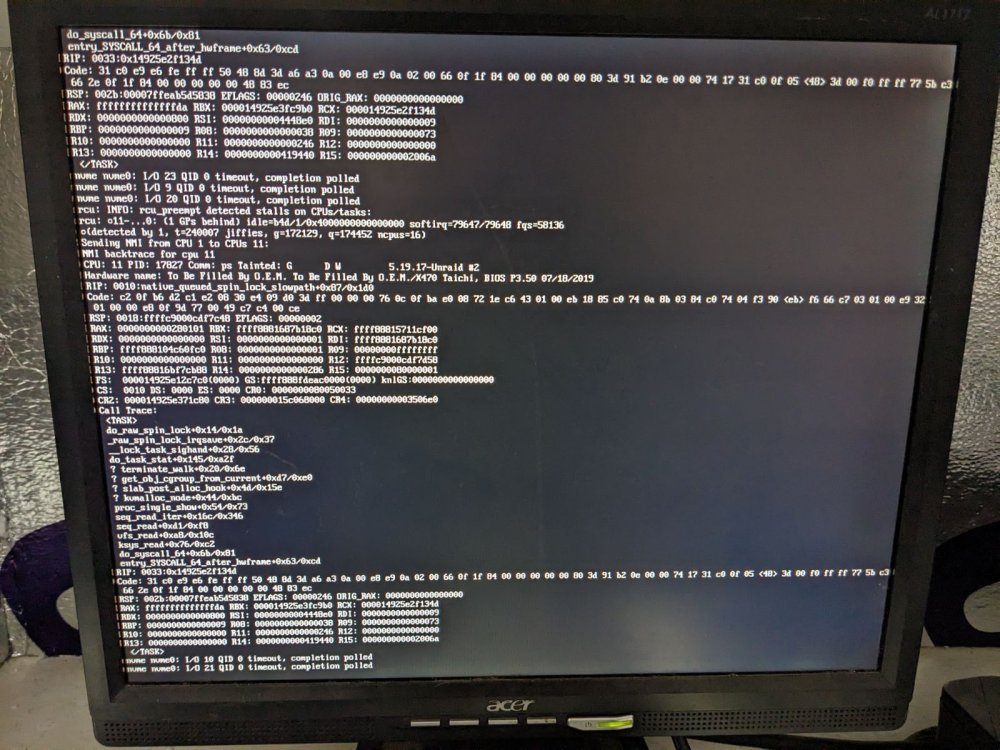
wow everything went to heck. I was restoring my backups then everything stopped responding. I checked the server itself and it said something about a critical Kernel error. rebooted stopped all dockers and vms system is running parity check now; estimating 9 days 47 errors found total raid size 4.11TB out of 21TB. not moving past .3% I think I'm done with unraid. every time I try to do something simple everything goes wrong. All drives reporting healthy and good temps. Browser interface stopped respoding. Here is picture of the server screen. Looks like the nvme is not responding. Please any thoughts. tower-diagnostics-20230613-2230.zip
-
Had to blow it all out and restore from backups. I just went with a single cache drive and used the 2TB nvme this time.
-
When I set the system to maintenance mode and do a Check Filesystem on the cache drive I get the warning device 2 is missing and errors found in extended allocation tree or chunk allocation. Looks like i have to blow out the whole thing and restore from a back up.
-
Old Cache drive SSD 1T I added a second drive to the cache pool nvme 2TB Raid1, And let it clone it self. Afterwards I tried to enable docker and VMs only to find neither of them would work. I tried pathing the vdisk to the cache drive I also tried pathing the libvirt.img location but nothing seems to be working. (Fix Common Problems) keep saying Unable to write to cache Any help would be greatly appreciated. I tried removing the second drive from the app pool, but then I got a error to many profiles. tower-diagnostics-20230613-2025.zip
-
Solved the issue. Had to turn on the following options in BIOS IOMMU - enabled SR-IOV - enabled In addition there are some values that have to be set to enabled putting them on AUTO seems to have no effect. Unfortunately I forgot what those were. But if you have the option of Enable use that rather than AUTO Everything looks stable and is running smoothly; there is still a peeked thread when someone joins but only for about 5 seconds then back down to 2-6%
-
I did notice that IOMMU is disabled on the board, maybe that will help some.
-
I had unraid running off a HP ML350 G5 2 processor at 2.3ghz and 12cores with 32gb of ram (slow ram like 660mhz) Either way I was having issues where the server and it would reboot randomly and I couldn't find the problem. I've been having issue with that server for years and I've put so much money into that I'm just fed up with it. Time for a simpler server and a quite one too. New system is running a Ryzen 7 2700k 8cores 3.7ghz with x470 Taichi and 32gb pc3200 The VM is running Ubuntu with 4 cores and 16gb ram We are currently running a 7Days server When players would join and play on the old server there was no lag but now on the new hardware we're experiencing quite a bit of lag. The VM cores are pinned to threads on the same core and what I'm noticing is that one thread will hit 100% then jump to another thread and hit 100% and it will keep hopping around keeping of of the 4 threads at 100% while someone is connecting and then it settles down. I didn't notice this behavior before on the old system. One thing to note; on the old system I was using onboard video and on this new server I have a really craptastic card I pulled from a hp minitower ati 200x or something. I just needed the card so the system would post. As far as I know the VMs video card is emulated so it should have nothing to do with my hardware one. Any thoughts?
-
JorgeB you nailed it. The cache drive was unmounted. And I am at fault for it. It was not caused by the upgrade but something I did. I had removed IP_Storage which consisted of 2 drives. But when I had removed this pool and must have removed that cache drive as well. I remounted the cache drive and my VMs and docker are back. My bad, Thank you very much JorgeB.


