Luis Belo
Members
-
Joined
Everything posted by Luis Belo
-
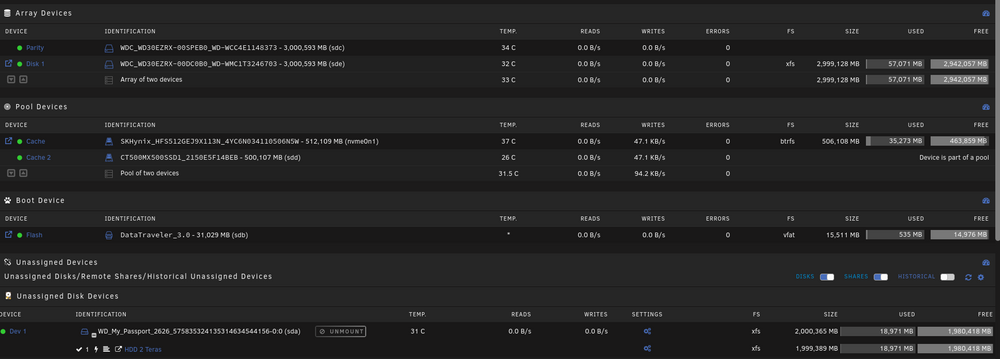
Good morning M8s. Need some help (advices), please. My config is: (file attached) Could you suggest me how it was the best config for these hard drives? Thanks
-
Perfect. Thanks :D
-
Problem solved with the DS3622xs+. On surveilance stantion anyone have problems wit the sound? It ask to login on Synology account... but i dont have it
-
Thanks for you reply 👍 I think that's the problem... I don't understand that part... I use the pat that is shared on the first link... Should be another one? Thanks again 4 your help
-
Hi, Anyone with AMD cpu? I am having some difficulties to install it on my rizen 5. When flash the pat file, give me corrupt file. Any help please? Thanks
-
Its not possible share a backup of the vm? I think it mutch more esasy for wveryone.
-
Hi, Hi, Thanks for your help, but i am having one doubt. Where its user the DSM image on your tutorial? Thanks
-
Thanks for the reply. I have also tried that and didn't work. Just copy the qcow2 image to a new/fresh VM and always show me the uefi boot screen. Note: with the same exact hardware configuration.
-
Hi again M8s, I've the backup files but with qcow2... And I can't restore with the script... It sais that don't exist... And now I don't any other backup... All my stuff are in that qcow2 image. I already convert it to img but no results 😭 any ideias Thanks
-
Hi, My config menu it doesn´t show Unassigned Devices... I would like to safe the backups to a external drive. Any one can help me please? Thanks