meaning
Members
-
Joined
-
Last visited
-
@mmm77 first of all, sorry for the very late reply — your post deserved much better than a month and a half of silence. Your night of detective work paid off twice. You found your own culprit (Dynamix Cache Directories), and you also exposed a real blind spot in Disk Talkers: those "find ... -noleaf" scans only open directories, and the kernel watch the plugin used did not report directory opens at all. A pure folder walk opens almost no files — so the busiest process on your disks was literally invisible to the plugin, and its time collapsed into "Other activity". That is also part of why library maintenance scans were hard to attribute. This is fixed in 2026.10.12b: directory opens are now monitored too, and since "find ... -noleaf -maxdepth N" is the exact signature of Cache Directories, it now shows up named "Folder Caching (cache_dirs)" — on my test box a cache_dirs-style scan gets attributed within seconds. Generic find runs show as "Directory scan (find)", and the mover was already named. So, to answer your question "how can I help you to identify such things": you already did, more than you know. Thanks for the persistence — and sorry again for the slow answer.
-
Hey @surikan ,I don’t have a ZFS pool to test on myself (my ZFS users so far confirmed live attribution works, and the history mechanism is filesystem-agnostic), so I’d really appreciate it if you could update, let it run for a day, and confirm both the history and the hdd/ssd badges look right on your ZFS pools. If a pool still shows the wrong media type, tell me its name as it appears in Main. ;)
-
@mmm77 good question, and thanks for the screenshots — they confirm exactly what I found when I dug into this. The honest answer: most of that 79% "Other activity" is time where nothing was working on your disks at all. Disk Talkers was counting every sample window where a disk was awake but had no identifiable activity as "Other activity". So when a disk spins up and then just stays awake until the spin-down delay kicks in, all those idle hours got labeled "Other activity" — which makes it look like some mystery app is hammering the disk. That was misleading, and it should be fixed in 2026.08.24b. Two changes: First: windows where the disk was awake but did (almost) no real I/O are now labeled "Idle (spun up)". The interesting question then becomes what woke the disk up — that is what the spin-up sessions table under each disk is for. Second: when there IS real disk I/O but no identified app, the plugin now makes a last attempt to name the process/container holding the disk before falling back to "Other activity". So the remaining "Other activity" should shrink a lot. Existing history will not be relabeled, but new samples after updating should mostly show "Idle (spun up)", real app names, and only a small "Other activity" remainder. Could you update, let it run for a day, and tell me how the split looks? If you still see big genuine "Other activity" blocks after that, a fresh state.json would help me dig further. By the way, I also took the opportunity to tidy up the charts while I was in there: the timeline and the usage donut now render properly at any resolution — no more giant axis labels on wide monitors, and the layout stays proportioned on ultra-wide screens.
-
@hollowimage thanks for the detailed report, much appreciated — all three points were real issues, and I've just pushed 2026.08.20a that should address them: Tools menu: you were right — Disk Talkers relied on the "System Information" section being defined by another plugin (that's why installing File Activity made it appear). The plugin now ships its own section definition, so it should show up on a stock system. Light theme: the page was guessing the theme from the page background color, and on some themes that guess failed, leaving dark-theme colors on a light host. It now reads the actual Unraid theme server-side, and I moved the remaining hardcoded colors to theme variables. I mostly run dark themes myself, so if you spot anything still hard to read after updating, a screenshot would help me a lot. Truncated names: names can now wrap to two lines instead of being cut off, and hovering any name shows the full text — so the last octet of the address should be visible now. Could you update the plugin, hard-refresh the page, and let me know if all three look right on your side? I could only fully test 1:1 on my own box, so your confirmation on 7.3.1 with the light theme would be really valuable. @hollowimage thanks for the detailed report, much appreciated — all three points were real issues, and I've just pushed 2026.08.20a that should address them: Tools menu: you were right — Disk Talkers relied on the "System Information" section being defined by another plugin (that's why installing File Activity made it appear). The plugin now ships its own section definition, so it should show up on a stock system. Light theme: the page was guessing the theme from the page background color, and on some themes that guess failed, leaving dark-theme colors on a light host. It now reads the actual Unraid theme server-side, and I moved the remaining hardcoded colors to theme variables. I mostly run dark themes myself, so if you spot anything still hard to read after updating, a screenshot would help me a lot. Truncated names: names can now wrap to two lines instead of being cut off, and hovering any name shows the full text — so the last octet of the address should be visible now. Could you update the plugin, hard-refresh the page, and let me know if all three look right on your side? I could only fully test 1:1 on my own box, so your confirmation on 7.3.1 with the light theme would be really valuable.
-
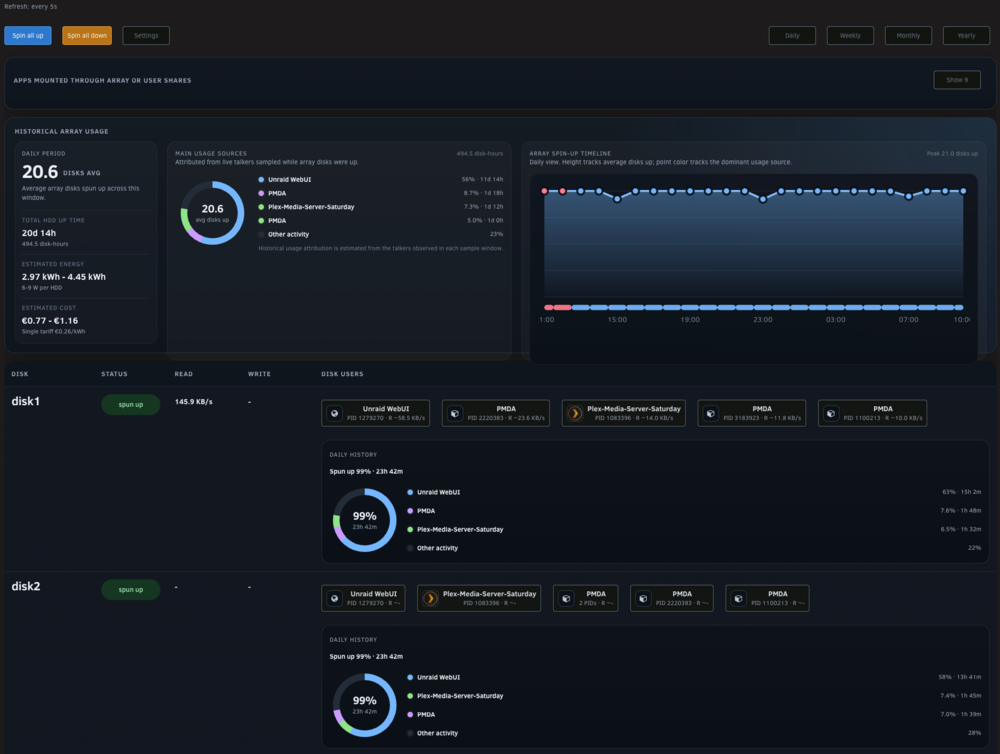
Hm, ok, it looks like on your system Disk Talkers is running again, but still cannot attach the activity to a named app/container/process. Could you please share the output of this command after one of those disks has spun up and still shows unattributed activity? cat /tmp/disk.talkers/state.json Also useful: - your Unraid version - whether the apps use /mnt/user/... or /mnt/diskX/... paths - any syslog lines around the spin-up time That should show me where the attribution is being lost.Hey mmm77, Thanks for the report. This should be fixed in Disk Talkers 2026.06.03a. The error means that one of the Unraid mount paths Disk Talkers was watching briefly disappeared or changed while the collector was running. Disk Talkers was handling that too aggressively and could disable fanotify permanently until restart, which then made historical attribution fall back to “Other activity”. This is not, by itself, proof of a failing disk. But if you keep seeing similar mount-related warnings after updating, it would be worth checking your Unraid syslog, disk/pool mount state, and SMART reports for any recurring disk, controller, or filesystem issues. Existing historical “Other activity” entries will not be retroactively fixed, but new samples after updating should keep fanotify active and preserve attribution much better. Let me know if it's allright now ! :)Yes, you were right. I profiled it and Disk Talkers was doing too much work every 5 seconds, mainly repeated fuser scans and history recalculation. This is fixed in 2026.05.03a; on my test server it dropped from about 15.6% of one CPU to about 1.25%, while keeping the 5s UI refresh.Thanks for the report. This was caused by Disk Talkers starting after reboot with a reduced service PATH, so it could not find Unraid’s mdcmd binary. This should be fixed in 2026.04.26a: update/reinstall the plugin and it should recover after reboot without needing an uninstall/reinstall. let me know if the problem is fixed at your next reboot ;)Thanks, you were right: on Unraid 6.12+ exclusive pool-only shares can make /mnt/user/<share> resolve directly to the pool and bypass shfs/FUSE. Disk Talkers 2026.04.21a now treats those mounts as safe, while non-exclusive pool-only /mnt/user mounts remain low-severity informational warnings.I’ve pushed a light-theme compatibility fix. :)can you update and let me know if this would be ok ?Fixed in 2026.04.17c. The historical summary panels were using a layout combination that could visually overflow the parent card. I’ve corrected the panel sizing/containment and published the update. Please update the plugin and hard-refresh the page and let me know ;)Hey there, can you update the plugin and see how it looks now ?Disk Talkers adds a dedicated Unraid page to show what is actively keeping array disks and pools spun up. The goal is simple: make it easier to understand which apps, containers, VMs, or host-side activity are touching your storage, and help reduce unnecessary array spin-ups. What it shows - Per-disk live status spun up / spun down) - Current read/write throughput - Live disk users, including: - Docker containers - VMs - host services - user-share access through shfs - Array-wide summary of apps currently keeping HDDs spun up - Historical usage views across: - Daily - Weekly - Monthly - Yearly - Historical attribution estimates showing which apps were most involved in keeping disks active - Estimated HDD energy usage and electricity cost based on configurable watt ranges and tariffs - Mount audit to highlight containers using /mnt/user or array-backed paths where a direct pool/cache path may help avoid unnecessary spin-ups Why this exists On many Unraid systems, disks stay spun up and it is not always obvious why. Sometimes the cause is direct array access. Sometimes it is a container using /mnt/user/... instead of a direct cache or pool path. Sometimes it is a service or background scan that keeps touching files often enough to prevent spindown. Disk Talkers is meant to make that visible. ## Main features - Dedicated Unraid WebUI page - Live refresh - Disk-by-disk visibility - Historical usage overview - Mount-path audit for Docker containers - Estimated power and cost visibility - Quick actions and configuration inside the plugin UI Install Until Community Applications listing is live, the plugin can already be tested with the direct plugin URL. WebUI method 1. Open your Unraid WebUI 2. Go to Plugins 3. Click Install Plugin 4. Paste this URL: https://raw.githubusercontent.com/silkyclouds/unraid-disk-talkers/main/disk.talkers.plg CLI method installplg https://raw.githubusercontent.com/silkyclouds/unraid-disk-talkers/main/disk.talkers.plg GitHub Source and releases: https://github.com/silkyclouds/unraid-disk-talkers Notes - Attribution is best-effort. Very short-lived activity may still appear as residual or unattributed activity in history views. - Energy and electricity cost values are estimates based on HDD uptime history plus user-configured watt and tariff settings. - This plugin is intended to help identify real-world storage behavior, not to claim perfect block-level forensic attribution. Feedback Bug reports, screenshots, edge cases, and UI/UX feedback are very welcome, especially for: - shfs / user-share attribution - incorrect container attribution - historical attribution gaps - cases where cache/pool mounts should be preferred over array-backed paths - installs and upgrades across different Unraid versions