





Shagon
Members
-
Joined
-
Last visited
-
One 4TB disk died so I've performed the following steps to replace it: - Turned off unraid - Removed defective drive - Added new 8TB drive - Started unraid - Replaced the drive in unraid webui - Data rebuild started Now at this point it said that the filesystem needs to be formatted for the disk to be used. So I clicked, checked the box and formatted the drive. The rebuild is still ongoing however no files are visible from the "emulated" drive. I can further confirm this by opening plex and choosing a file, seeing "unavailable" and confirming that the file is not present under "/mnt/user/(...)". Is the file going to be available _after_ the rebuild as right now it seems that I've lost terabytes of data with that format for the filesystem that was prompted. My understanding was that the rebuild would write over the data when the disk was formatted for use. unraid-diagnostics-20250425-1245.zip
-
I've made a project here - https://gitlab.com/shagon/caddy-cloudflare/ and pushed an image, it works as expected, however the version is "not available" in the UI, even though it is available and working: ~ # docker image pull registry.gitlab.com/shagon/caddy-cloudflare:latest latest: Pulling from shagon/caddy-cloudflare Digest: sha256:7413d26a1a8d57c4677de5f766380e62246565300959a7c49e5c43578a3ae463 Status: Image is up to date for registry.gitlab.com/shagon/caddy-cloudflare:latest registry.gitlab.com/shagon/caddy-cloudflare:latest Force update through the UI leaves the version as "up-to-date", however a subsequent "check for updates" check puts it at "not available".
-
Currently the only way to access the WebUI is through username and password. A lot of users have some sort of an external authentication and authorization mechanisms such as authelia, authentik, keycloak, and so on. Would it be possible to implement an external authentication provider option, for example: - As a user I want to authenticate with the system via a configurable header. - use case: Depending on the value of a specific header that is passed via a reverse proxy, for example `x-username` unraid would allow login - fallback to the default username and password screen should the header be missing - As a user I want to authenticate with the system via OIDC - this is a step up in security and harder to implement, but the standards are higher in the modern age And so on and so forth. The header approach is easiest to implement and allows better security, for example - I enforce MFA and passkeys whereever possible, instead of the plain old username and password approach.
-
Can you please point me how to create a feature request for this? Essentially an external authentication & authorization provider for unraid would be great. The easiest implementation is to use a header as to indicate a signed in user, for example calibre-web and filebrowser use this and just rely on an external process to manage authentication and autherization.
-
Any chance I can create a feature request for the webui to allow disabling authentication? As a user I'd like to login to the webui without username/password. The reason for this is because I reverse proxy all services and have authelia authorize the requests.
-
Hello, I've read somewhere on the forum that I can either remove WebUI authentication and have SSH be turned off, or I can keep it on with SSH off. Is there a way to have: - No password for WebUI - SSH authentication The reason for it is because I'd like to implement authelia to be in front of unraid, and I'd rather turn authentication off since it's easier than a double-login.
-
In unraid itself
-
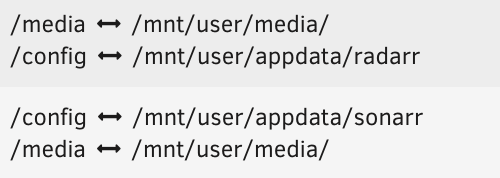
Managed to get it working. # Steps Given the layout on disk: ```shell /mnt/user/media ├── ebooks ├── downloads ├── Movies ├── Music └── TV Shows ``` The container view should be: ## Deluge ```shell /media └── downloads ``` ## Sonarr ```shell /media ├── ebooks ├── downloads ├── Movies ├── Music └── TV Shows ``` ## The switch 1. Backup `/appdata` 2. Turn off plex scanning 3. Turn off plex garbage collection (1, 2, 4, 5) 4. Turn off plex 5. Change sonarr volume binding 1. Remove `/tv` => `/mnt/user/media/TV Shows` volume binding 2. Add volume binding `/media` => `/mnt/user/media` 6. Change Deluge volume binding 1. Remove `/downloads` => `/mnt/user/torrent/` 2. Add volume binding `/media/downloads` => `/mnt/user/media/downloads` 7. Test manual volume binding 1. `docker exec -it sonarr /bin/bash` 2. `echo "something" > /media/downloads/something` 3. `ln /media/downloads/something /media/TV\ Shows/something` 4. `stat /media/downloads/something` should return "Links: 2" 8. Going back to Sonarr change the root directory from `/tv` to `/media/TV\ Shows` making sure **NOT** to move the files as the naming scheme is correct 9. Ensure Sonarr is set to use hardlinks 10. Ensure Sonarr is set **NOT** to remove downloaded files 11. Configure Deluge to seed for at least 1:1 ratio 12. Configure Deluge to use `/media/downloads` directory for downloads 13. Find a random episode on Sonarr and download it 14. Observe the import in Sonarr 15. Confirm the link exists by looking into the `/media/downloads` directory and doing `stat` on the downloaded file 16. Remove `something` file used for testing `rm /media/TV\ Shows/something` 17. Turn on plex and enable garbage collection (settings 1,2,4,5) Repeat the above for Radarr as the core seems to be NAMING to be the same, so media in the container and media in unraid, or data in unraid and data in the container - the names MUST match
-
Tried the following setup: Deluge: - /data/torrent => /mnt/user/media/torrent Sonarr - /data => /mnt/user/media So technically sonarr should see both however atomic movies / hardlinks are not working as the contents get deleted after the move, which is not ideal at all since we have extra io and we can't seed the files. Used docker exec -it sonarr /bin/bash to jump into the container however, one interesting thing is that I could run "ln /data/torrent/something /data/TV Shows/something" so technically it works when manually running it, however sonarr seems to always just move, even though in the UI hardlinks are checked. Hopefully someone has a working guide on how we can properly use hardlinks.
-
I have the following setup: radarr /config = /mnt/user/appdata/radarr /movies = /mnt/user/media/Movies/ /downloads = /mnt/user/torrent/ sonarr /tv = /mnt/user/media/TV Shows/ /downloads = /mnt/user/torrent/ /config = /mnt/user/appdata/sonarr deluge /downloads = /mnt/user/torrent/ /config = /mnt/user/appdata/deluge However, once a file is downloaded it is moved from "/mnt/user/torrent/" to a "/mnt/user/media/Movies" without a hardlink. "/mnt/user/torrent" and "/mnt/user/media" are 2 user shares. For hardlinks to work - do I need to have torrents inside the same share? Additionally, do I need to make any changes to the volume mappings? For example to have: radarr /data/movies = /mnt/user/media/Movies/ /data/downloads = /mnt/user/media/torrent/ sonarr /data/tv = /mnt/user/media/TV Shows/ /data/downloads = /mnt/user/media/torrent/ deluge /data/downloads = /mnt/user/media/torrent/ I am not sure if I would need to have sonarr and radarr re-index my library if I make this change?
-
I'm 3 hours in, 20% done - no errors, I'm writing it down to sata cable issues for now.
-
without swapping the cables - non stop errors like above. Swapped the cables, started the data-rebuild - the first 1% threw a lot of these, then I waited until the disks reach about 35-40'C (i.e. let them running for a while), since then no errors. Perhaps its the power cable - how do I check - connect a different drive and see if it throws the same errors?
-
Can you clarify why this setup worked fine for the last 2 years and only now started happening? How do I check if its the PSU - can I check the voltage via bios to confirm somehow? Additionally - how would I go about having 6 drives connected, what PSU _should_ I use?
-
Uploaded flareon-diagnostics-20230905-1623.zip
-
One data disk and one parity disk have apparently the same errors: [Tue Sep 5 15:51:34 2023] ata1: hard resetting link [Tue Sep 5 15:51:39 2023] ata1: link is slow to respond, please be patient (ready=0) [Tue Sep 5 15:51:44 2023] ata1: COMRESET failed (errno=-16) [Tue Sep 5 15:51:44 2023] ata1: hard resetting link [Tue Sep 5 15:51:46 2023] ata1: SATA link up 1.5 Gbps (SStatus 113 SControl 310) [Tue Sep 5 15:51:46 2023] ata1.00: configured for UDMA/100 [Tue Sep 5 15:51:46 2023] ata1: EH complete [Tue Sep 5 15:52:15 2023] ata1.00: exception Emask 0x50 SAct 0x80e00007 SErr 0x4890800 action 0xe frozen [Tue Sep 5 15:52:15 2023] ata1.00: irq_stat 0x0d400040, interface fatal error, connection status changed [Tue Sep 5 15:52:15 2023] ata1: SError: { HostInt PHYRdyChg 10B8B LinkSeq DevExch } [Tue Sep 5 15:52:15 2023] ata1.00: failed command: READ FPDMA QUEUED [Tue Sep 5 15:52:15 2023] ata1.00: cmd 60/40:00:40:29:b2/05:00:00:00:00/40 tag 0 ncq dma 688128 in res 40/00:08:80:2e:b2/00:00:00:00:00/40 Emask 0x50 (ATA bus error) [Tue Sep 5 15:52:15 2023] ata1.00: status: { DRDY } [Tue Sep 5 15:52:15 2023] ata1.00: failed command: READ FPDMA QUEUED [Tue Sep 5 15:52:15 2023] ata1.00: cmd 60/40:08:80:2e:b2/05:00:00:00:00/40 tag 1 ncq dma 688128 in res 40/00:08:80:2e:b2/00:00:00:00:00/40 Emask 0x50 (ATA bus error) [Tue Sep 5 15:52:15 2023] ata1.00: status: { DRDY } [Tue Sep 5 15:52:15 2023] ata1.00: failed command: READ FPDMA QUEUED [Tue Sep 5 15:52:15 2023] ata1.00: cmd 60/40:10:c0:33:b2/05:00:00:00:00/40 tag 2 ncq dma 688128 in res 40/00:08:80:2e:b2/00:00:00:00:00/40 Emask 0x50 (ATA bus error) [Tue Sep 5 15:52:15 2023] ata1.00: status: { DRDY } [Tue Sep 5 15:52:15 2023] ata1.00: failed command: READ FPDMA QUEUED [Tue Sep 5 15:52:15 2023] ata1.00: cmd 60/40:a8:00:19:b2/05:00:00:00:00/40 tag 21 ncq dma 688128 in res 40/00:08:80:2e:b2/00:00:00:00:00/40 Emask 0x50 (ATA bus error) [Tue Sep 5 15:52:15 2023] ata1.00: status: { DRDY } [Tue Sep 5 15:52:15 2023] ata1.00: failed command: READ FPDMA QUEUED [Tue Sep 5 15:52:15 2023] ata1.00: cmd 60/40:b0:40:1e:b2/05:00:00:00:00/40 tag 22 ncq dma 688128 in res 40/00:08:80:2e:b2/00:00:00:00:00/40 Emask 0x50 (ATA bus error) [Tue Sep 5 15:52:15 2023] ata1.00: status: { DRDY } [Tue Sep 5 15:52:15 2023] ata1.00: failed command: READ FPDMA QUEUED [Tue Sep 5 15:52:15 2023] ata1.00: cmd 60/40:b8:80:23:b2/05:00:00:00:00/40 tag 23 ncq dma 688128 in res 40/00:08:80:2e:b2/00:00:00:00:00/40 Emask 0x50 (ATA bus error) [Tue Sep 5 15:52:15 2023] ata1.00: status: { DRDY } [Tue Sep 5 15:52:15 2023] ata1.00: failed command: READ FPDMA QUEUED [Tue Sep 5 15:52:15 2023] ata1.00: cmd 60/80:f8:c0:28:b2/00:00:00:00:00/40 tag 31 ncq dma 65536 in res 40/00:08:80:2e:b2/00:00:00:00:00/40 Emask 0x50 (ATA bus error) [Tue Sep 5 15:52:15 2023] ata1.00: status: { DRDY } [Tue Sep 5 15:52:15 2023] ata1: hard resetting link [Tue Sep 5 15:52:21 2023] ata1: link is slow to respond, please be patient (ready=0) [Tue Sep 5 15:52:25 2023] ata1: COMRESET failed (errno=-16) [Tue Sep 5 15:52:25 2023] ata1: hard resetting link [Tue Sep 5 15:52:28 2023] ata1: SATA link up 1.5 Gbps (SStatus 113 SControl 310) [Tue Sep 5 15:52:28 2023] ata1.00: configured for UDMA/100 [Tue Sep 5 15:52:28 2023] ata1: EH complete I've sent one disk for RMA however now the parity disk (ata1) is showing these errors. Quick smart reports no errors. Num Test_Description Status Remaining LifeTime(hours) LBA_of_first_error # 1 Short offline Completed without error 00% 4691 - # 2 Short offline Completed without error 00% 3099 - # 3 Short offline Completed without error 00% 485 - # 4 Short offline Completed without error 00% 41 - # 5 Short offline Completed without error 00% 28 - Now what I think happens is, and this is kinda weird. I _think_ Parity + Disk 1 + Disk 2 + Disk 3 + Disk 4 + Cache SSD are on the same sata cable. The PSU came with one cable I believe, or perhaps 2 - I can't remember. The thing that troubles me is that this worked fine for the last 2 years I think and then suddenly these errors started happening. I added a brand new 8TB disk to rebuild from parity, and while it's working now - in the beginning, the first 1% or so was throwing these errors, now it works without issues. Could it be that the PSU rail doesn't supply enough power - and if so - how do I check? Should I do an extended SMART on the parity? Right now unraid states there's going to take about 15h for the parity rebuild which is fine as I would like to keep the data on the disks

