lakimakromedia
Members
-
Joined
-
Last visited
-
Here is prev syslog, before last automatic parity check which was succefull I think. (wife didn't infermed me abauot any problems). tower-syslog-previous-20250911-1356.zip tower-syslog-20250911-1359.zip
-
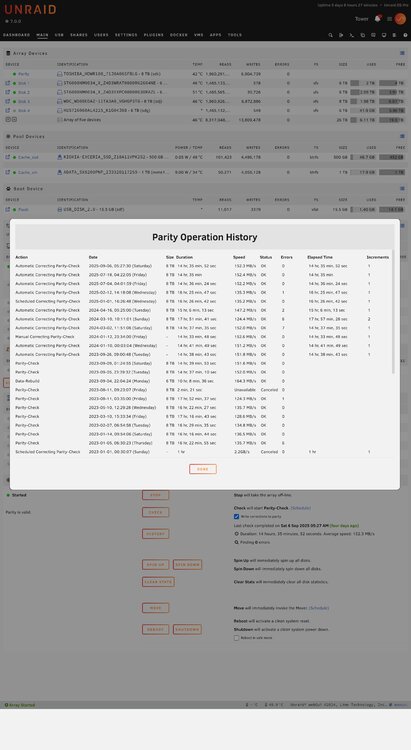
I was rebooting/hard reseting due to automatic parity checks were freezing server ror long time, like days, not hours (web ui not avaliable, no access to any docker, server was like offline, physically pc was working) . After this parity was not present, until it shows up in next random day (around month like in history).
-
I was restarting server due to this parity check.. Usually it happened when I was not home, and wife said every time that plex is not working already few days, I was checking and yes, it was not avaliable via tailscale. During my presence after reset I saw this parity check. We can see in history, that process takes around 18 hours. I had this similar problem on 6.9, after update to 7.x this happened.
-
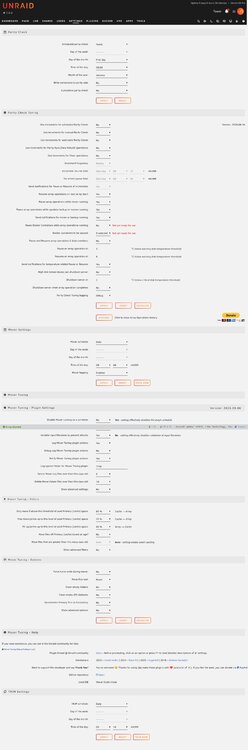
Sorry if this problem already solved somewhere. I used search button FYI. So why - Automatic Correcting Parity-Check - is starting automatically and randomly? In attachments: history, and settings for scheduler. I tried two Ai bots. Perplexity helped somehow, bcs gave good info, but my option was already off/no. It said, change "Write corrections to parity" to "no". tower-diagnostics-20250911-1552.zip
-
Same story here! So how to fix it? Backup should be on my ext nas. Avalaible in remote and shares. When try to do backup, its not posible, prev version works.
-
For me best tutorial is here. https://forums.serverbuilds.net/t/guide-remote-gaming-on-unraid/4248 And I got my r9 nano, and rtx4000 passth.
-
Ahh, So its here as this button [Bind selected to vfio at boot]. Ok, thank You 😘
-
Hi have same problem with my RTX3080 Here are logs from VM https://pastebin.com/shUSQwmY Here my VM Config https://pastebin.com/EJE8AsPf And my IOMMU https://pastebin.com/Azy0scLs I want to notice, that I already pass succesfuly Radeon R9 Nano, (also many problems, also inside of VM, so I changed for this RTX...) Can somone just give me some tip where to look to fix it? Reagrds L.
-
Good day. on begining we have info So where it is i newer versions? Ofc found this plugin by @SpaceInvaderOne. Trying to assign ssd's without copying text in xml what I did before and spent way too much time on it... Plugin still working well, after reboot it dissapearing and leaving error. Regards L.
-
Hi, I have same problem. Don't get it. I know, price of Gold Shovel ... I have path in sonarr -folder for downloads: /Downloads but it is downloading to: /Downloads/tv sonarr In integration with plex are good folders like ../movies and ../series, but inside are only "link/shortcut" folders which are empty. Real stuff is still in .../tv sonarr Also don't create folder for season in all series. ps same in radarr ed Using qBittorrent rTorrent and deluge - can't get remote access which is obligatory for me (right now using Xpenology, but want combine 2 machine in one). Deluge is also not downloading enything...