





BxReap3r
Members
-
Joined
-
Last visited
-
Hey Hoju, Not an unraid pro by any means, but have been working on my server for a couple of years. Looking at what I have setup versus your settings. I have use SSL/TLS on. I also have the destination port (server LAN IP) 192.xxx.xxx.xx:443 forwarded on my router for one of my docker containers. Hope that helps.
-
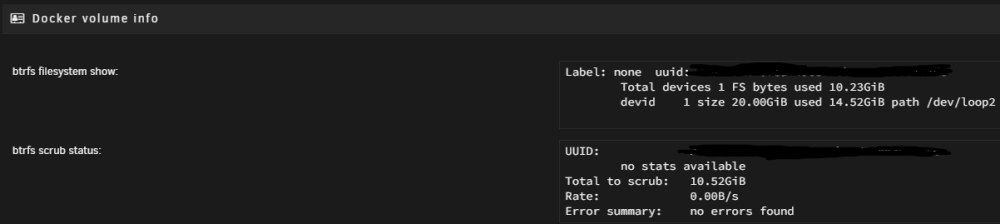
Solved my own problem with the help of Space Invader One Youtube help video. -My BTRFS file system and the docker vdisk on my server had become corrupted. How I fixed my problem: 1. I had to disable my docker service. 2. Then delete my docker vdisk from the settings menu 3. Changed my docker vdisk from BTRFS to XFS (This is just a personal preference, my whole array is XFS) 4. Re-Enabled my docker service. Now I am just going through the motions of re adding my containers from templates so all of my settings would be restored. Hope this helps somebody as this took a couple days of research and poor server performance before I figured out what the root cause was.
-
I have been getting this error the last couple days consistently. I reboot my server and restart my array and it temporarily goes away. But is back before long. My docker containers are still running but some are in limited states like Plex is no longer displaying the "Continue watching section on my web browser". I am not sure how to troubleshoot this as looking at my docker settings shows no errors. When scrubbing system logs there are quite a few errors but not sure if they are related to this issue. I've included the logs from today. Any help would be appreciated. syslog.txt
-
BxReap3r changed their profile photo
-
Recently I replaced a 500gb WD Black drive that has been in my server since it was built just to add capacity. No issues with the drive prior to replacement. I replaced it with a 4TB Seagate SAS drive. During the data rebuild overnight it ended up writing millions of errors to the log and essentially all my shares were missing and it did not rebuild correctly. Tried re running the parity rebuild a couple of times with the same issues. So removed this drive and replaced it with another 4TB SAS drive of the same brand, this time it said the drive was full and mounted as read only. Could not get this to change. Finally I installed a WD Red 4TB drive and once again mounted as read only or full and could not rebuild correctly. I ended up doing a xfs_repair -L and erasing the logs to finally correct the issue. Has anyone else run into this with 6.10? I have replaced drives numerous times in previous versions and not run into this issue.

