





arigold
Members
-
Joined
-
Last visited
-
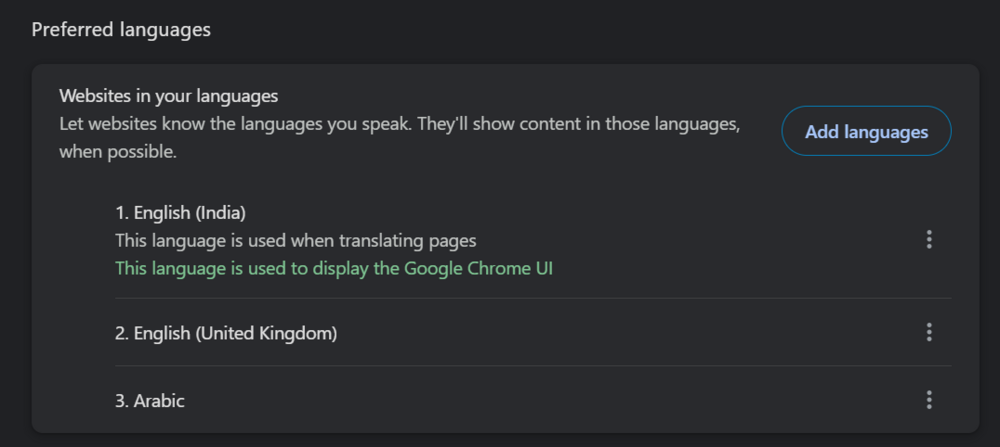
@Leng XIONG Hey I had the same issue, when i installed the calibre docker. Kasm VNC was in Arabic and I dont know how to read arabic. To solve this: 1) I opened calibre in incognito mode and it opened it in english so this confirmed something was wrong in my browser settings as @Chunks suggested. To fix this in chrome just: 1) Go to chrome://settings/languages 2) From here I just deleted Arabic and this fixed the issue for me. KASM VNC is now in english. Hope this helps you or anyone who arrives at this post
-
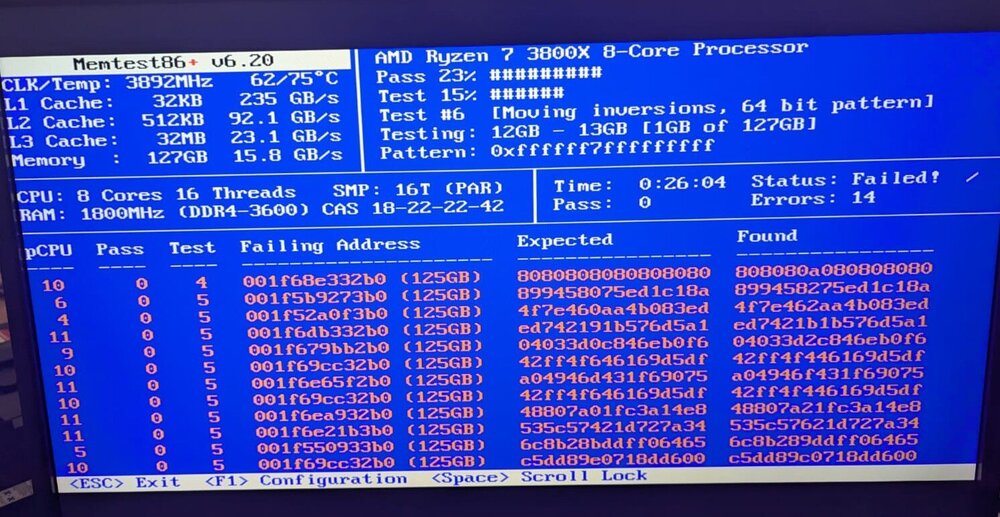
I had recently upgraded to 128 gb from 32 gb ram. It looks like those sticks are causing the issue. I will contact RMA and get them replaced. In the meanwhile I have put my old 32 gb ram sticks and started a memtest on them just in case. Thank You @JorgeB for your help.
-
I am at a loss on how to go out solving this issue. Please help Jul 15 11:37:44 Tower kernel: BTRFS error (device loop2: state EA): bdev /dev/loop2 errs: wr 2797, rd 0, flush 0, corrupt 830, gen 0 Jul 15 11:37:49 Tower kernel: loop: Write error at byte offset 3429310464, length 4096. Jul 15 11:37:49 Tower kernel: loop: Write error at byte offset 5946294272, length 4096. Jul 15 11:37:49 Tower kernel: loop: Write error at byte offset 5946048512, length 4096. Jul 15 11:37:49 Tower kernel: loop: Write error at byte offset 3870638080, length 4096. Jul 15 11:37:49 Tower kernel: I/O error, dev loop2, sector 6697872 op 0x1:(WRITE) flags 0x100000 phys_seg 1 prio class 2 Jul 15 11:37:49 Tower kernel: I/O error, dev loop2, sector 11613856 op 0x1:(WRITE) flags 0x100000 phys_seg 1 prio class 2 Jul 15 11:37:49 Tower kernel: BTRFS error (device loop2: state EA): bdev /dev/loop2 errs: wr 2798, rd 0, flush 0, corrupt 830, gen 0 Jul 15 11:37:49 Tower kernel: BTRFS error (device loop2: state EA): bdev /dev/loop2 errs: wr 2799, rd 0, flush 0, corrupt 830, gen 0 Jul 15 11:37:49 Tower kernel: I/O error, dev loop2, sector 11613376 op 0x1:(WRITE) flags 0x100000 phys_seg 1 prio class 2 Jul 15 11:37:49 Tower kernel: BTRFS error (device loop2: state EA): bdev /dev/loop2 errs: wr 2800, rd 0, flush 0, corrupt 830, gen 0 Jul 15 11:37:49 Tower kernel: I/O error, dev loop2, sector 7559840 op 0x1:(WRITE) flags 0x100000 phys_seg 1 prio class 2 Jul 15 11:37:49 Tower kernel: BTRFS error (device loop2: state EA): bdev /dev/loop2 errs: wr 2801, rd 0, flush 0, corrupt 830, gen 0 Jul 15 11:37:49 Tower kernel: loop: Write error at byte offset 3870650368, length 4096. Jul 15 11:37:49 Tower kernel: loop: Write error at byte offset 5946843136, length 4096. Jul 15 11:37:49 Tower kernel: I/O error, dev loop2, sector 7559864 op 0x1:(WRITE) flags 0x100000 phys_seg 1 prio class 2 Jul 15 11:37:49 Tower kernel: loop: Write error at byte offset 5946388480, length 4096. Jul 15 11:37:49 Tower kernel: I/O error, dev loop2, sector 11614928 op 0x1:(WRITE) flags 0x100000 phys_seg 1 prio class 2 Jul 15 11:37:49 Tower kernel: BTRFS error (device loop2: state EA): bdev /dev/loop2 errs: wr 2802, rd 0, flush 0, corrupt 830, gen 0 Jul 15 11:37:49 Tower kernel: BTRFS error (device loop2: state EA): bdev /dev/loop2 errs: wr 2803, rd 0, flush 0, corrupt 830, gen 0 tower-diagnostics-20240715-1110.zip


