





micka
Members
-
Joined
-
Last visited
-
I had a question @ich777 If i'm getting this correctly , if you pick anything else than open source driver within the latest versions options you'll get a proprietary driver. If you pick from the available versions you'll also get proprietary driver right ? Is it possible to change this behavior with a toggle (open source / proprietary) that would allow you to install whatever driver version you want (in the case there is a bug on a release) for open source as well as proprietary as the demand is growing with new rtx 5000 being used ?
-
What PSU are you using ? The rtx 5060 ti is using double the amount of energy than the a2000 Did you try the card on another computer ? I had an issue whe using an rtx 5080 with a motherboard with gen 5 pci but with a gen 4 pci riser
-
Have you tried disabling your iGpu ?
-
I didn't understand why i had a different version from alturismo and though it was related to the gpu itself but it is related to the unraid version , good to know I just did which allowed my to get the same driver version as alturismo and now it's working perfectly ! Thank you !
-
It is ! That is why i'm wondering why the nvidia plugin is suggesting a 575.57.05 as open source driver for both my 1660 TI and my 5060 while suggesting an older version for @alturismo and why that driver version is not working properly for both my cards.
-
The 1660 TI is Turing , it's supposed to work with open source branch as well as any other card from that architecture to Blackwell no ?
-
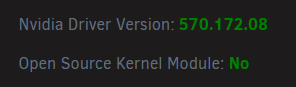
The same driver as @alturismo appear as closed blob to me but it's working properly
-
No but i can try it, i was wondering if the new linux kernel would help ( or if the nvidia plugin was any different in that Unraid version ) I think the plugin suggests the version based on your GPU and since the RTX 5080 was released before the 5060 i think it's normal behaviour (don't know why i got the same version for the 1660 TI though). The thing is i got an RTX 5080 i could put in but i got to get it out of my rig and it would be complicated ( not a regular PC case ) so i'd rather solve it without testing it ^^"
-
The driver version differ from what i got, i'm using the 575.57.08 : That is the option i got for the 1660 TI and the 5060

-
The thing is i keep finding issues related to this with no fix whatsoever , if someone was able to make it work they would probably tell us at some point no ? I found this reddit as well : https://www.reddit.com/r/unRAID/comments/1k69ufy/rtx_50_series_cards_and_unraid_issues/?tl=fr Because i can install the open blob driver successfully, nvidia-smi will work, but as soon as i'm trying to use GSP related features ( such as encoding, decoding etc ... ) the GPU won't work. 8k downloads on the open blob driver ? Were you able to try the open blob driver ?
-
Hello, I tried with another GPU ( 1660 TI ) and i seem to get the same error on 575.57.08. The 1660 TI is working properly when using closed blob. Could it be related to this driver version ?
-
I've sent you a PM so we don't flood the thread.
-
When you are on 7.1.4 can you see the gpu within your pci devices ? You can test it with that command : "lspci | grep -i nvidia"
-
Hello , i do not see any breaking changes that would explain this , what driver version did you install ?
-
Yeah i have this error as well and the option of UEFI boot enabled and CSM disabled are my default options so i don't think it's related. How many time has it been since you applied this fix without getting any errors ?

