





jndhui
Members
-
Joined
-
Last visited
-
The issue has been resolved. After setting it to "slave," I restarted Unraid, and Emby started up accordingly. Now it plays normally without needing to restart Emby again. Thank you so much! It seems I still don’t fully understand the meanings of "slave" and "shared"—I’ll have to study them more carefully.
-
With the help of alturismo, the issue has been resolved. After setting it to "slave," I restarted Unraid, and Emby started up accordingly. Now it plays normally without needing to restart Emby again. Thank you so much! It seems I still don’t fully understand the meanings of "slave" and "shared"—I’ll have to study them more carefully.
-
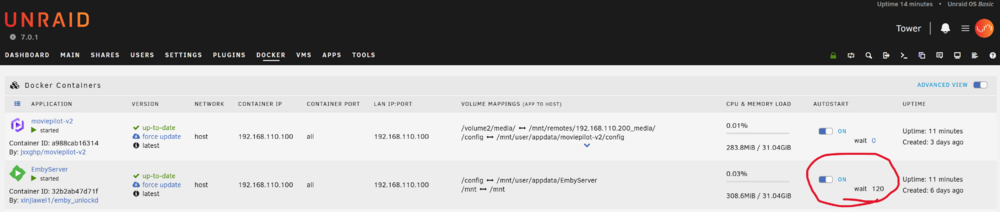
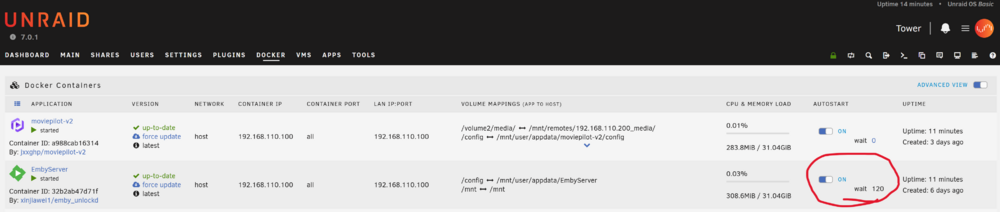
In my Unraid system, I am using Unassigned Devices to mount a shared folder from another device on my LAN via SMB. In the Docker container, Emby uses this mounted remote folder as its media library. However, after every system restart, Emby fails to recognize the media library and only works properly after a manual restart of Emby. I initially thought the issue might be due to Emby starting before the mount is completed, so I set a 120-second delay for Emby's startup, but the problem persists. I'm at a loss as to what might be causing this issue and would appreciate any insights.

-
In my Unraid system, I am using Unassigned Devices to mount a shared folder from another device on my LAN via SMB. In the Docker container, Emby uses this mounted remote folder as its media library. However, after every system restart, Emby fails to recognize the media library and only works properly after a manual restart of Emby. I initially thought the issue might be due to Emby starting before the mount is completed, so I set a 120-second delay for Emby's startup, but the problem persists. I'm at a loss as to what might be causing this issue and would appreciate any insights.

-
I can basically conclude that the issue is with the youshandefeiyang/allinone Docker container. When it is enabled, it randomly becomes unresponsive (I can't determine whether it's a network disconnection or a system crash, but a reboot restores it). I have disabled it for two weeks now, and the issue has not occurred again.
-
Thank you for your guidance. I would like to know how I can resolve this NIC issue. From the logs, can we rule out poor cable connection? Since I didn't touch the network cable or router when the issue occurred, could it be a driver issue with the network card? Also, does the log indicate that the e1000e network card is problematic? The e1000e network card is a virtual network card, right? So, could it be that the issue with the virtual machine is causing the network problem? Am I understanding this correctly?
-
Thank you for your guidance. As per your suggestion, I enabled "Settings -> System Log Server -> Mirror system log to flash" and set it to Yes. Last night, my Unraid server disconnected again. I checked my router and confirmed that there was no IP address assigned to the Unraid server, and I couldn't ping it. This suggests that the system completely froze. Below is my diagnostics file for analysis. Additionally, I suspect that the issue might be caused by an IPTV service Docker container (pulled from youshandefeiyang/allinone). Over the past few days, I haven't experienced any issues when this Docker was disabled. However, after enabling it last night, the system lost connection one hour later, right when I was watching IPTV. I cannot confirm whether this Docker is the root cause, and I would appreciate any insights or suggestions. Thanks in advance! tower-diagnostics-20250212-0933.zip
-
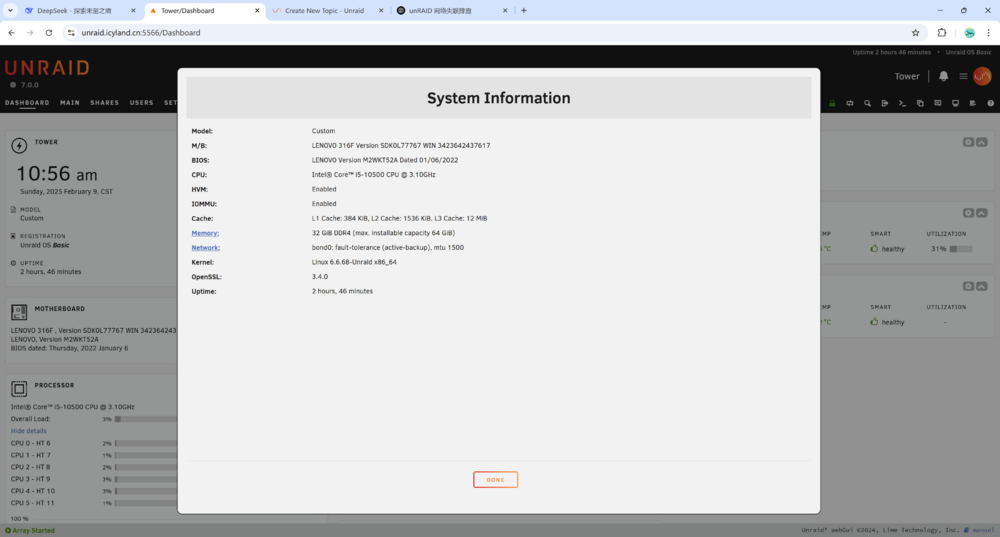
Hello everyone, I am running Unraid 7.0.0, and recently, the system has been frequently disconnecting without any apparent reason. Simply unplugging and plugging back the network cable does not work; the only way to restore the system is by performing a forced restart using the power button. There are no specific details in the log files to indicate the cause of the disconnections. The most recent incident occurred last night at around 11:00 PM, and the system only recovered after 8:00 AM today (UTC+8 time zone). Can anyone help me diagnose where the problem lies? I have attached the content from "Tools - Diagnostics - Download". Please help me analyze the cause and let me know what I should do next. Thank you in advance! tower-diagnostics-20250209-1039.zip
-
I replaced eth0 with an Intel network card, and the SMB mounts have been stable ever since. The issue has not reoccurred, confirming that the problem was due to compatibility issues with the RTL network card. The problem is now fully resolved. Thank you.
-
Ah, I see! So it's due to compatibility issues with the Realtek network card. No wonder it's intermittently causing problems and the connection is unstable. I'll try using the other i219v network card on the server now. Thank you for your guidance. I admire your breadth of knowledge and problem-solving skills.
-
Forgot to mention, typically rebooting resolves the issue, and SMB mounts become available again, but intermittently the mounts become invalid as shown in the screenshot.
-
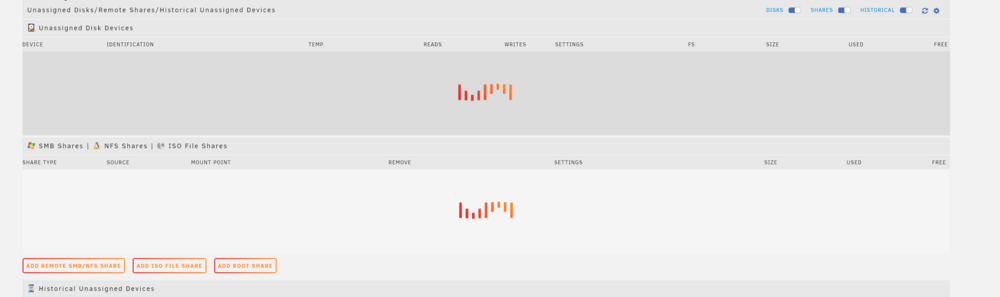
Sorry to bother everyone again. I have been using the Unassigned Devices plugin for about a year to mount Synology shared folders over SMB on my local network, and everything has been working fine. However, a few days ago, I upgraded both Unraid and the Unassigned Devices plugin to the latest versions, and since then, the Unassigned Devices plugin has been frequently stopping. The specific issue is shown in the attached image. During this time, I have tried restarting Unraid and reinstalling the Unassigned Devices plugin, but these attempts have been ineffective. Please advise me on what to do. ud_diagnostics-20240517-083638.zip tower-diagnostics-20240517-0834.zip


-
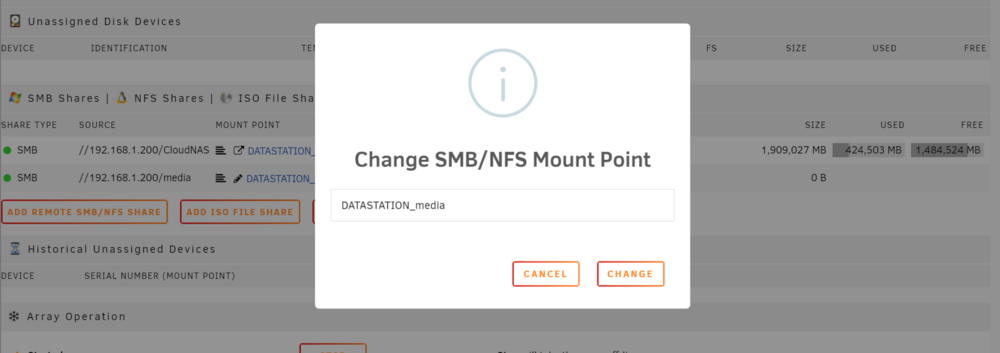
Sorry, I've been really busy these past few days and couldn't reply promptly. I updated UD and found that I can now modify the names of the shared folders I'm mounting. So I made some changes, and now PLEX can recognize them correctly by their names. The problem is perfectly solved now. Thank you!
-
No wonder I can't find the Synology server by its name. I don't have a local DNS server. But, except for enterprises, few individuals or home users use a local DNS server, right? How can I display shares by name without adding a local DNS server? All my PLEX server media libraries are set up based on names. Changing to IP addresses would require re-scanning, which is a significant undertaking.




