Jaycedk
Members
-
Joined
-
Last visited
Everything posted by Jaycedk
-
Think this will help you.
-
Don't be like me, and wonder why this does not work. You will need this version of FolderView 2023.09.20 😁
-
Ok just think that was it 😁
-
I'm seeing that to. Can you see if you see this too ? In that docker All my dockers that work shows like this


-
@scolcipitato You might wan't to make the above a sticky or add it to your first post. New commers to 6.12.X will have no clue. Not your fault, but something new to Unraid 6.12.X
-
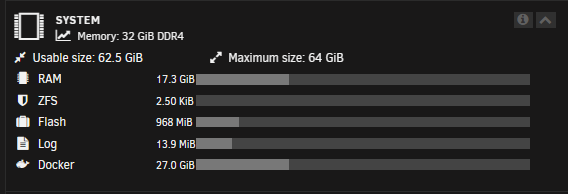
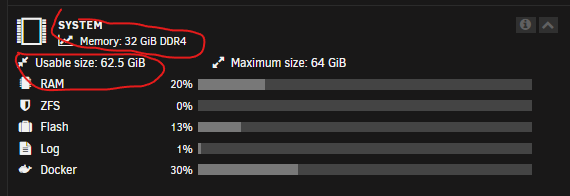
I think that's been mentioned a several times in this thread 🤣😂Np, happy to help 😀Hmm try zoom to 90% seen this happen at 100% zoom.Still not solved. No new BIOS update available, atm. BIOS shows 64GB installed as before, unraid still showning 32GB. But usable 62.5GB
 @i1mran92 Try and force refresh the dashboard tab. CTRL+F5Jep after changing that you need to force refresh web page. ctrl+F5 should do it.@baccula You need to unlock the luck, before you can do edit docker folder order.
 Ok I will see what i can get from a bios update. Last i checked, I was on latest. 2 weeks a go.Yes i have 64 GiB installed, have used it with windows before, where it saw 64 GiB. In bios it reports 64GiB. So that's what confusing me. As in the picture. System Memory 32 GiB, but Usabel size 62.5.Hi ppl. I'm a bit confused by what I'm seeing here Bios says 64 GiB. 2 x 32GiB mem sticks.
 Im using the official image. But I do keep my image up to date. So tbh never had the issue. Sorry about the link https://www.reddit.com/r/NextCloud/comments/156jmoh/updating_with_docker_stacks_25011_to_current/Have a look at this. It look like you need first install 25 then 26 then 27. https://www.reddit.com/r/NextCloud/comments/156jmoh/updating_with_docker_stacks_25011_to_current/Have a look at this. It look like you need first install 26 then 27. https://www.reddit.com/r/NextCloud/comments/156jmoh/updating_with_docker_stacks_25011_to_current/Did you edit you config.php to match you new docker. It can be many things. You need to be more specific. Maybe add docker logs ?Updated this morning, everything is working as expected 🎉😁Ok is looks like he's back 😀 Welcome to arr-scripts Discussions! · RandomNinjaAtk/arr-scripts · Discussion #5 (github.com) Its just in script format, interacting with Arrs.I found this, in short he was tired of the support. Usage? · Issue #3 · RandomNinjaAtk/arr-scripts (github.com)Thank you, don't know how I missed thatHi there. First of thanks for making this plugin. I keep getting backup failed, but can't seem to figure out why. Can I get someone to look at this log ? Thanks i advance backup.debug.log