




Skip to content
View in the app

A better way to browse. Learn more.

Unraid

A full-screen app on your home screen with push notifications, badges and more.

To install this app on iOS and iPadOS
  1. Tap the Share icon in Safari
  2. Scroll the menu and tap Add to Home Screen.
  3. Tap Add in the top-right corner.
To install this app on Android
  1. Tap the 3-dot menu (⋮) in the top-right corner of the browser.
  2. Tap Add to Home screen or Install app.
  3. Confirm by tapping Install.

LordVader

Members
  • Joined

  • Last visited

Everything posted by LordVader

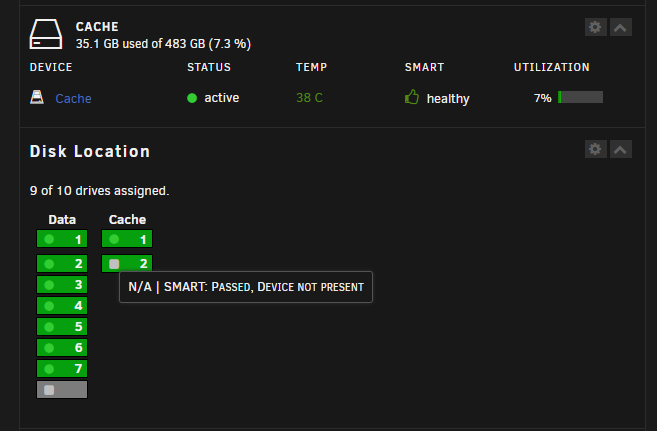
  1. Hello, I upgraded the MB, RAM, CPU and added a video card for my Unraid server. I keep all the drives (parity, data drives and two nvme drives for the pool. All went well, but now one of the pool drives is missing, they are both recognized by the BIOS. I get a message NA smart passed, device not present. What's going on? I made sure to connect the nvme drives in the same slots as before. What I'm missing, what should I do to bring both drives available for the pool? I'm new to Unraid so I will try to answer to the best of my knowledge. Thanks for your help in advance.

Account

Navigation

Search

Search

Configure browser push notifications

Chrome (Android)
  1. Tap the lock icon next to the address bar.
  2. Tap Permissions → Notifications.
  3. Adjust your preference.
Chrome (Desktop)
  1. Click the padlock icon in the address bar.
  2. Select Site settings.
  3. Find Notifications and adjust your preference.